IDPA: PowerProtect DP Rapid Upgrade Checker, Bellenim Yükseltmesi ön denetim hatası bildirdi
Summary: PowerProtect Data Protection (DP) Serisi Cihazlar ve IDPA: PowerProtect DP Rapid Upgrade Checker (RUCK), Bellenim yükseltme ön denetiminin başarısız olduğunu bildirdi. The cached response with Node Event Service is disabled. Düğüm Olay Hizmeti indirgenmiş durumda, iDRAC Hizmet Modülü şu anda kullanılamıyor/etkin değil. Check iDRAC Service Module/iDRAC status. Bu, PCIe SSD Yuvası 4 teki eski NVMe PM1735 kartı belleniminden kaynaklanabilir. ...
Symptoms
PowerProtect Data Protection Rapid Upgrade Checker (RUCK) aşağıdaki hatayla başarısız olur:
+-----------+--------------------+--------+-----------------------------------------------+-----------------------------------------------+
| Component | Check              | Status | Message                                       | Remedy                                        |
+-----------+--------------------+--------+-----------------------------------------------+-----------------------------------------------+
| ESXi      | firmware_readiness | FAILED | Firmware pre-upgrade checks failed. [ xxx.xxx.| Use KB https://www.dell.com/support/kbdoc/191 |
|           |                    |        | xxx.xxx ]: The cached response with Node Event| 627 to fix the issue.                         |
|           |                    |        | Service is disabled. Node Event Service is in |                                               |
|           |                    |        |  a degraded state,iDRAC Service Module is not |                                               |
|           |                    |        |  available/active at this time. Check iDRAC S |                                               |
|           |                    |        | ervice Module/iDRAC status.                   |                                               |
+-----------+--------------------+--------+-----------------------------------------------+-----------------------------------------------+
[ERROR] Firmware pre-upgrade checks failed. [ <ESXi IP Address> ]: The cached response with Node Event Service is disabled. Node Event Service is in a degraded state, iDRAC Service Module is not available/active at this time. Check iDRAC Service Module/iDRAC status.
Yuva 4 teki PCIe SSD'nin Donanım Modeli Dell Enterprise NVMe AGN MU AIC 1,6 TB kart (NVMe PM1735) olup bellenim 2.3.0 sürümünden eskidir.
PCIe SSD kart modeli ve bellenim sürümü iDRAC te bulunabilir. Sistem > Fiziksel Diskleri PCIe Aygıtı > - Yuva 4 de PCIe SSD Disk 1
Bu örnekte PCIe SSD kartı bir PM1725b'dir. Bu nedenle, geçici çözüm bu durumda geçerli değildir:

Şekil 1: PCIe SSD kartını iDRAC kullanıcı arabiriminden bulma.
Dell iDRAC Teknik Destek Raporu (TSR) günlüğünden PCIe SSD kartı "Dell Ent NVMe AGN MU AIC 1,6 TB" olarak adlandırılır:

Şekil 2: TSR günlüğüne göre NVMe PM1735 kartının adı Dell Ent NVMe AGN MU AIC 1,6 TB'dir.
iDRAC Servis Modülü (iSM), iDRAC kullanıcı arayüzünde Çalışıyor olarak görünür:

Şekil 3: iSM durumu çalışıyor.
Dell PT Aracısı ve iSM çalışır durumda ve yeniden başlatıldıktan sonra sorun devam ediyor:
[root@ESXi:/opt/dell/DellPTAgent/tools] /etc/init.d/DellPTAgent status
DellPTAgent is running
[root@ESXi:/opt/dell/DellPTAgent/tools] /etc/init.d/DellPTAgent stop
Stopping DellPTAgent...
watchdog-DellPTAgent: Terminating watchdog process with PID 7447869
DellPTAgent stopped
[root@ESXi:/opt/dell/DellPTAgent/tools] /etc/init.d/DellPTAgent start
Starting DellPTAgent...
DellPTAgent started
[root@ESXi:/opt/dell/DellPTAgent/tools] /etc/init.d/DellPTAgent status
DellPTAgent is running
[root@ESXi:/opt/dell/DellPTAgent/tools]

[root@ESXi:/opt/dell/DellPTAgent/tools] /etc/init.d/dcism-netmon-watchdog status
iSM is active (running)
[root@ESXi:/opt/dell/DellPTAgent/tools] /etc/init.d/dcism-netmon-watchdog stop
Module dcism_module successfully unloaded
[root@ESXi:/opt/dell/DellPTAgent/tools] /etc/init.d/dcism-netmon-watchdog start
[root@ESXi:/opt/dell/DellPTAgent/tools] /etc/init.d/dcism-netmon-watchdog status
iSM is active (running)
[root@ESXi:/opt/dell/DellPTAgent/tools]
Cause
ACM'den, iDRAC önbelleğinin bozulmuş olduğu gösterilir:
ACM:/tmp # dpacli -agentinfo
{"Agent Info": [{"ESXiHost-xxx.xxxx.xxx.xxx": {
    "ptagentversion": "2.4.1-3",
    "uptime": "54 seconds ( 54 seconds )",
    "ism_version": "3.6.0",
    "system_uuid": "618axxxx-xxxx-xxxx-xxxx-xxxxxxxxdd70",
    "process_id": "7440642",
    "host_epoch_time": "1646617738.156490 (secs.usecs)",
    "model": "DP4400",
    "name": "<ESXi_hostname>",
    "mfr": "Dell Inc.",
    "domain": "<ESXi FQDN>",
    "servicetag": "XXXXXXX",
    "os": "VMWare ESXi",
    "os_version": "6.7.0 build-17700523",
    "rest_endpoints": "https://127.0.0.1:8086,https://192.168.100.101:8086",
    "api_blocking_enabled": "false",
    "TPM Present": "false",
    "MarvellLibraryVersion": "5.0.13.1109",
    "libstorelib.so": "07.07",
    "libstorelibir-3.so": "15.03-0",
    "libstorelibit.so": "07.05",
    "idrac_pass_thru_ip": "169.254.0.1",
    "idrac_ethernet_ip": "xx.xxx.xxx.x",
    "host_pass_thru_ip": "169.254.0.2",
    "default_server_cert": "true",
    "status": {
        "idraccache": "Degraded",
        "idracConnection": "OK",
        "iSM": "N/A",
        "agent": "Degraded"
    }
}}]}
ACM:/tmp #
ESXi'den çekim yaparken de aynı bilgiler görülür:
[root@ESXi:~] /opt/dell/DellPTAgent/tools/pta_call get agent/info
Request sent to DellPTAgent @ https://192.168.100.101:8086
{
    "TPM Present": "false",
    "MarvellLibraryVersion": "5.0.13.1109",
    "uptime": "344 seconds ( 5 minutes 44 seconds )",
    "system_uuid": "618axxxx-xxxx-xxxx-xxxx-xxxxxxxxdd70",
    "host_pass_thru_ip": "169.254.0.2",
    "servicetag": "XXXXXXX",
    "domain": "<ESXi FQDN>",
    "default_server_cert": "true",
    "libstorelibir-3.so": "15.03-0",
    "model": "DP4400",
    "idrac_ethernet_ip": "xxx.xxx.xxx.xxx",
    "os": "VMWare ESXi",
    "rest_endpoints": "https://127.0.0.1:8086,https://192.168.100.101:8086",
    "mfr": "Dell Inc.",
    "api_blocking_enabled": "false",
    "libstorelib.so": "07.07",
    "ptagentversion": "2.4.1-3",
    "ism_version": "3.6.0",
    "host_epoch_time": "1646618523.10088 (secs.usecs)",
    "os_version": "6.7.0 build-17700523",
    "libstorelibit.so": "07.05",
    "idrac_pass_thru_ip": "169.254.0.1",
    "name": "<ESXi_hostname>",
    "process_id": "7441193",
    "status": {
        "idraccache": "Degraded",
        "idracConnection": "OK",
        "agent": "Degraded",
        "iSM": "N/A"
    }
}
Response: status: 200 [OK], size: 1067 bytes, latency: 0.145 seconds.
[root@ESXi:~]
Bu durumda, PT Aracısı 'PhysicalDisk' bileşenini içinde bulamadı hwInventory çünkü Yuva 4'teki NVMe PM1735 kartından veri sorgulamada sorun yaşıyor.
ESXi /scratch/log/ pta_debug.log dosyasında şu hata mesajı gösterilir:
2022/03/07 04:51:03[UTC] [7459005:193227584] WARN  - WSManClient::isValidResponse: Http request to host: 169.254.0.1, failed with status code: -5
2022/03/07 04:51:03[UTC] [7459005:193227584] WARN  - getComponentFromInventory: Cannot find component 'PhysicalDisk' in hwInventory:
{
    "Message": "Read timed out!",
    "ReturnValue": -5
}
2022/03/07 04:52:57[UTC] [7459005:189000512] WARN  - NvmeDiscoveredDevice::setIntAttrFromDescriptor: Cannot convert string <ie> to int.
2022/03/07 04:52:57[UTC] [7459005:189000512] WARN  - NvmeDiscoveredDevice::setIntAttrFromDescriptor: Failed to read <bay> from <PCIe Slot 4>
Bu nedenle, "PowerProtect Data Protection Appliance-IDPA Firmware Gen14 December 2021" paketinde yer alan NVMe 1735 belleniminin 2.3.0 sürümüne yükseltilmesi önerilir. Gerekli bellenim dosyası: Express-Flash-PCIe-SSD_Firmware_RP8RC_WN64_2.3.0_A03.EXE
Resolution
NVMe 1735 bellenimini 2.3.0 sürümüne yükseltmek için:
-
Dell Support web sitesinden "PowerProtect Data Protection Series Appliance-IDPA Firmware Gen14 December 2021" yazılımını indirin ve ardından gerekli bellenim dosyasını çıkarın
Express-Flash-PCIe-SSD_Firmware_RP8RC_WN64_2.3.0_A03.EXE. -
Integrated Data Protection Appliance'ı ACM web kullanıcı arayüzünden kapatın.
-
ESXi'nin kapalı olduğunu doğruladıktan sonra iDRAC kullanıcı arayüzünde oturum açın ve ardından bellenim dosyasını manuel olarak iDRAC'a yükleyin:
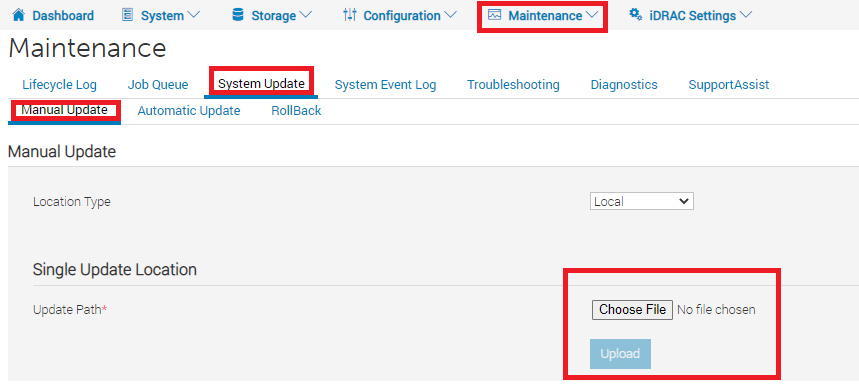
Şekil 4: iDRAC kullanıcı arayüzüne bellenim yükleme -
Şunu seçin:
Express-Flash-PCIe-SSD_Firmware_RP8RC_WN64_2.3.0_A03.EXEdosyasını açın ve Yükle ve Yeniden Başlat'a tıklayın. Ardından iDRAC, bellenimi yükler ve yeniden başlatır.
Şekil 5: Ürün yazılımı nasıl uygulanır -
Yeniden başlatmanın ardından bellenim sürümü iDRAC >Sistem > Envanteri >Bellenim Envanterinde doğrulanabilir:

Şekil 6: Bellenim Envanterinden bellenimi inceleme - DP4400'ün başlatılmasını ve sonrasında sanal makinelerin başarıyla başlatılmasını izleme.
- Şunu çalıştırın:
dpaclikomutunu tekrar ACM'de kullanın veidraccacheve aracı durumu OK olarak değişmelidir:
ACM:~ # dpacli -agentinfo
{"Agent Info": [{"ESXiHost-xxx.xxxx.xxx.xxx": {
    "ptagentversion": "2.4.1-3",
    "uptime": "595 seconds ( 9 minutes 55 seconds )",
    "ism_version": "3.6.0",
    "system_uuid": "618axxxx-xxxx-xxxx-xxxx-xxxxxxxxdd70",
    "process_id": "2100391",
    "host_epoch_time": "1646800495.522825 (secs.usecs)",
    "model": "DP4400",
    "name": "<ESXi_hostname>",
    "mfr": "Dell Inc.",
    "domain": "<ESXi FQDN>",
    "servicetag": "XXXXXXX",
    "os": "VMWare ESXi",
    "os_version": "6.7.0 build-17700523",
    "rest_endpoints": "https://127.0.0.1:8086,https://192.168.100.101:8086",
    "api_blocking_enabled": "false",
    "TPM Present": "false",
    "MarvellLibraryVersion": "5.0.13.1109",
    "libstorelib.so": "07.07",
    "libstorelibir-3.so": "15.03-0",
    "libstorelibit.so": "07.05",
    "idrac_pass_thru_ip": "169.254.0.1",
    "idrac_ethernet_ip": "xxx.xxx.xxx.xxx",
    "host_pass_thru_ip": "169.254.0.2",
    "default_server_cert": "true",
    "status": {
        "idraccache": "OK",
        "idracConnection": "OK",
        "iSM": "N/A",
        "agent": "OK"
    }
}}]}
ACM:~ #
-
Sorunun çözülüp çözülmediğini doğrulamak için sağlık kontrolü RUCK aracını tekrar çalıştırın.
Additional Information
PowerProtect DP Serisi Cihaz-IDPA Ürün Yazılımı Gen14 Aralık 2021" bellenim paketi Dell Desteği web sayfasından indirilebilir:
Şekil 7: PowerProtect DP Serisi Cihaz-IDPA Bellenimi Gen14 Aralık 2021" bellenimi Dell Destek web sayfasında mevcuttur.
Ürün yazılımını ayıklamak için IDPA_Firmware_Gen14_Update_Dec_2021_Package.zip, tüm paket dosyalarını ayıklayın: "dpafw-2.312.rpm" > "dpafw-2.312-0.noarch.cpio" > "IDPA-2.312-2.312.tar.gz" > "IDPA-2.312-2.312.tar">, ardından bellenim dosyası DUPS > NVME altında bulunabilir: Şekil 8: NVMe PM1735 bellenimini "PowerProtect DP Serisi Cihaz-IDPA Bellenimi Gen14 Aralık 2021" bellenim paketinden çıkarma örneği.