IDPA:PowerProtect DP Rapid Upgrade Checker 报告固件升级预检查失败
Summary: PowerProtect Data Protection (DP) 系列备份一体机和 IDPA:PowerProtect DP Rapid Upgrade Checker (RUCK) 报告固件升级预检查失败。 节点事件服务的缓存响应被禁用。节点事件服务处于降级状态,iDRAC Service Module 当前不可用/处于活动状态。Check iDRAC Service Module/iDRAC status. 这可能是由 PCIe SSD 插槽 4 中过时的 NVMe PM1735 卡固件引起的。 ...
Symptoms
PowerProtect Data Protection Rapid Upgrade Checker (RUCK) 失败并显示以下错误:
+-----------+--------------------+--------+-----------------------------------------------+-----------------------------------------------+
| Component | Check              | Status | Message                                       | Remedy                                        |
+-----------+--------------------+--------+-----------------------------------------------+-----------------------------------------------+
| ESXi      | firmware_readiness | FAILED | Firmware pre-upgrade checks failed. [ xxx.xxx.| Use KB https://www.dell.com/support/kbdoc/191 |
|           |                    |        | xxx.xxx ]: The cached response with Node Event| 627 to fix the issue.                         |
|           |                    |        | Service is disabled. Node Event Service is in |                                               |
|           |                    |        |  a degraded state,iDRAC Service Module is not |                                               |
|           |                    |        |  available/active at this time. Check iDRAC S |                                               |
|           |                    |        | ervice Module/iDRAC status.                   |                                               |
+-----------+--------------------+--------+-----------------------------------------------+-----------------------------------------------+
[ERROR] Firmware pre-upgrade checks failed. [ <ESXi IP Address> ]: The cached response with Node Event Service is disabled. Node Event Service is in a degraded state, iDRAC Service Module is not available/active at this time. Check iDRAC Service Module/iDRAC status.
插槽 4 中 PCIe SSD 的硬件型号是 Dell Enterprise NVMe AGN MU AIC 1.6 TB 卡 (NVMe PM1735),固件版本低于 2.3.0。
PCIe SSD 卡型号和固件版本可在 iDRAC 上找到。系统 > 物理磁盘 > PCIe 设备 — 插槽 4 磁盘 1
中的 PCIe SSD 在此示例中,PCIe SSD 卡是 PM1725b。因此,在这种情况下,解决方法不适用:

图 1:如何从 iDRAC 用户界面查找 PCIe SSD 卡。
在 Dell iDRAC 技术支持报告 (TSR) 日志中,PCIe SSD 卡被命名为“Dell Ent NVMe AGN MU AIC 1.6TB”:
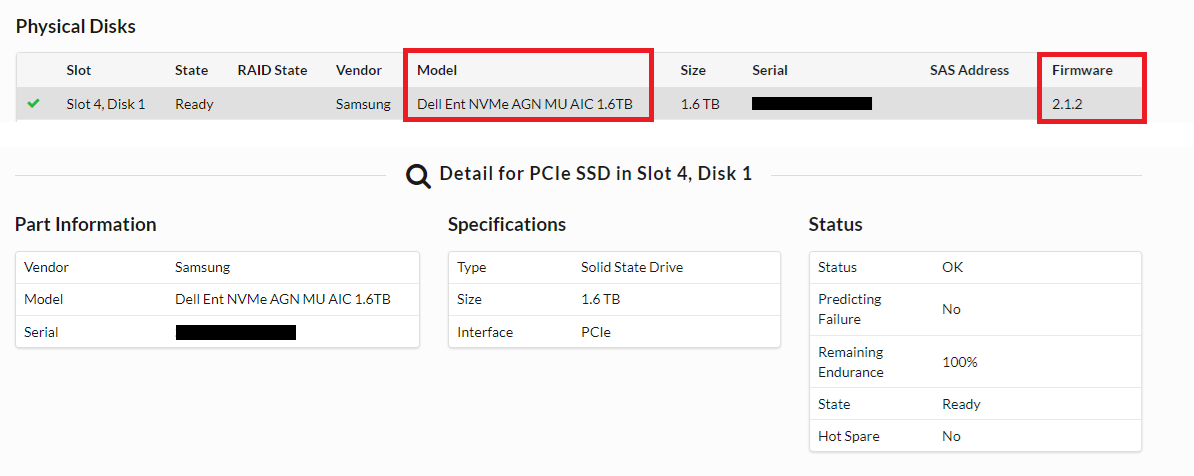
图 2:在 TSR 日志中,NVMe PM1735 卡被命名为 Dell Ent NVMe AGN MU AIC 1.6 TB。
iDRAC Service Module (iSM) 在 iDRAC 用户界面中显示为正在运行:

图 3:iSM 状态为正在运行。
Dell PT Agent 和 iSM 正在运行,重新启动它们后问题仍然存在:
[root@ESXi:/opt/dell/DellPTAgent/tools] /etc/init.d/DellPTAgent status
DellPTAgent is running
[root@ESXi:/opt/dell/DellPTAgent/tools] /etc/init.d/DellPTAgent stop
Stopping DellPTAgent...
watchdog-DellPTAgent: Terminating watchdog process with PID 7447869
DellPTAgent stopped
[root@ESXi:/opt/dell/DellPTAgent/tools] /etc/init.d/DellPTAgent start
Starting DellPTAgent...
DellPTAgent started
[root@ESXi:/opt/dell/DellPTAgent/tools] /etc/init.d/DellPTAgent status
DellPTAgent is running
[root@ESXi:/opt/dell/DellPTAgent/tools]

[root@ESXi:/opt/dell/DellPTAgent/tools] /etc/init.d/dcism-netmon-watchdog status
iSM is active (running)
[root@ESXi:/opt/dell/DellPTAgent/tools] /etc/init.d/dcism-netmon-watchdog stop
Module dcism_module successfully unloaded
[root@ESXi:/opt/dell/DellPTAgent/tools] /etc/init.d/dcism-netmon-watchdog start
[root@ESXi:/opt/dell/DellPTAgent/tools] /etc/init.d/dcism-netmon-watchdog status
iSM is active (running)
[root@ESXi:/opt/dell/DellPTAgent/tools]
Cause
在 ACM 中,它显示 iDRAC 高速缓存已降级:
ACM:/tmp # dpacli -agentinfo
{"Agent Info": [{"ESXiHost-xxx.xxxx.xxx.xxx": {
    "ptagentversion": "2.4.1-3",
    "uptime": "54 seconds ( 54 seconds )",
    "ism_version": "3.6.0",
    "system_uuid": "618axxxx-xxxx-xxxx-xxxx-xxxxxxxxdd70",
    "process_id": "7440642",
    "host_epoch_time": "1646617738.156490 (secs.usecs)",
    "model": "DP4400",
    "name": "<ESXi_hostname>",
    "mfr": "Dell Inc.",
    "domain": "<ESXi FQDN>",
    "servicetag": "XXXXXXX",
    "os": "VMWare ESXi",
    "os_version": "6.7.0 build-17700523",
    "rest_endpoints": "https://127.0.0.1:8086,https://192.168.100.101:8086",
    "api_blocking_enabled": "false",
    "TPM Present": "false",
    "MarvellLibraryVersion": "5.0.13.1109",
    "libstorelib.so": "07.07",
    "libstorelibir-3.so": "15.03-0",
    "libstorelibit.so": "07.05",
    "idrac_pass_thru_ip": "169.254.0.1",
    "idrac_ethernet_ip": "xx.xxx.xxx.x",
    "host_pass_thru_ip": "169.254.0.2",
    "default_server_cert": "true",
    "status": {
        "idraccache": "Degraded",
        "idracConnection": "OK",
        "iSM": "N/A",
        "agent": "Degraded"
    }
}}]}
ACM:/tmp #
从 ESXi 中提取时会看到相同的信息:
[root@ESXi:~] /opt/dell/DellPTAgent/tools/pta_call get agent/info
Request sent to DellPTAgent @ https://192.168.100.101:8086
{
    "TPM Present": "false",
    "MarvellLibraryVersion": "5.0.13.1109",
    "uptime": "344 seconds ( 5 minutes 44 seconds )",
    "system_uuid": "618axxxx-xxxx-xxxx-xxxx-xxxxxxxxdd70",
    "host_pass_thru_ip": "169.254.0.2",
    "servicetag": "XXXXXXX",
    "domain": "<ESXi FQDN>",
    "default_server_cert": "true",
    "libstorelibir-3.so": "15.03-0",
    "model": "DP4400",
    "idrac_ethernet_ip": "xxx.xxx.xxx.xxx",
    "os": "VMWare ESXi",
    "rest_endpoints": "https://127.0.0.1:8086,https://192.168.100.101:8086",
    "mfr": "Dell Inc.",
    "api_blocking_enabled": "false",
    "libstorelib.so": "07.07",
    "ptagentversion": "2.4.1-3",
    "ism_version": "3.6.0",
    "host_epoch_time": "1646618523.10088 (secs.usecs)",
    "os_version": "6.7.0 build-17700523",
    "libstorelibit.so": "07.05",
    "idrac_pass_thru_ip": "169.254.0.1",
    "name": "<ESXi_hostname>",
    "process_id": "7441193",
    "status": {
        "idraccache": "Degraded",
        "idracConnection": "OK",
        "agent": "Degraded",
        "iSM": "N/A"
    }
}
Response: status: 200 [OK], size: 1067 bytes, latency: 0.145 seconds.
[root@ESXi:~]
在这种情况下,PT Agent 无法在以下位置找到组件“PhysicalDisk” hwInventory 因为它无法从插槽 4 中的 NVMe PM1735 卡查询数据。
在 ESXi /scratch/log/pta_debug.log中,它显示错误消息:
2022/03/07 04:51:03[UTC] [7459005:193227584] WARN  - WSManClient::isValidResponse: Http request to host: 169.254.0.1, failed with status code: -5
2022/03/07 04:51:03[UTC] [7459005:193227584] WARN  - getComponentFromInventory: Cannot find component 'PhysicalDisk' in hwInventory:
{
    "Message": "Read timed out!",
    "ReturnValue": -5
}
2022/03/07 04:52:57[UTC] [7459005:189000512] WARN  - NvmeDiscoveredDevice::setIntAttrFromDescriptor: Cannot convert string <ie> to int.
2022/03/07 04:52:57[UTC] [7459005:189000512] WARN  - NvmeDiscoveredDevice::setIntAttrFromDescriptor: Failed to read <bay> from <PCIe Slot 4>
因此,建议将 NVMe 1735 固件升级到版本 2.3.0,该版本捆绑在“PowerProtect Data Protection Appliance — IDPA 固件第 14 代 2021 年 12 月”中。所需的固件文件为: Express-Flash-PCIe-SSD_Firmware_RP8RC_WN64_2.3.0_A03.EXE
Resolution
要将 NVMe 1735 固件升级到版本 2.3.0,请执行以下作:
-
从 戴尔支持 网站下载“PowerProtect Data Protection 系列备份一体机 — IDPA 固件第 14 代,2021 年 12 月”,然后解压所需的固件文件
Express-Flash-PCIe-SSD_Firmware_RP8RC_WN64_2.3.0_A03.EXE。 -
从 ACM Web 用户界面关闭融合备份一体机。
-
确认 ESXi 已关闭后,登录到 iDRAC 用户界面,然后手动将固件文件上传到 iDRAC:
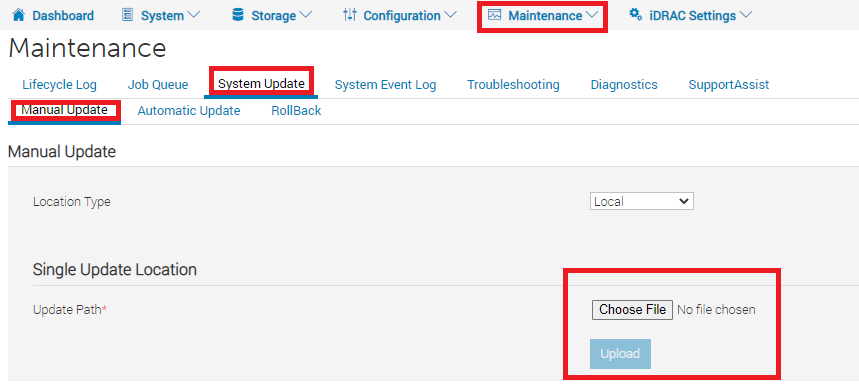
图 4:如何在 iDRAC 用户界面中上传固件 -
选择
Express-Flash-PCIe-SSD_Firmware_RP8RC_WN64_2.3.0_A03.EXE文件,然后单击 安装并重新启动。然后,iDRAC 安装固件并重新启动。
图 5:如何应用固件 -
重新引导后,可以在 iDRAC >系统 > 资源清册 >固件资源清册中验证固件版本:

图 6:如何通过固件资源清册查看固件 - 监视 DP4400 启动并在所有虚拟机成功启动后。
- 运行
dpacli命令,并确认idraccache工程师状态应更改为 OK:
ACM:~ # dpacli -agentinfo
{"Agent Info": [{"ESXiHost-xxx.xxxx.xxx.xxx": {
    "ptagentversion": "2.4.1-3",
    "uptime": "595 seconds ( 9 minutes 55 seconds )",
    "ism_version": "3.6.0",
    "system_uuid": "618axxxx-xxxx-xxxx-xxxx-xxxxxxxxdd70",
    "process_id": "2100391",
    "host_epoch_time": "1646800495.522825 (secs.usecs)",
    "model": "DP4400",
    "name": "<ESXi_hostname>",
    "mfr": "Dell Inc.",
    "domain": "<ESXi FQDN>",
    "servicetag": "XXXXXXX",
    "os": "VMWare ESXi",
    "os_version": "6.7.0 build-17700523",
    "rest_endpoints": "https://127.0.0.1:8086,https://192.168.100.101:8086",
    "api_blocking_enabled": "false",
    "TPM Present": "false",
    "MarvellLibraryVersion": "5.0.13.1109",
    "libstorelib.so": "07.07",
    "libstorelibir-3.so": "15.03-0",
    "libstorelibit.so": "07.05",
    "idrac_pass_thru_ip": "169.254.0.1",
    "idrac_ethernet_ip": "xxx.xxx.xxx.xxx",
    "host_pass_thru_ip": "169.254.0.2",
    "default_server_cert": "true",
    "status": {
        "idraccache": "OK",
        "idracConnection": "OK",
        "iSM": "N/A",
        "agent": "OK"
    }
}}]}
ACM:~ #
-
再次运行运行状况检查 RUCK 工具以确认问题是否已解决。
Additional Information
“PowerProtect DP 系列备份一体机 — IDPA 固件第 14 代 2021 年 12 月”固件包可从戴尔支持网页下载: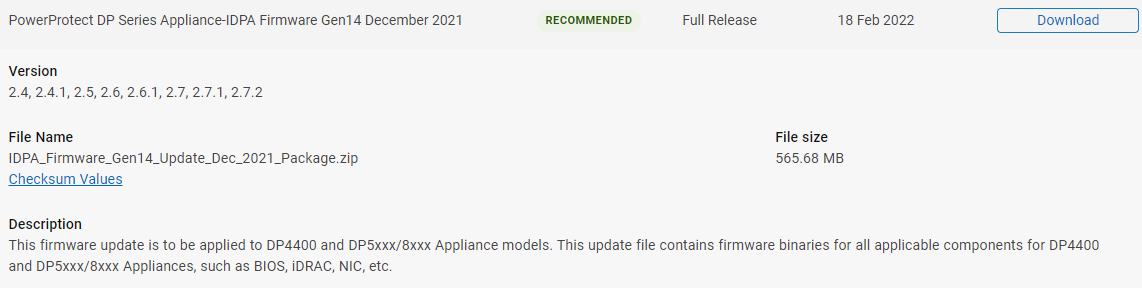
图 7:“PowerProtect DP 系列备份一体机 — IDPA 固件第 14 代 2021 年 12 月”固件可从戴尔支持网页获取。
要从以下位置解压固件,请执行以下作 IDPA_Firmware_Gen14_Update_Dec_2021_Package.zip,解压所有捆绑包文件:“dpafw-2.312.rpm” > “dpafw-2.312-0.noarch.cpio” > “IDPA-2.312-2.312.tar.gz” > “IDPA-2.312-2.312.tar”>,则固件文件可以在 DUPS > NVME 下找到: 图 8:从“PowerProtect DP 系列备份一体机 — IDPA 固件第 14 代 2021 年 12 月”固件捆绑包中提取 NVMe PM1735 固件的示例。