Alienware 和 Dell Gaming 顯示器上的滑鼠未對齊
Summary: 玩電玩遊戲時,Alienware 和 Dell Gaming 顯示器上出現滑鼠指標問題的相關資訊。
This article applies to
This article does not apply to
This article is not tied to any specific product.
Not all product versions are identified in this article.
Symptoms
滑鼠未對齊,這意味著滑鼠指標的位置與使用者與螢幕交互的位置不同。在以下情況下的某些視頻遊戲中可能會發生這種情況。
在視訊遊戲設定中:
- 決議已變更,並且...
- 顯示模式會從視窗變更為全螢幕,或反之亦然。
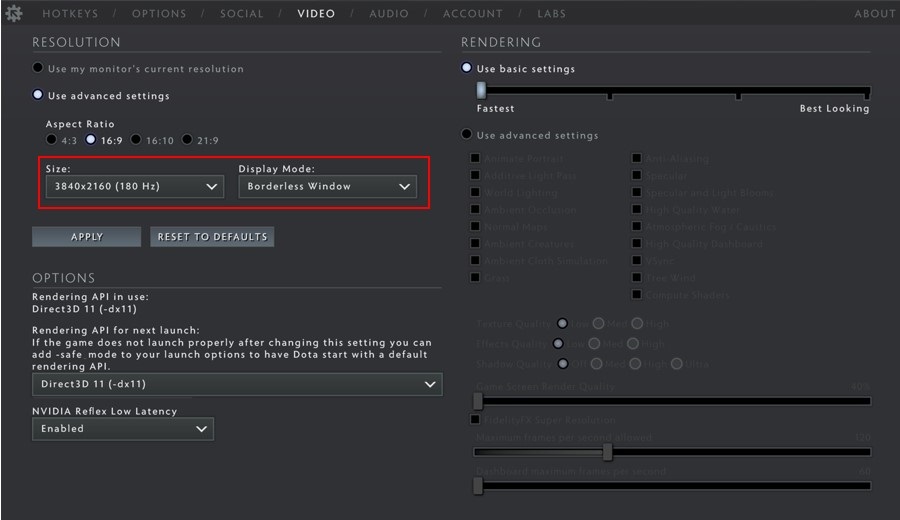
受影響的顯示器
- 具備高每吋點數 (DPI) 的 Alienware 或 Dell Gaming 顯示器 (通常是 4K 顯示器)。
Cause
滑鼠未對齊是由 Windows 和某些視訊遊戲之間的縮放不相符所造成 (這不是顯示器 的問題)。
Resolution
覆寫 Windows 縮放
此行為的解決方法是使用以下步驟為視頻遊戲應用程式設定視頻遊戲可執行二進位檔,以替代 Windows 縮放:
Windows 10 和 11
- 找到視頻遊戲可執行檔二進位檔。以 Steam 為例,視頻遊戲的預設安裝路徑為:C:\Program Files (x86)\Steam\steamapps\common
- 以滑鼠右鍵按一下視訊遊戲二進位檔,然後選取 內容。
- 按一下相容性標籤。
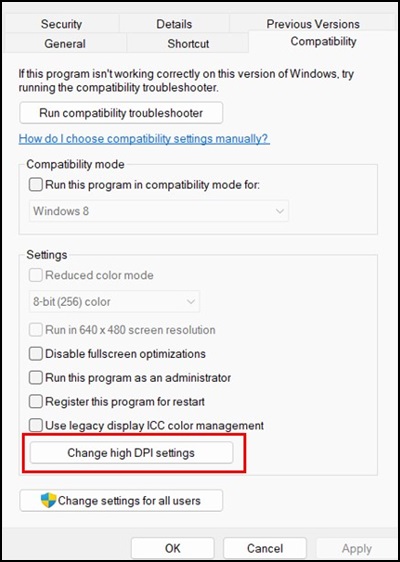
- 按 一下變更高 DPI 設定。
- 選取 覆寫高 DPI 縮放行為 核取方塊。確定已在下拉式清單中選取 該應用程式 。
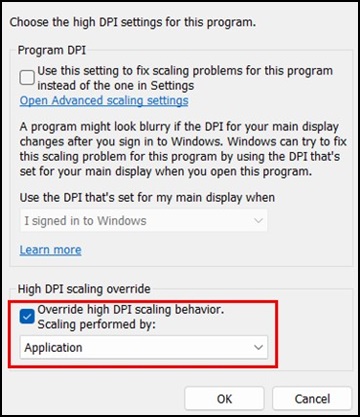
- 按一下 確定 關閉 高 DPI 設定 視窗。再次按下確定以關閉「屬性」 視窗。
注意:上述因應措施僅需要針對每個視訊遊戲二進位檔案執行一次,且必須針對每個具有此行為的視訊遊戲執行。
Affected Products
Alienware Advanced Gaming Mouse – AW558, Alienware Elite Gaming Mouse – AW958, Alienware Wireless Gaming Mouse AW310M, Alienware RGB Gaming Mouse AW510M, Alienware Wired/Wireless Gaming Mouse AW610M, Alienware Tri-Mode Wireless Gaming Mouse AW720M
, Alienware Elite Gaming Mouse - AW959, Alienware and Dell Gaming Monitors, Alienware Wired Gaming Mouse AW320M, Alienware Pro Wireless Gaming Mouse, Alienware Wireless Gaming Mouse AW620M
...
Article Properties
Article Number: 000226094
Article Type: Solution
Last Modified: 13 May 2025
Version: 2
Find answers to your questions from other Dell users
Support Services
Check if your device is covered by Support Services.