XtremIO Virtual XMS stops responding during vSphere Snapshots
Summary: This article provides resolution when XtremIO Virtual XMS stops responding during vSphere Snapshots.
This article applies to
This article does not apply to
This article is not tied to any specific product.
Not all product versions are identified in this article.
Symptoms
XtremIO Virtual XMS may stop or become unresponsive (sometimes the vXMS may become corrupt upon restoring) during the creation of a quiesced vSphere snapshot.
On the virtual machine console screen, the following error may be seen:
Not tainted 2.6.32-431.29.2..e16.x86_64 #1
"echo 0 > /proc/sys/kernel/hung_task_timeout_secs" disable this message.
INFO: task postmaster:1527 blocked for more than 120 seconds.
Note: In some situations, the following error may be present instead
"backlog limit exceeded".
See the following KB for more details: KB # 480967 XtremIO: XMS unresponsive "Audit backlog limit exceeded"
Note: This issue is applicable to all XtremIO virtual XMS (4.x, 6.x, and later versions). This issue can be seen with both X1 and X2 connected XtremIO clusters. This issue is not related to the installed XtremApp version.
Cause
- The root cause of vXMS stopping or becoming unresponsive is due to VM snapshot based backup process introduced into the environment.
- There are processes running on the vXMS that cannot be properly quiesced when snapshots are performed.
- Snapshots of the vXMS instance are known to cause performance-related issues, such as the vXMS becoming unresponsive.
- To confirm that such a snapshot was indeed performed on the vXMS, open the vmware.log for the vXMS and search for the following lines:
2019-03-04T16:19:29.182Z| vmx| I125: SnapshotVMX_TakeSnapshot start: 'vxms10-snap', deviceState=0, lazy=0, quiesced=1, forceNative=0, tryNative=0, saveAllocMaps=0 cb=365E039A0, cbData=3674E5F70
2019-03-04T16:19:34.422Z| vmx| I125: SnapshotVMXTakeSnapshotComplete: Done with snapshot 'vxms10-snap': 1
- Note that quiesced=1, means a quiesced indicates that a snapshot of the vXMS is being taken.
- Note: This issue has only been seen when performing a quiesced snapshot.
How to check if there is a VM snapshot from vCenter Server.
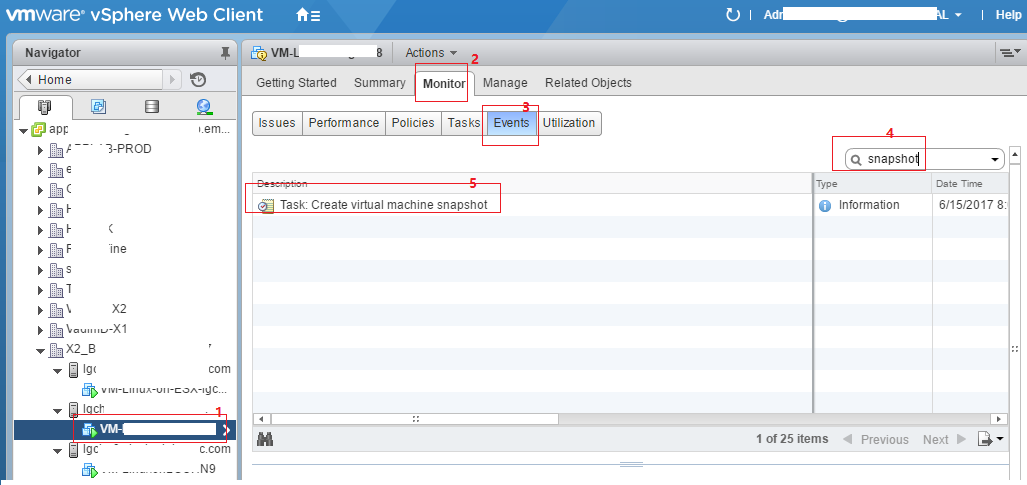
In vCenter vSphere web client, locate the vXMS VM > go to the Monitor tab > the Events tab > type 'snapshot' in the search field to filter the events of VM snapshot.
Resolution
Option #1
To resolve this issue on the virtual XMS, perform the following two steps:
- Reboot the Virtual XMS VM to make it work again
- Disable snapshot-based VM backup solution on the Virtual XMS
Additional Information
XtremIO does not support recovery from vSphere Snapshots of vXMS. The XMS Database is regularly backed up to the XtremIO cluster, thus XMS backup is not required.
Affected Products
XtremIO FamilyProducts
XtremIO Family, XtremIO HW Gen2 400GB, XtremIO HW Gen2 400GB Encrypt Capbl, XtremIO HW Gen2 400GB Encrypt Disable, XtremIO HW Gen2 400GB Exp Encrypt Disable, XtremIO HW Gen2 400GB Expandable, XtremIO HW Gen2 800GB Encrypt Capbl
, XtremIO HW Gen2 800GB Encrypt Disable, XtremIO HW Gen3 40TB, XtremIO HW Gen3 40TB Encrypt Disable, XtremIO HW X2-T, XtremIO HW X2-T Encrypt Disable, XtremIO X1, XtremIO X2
...
Article Properties
Article Number: 000045145
Article Type: Solution
Last Modified: 17 Apr 2026
Version: 6
Find answers to your questions from other Dell users
Support Services
Check if your device is covered by Support Services.