VNX: Unable to create Raid group/Storage Pool
Summary: VNX: Unable to create Raid group/Storage Pool
This article applies to
This article does not apply to
This article is not tied to any specific product.
Not all product versions are identified in this article.
Symptoms
Unable to create Storage pool/RAID group even though there are unbound drives.
While creating a new RAID group:
Error: There are no more disks available to create a RAID.
While creating a new storage pool:
Error: There are no more disks available to create pool. Note that the system disk are not eligible for use in a pool.
Cause
The drives used to create a RAID group / storage pool were showing unbound in disk list [Unisphere > System > Storage Hardware > Disk]. However these unbound drives were showing as part of raid group [In Unisphere > Storage > Storage Pool > Raid Group]. And this raid group, RAID type was showing as Unbound. Refer the screenshot.
In the screen shot it can be seen that disk Bus 0 Enclosure 0 Disk 15 drives shows as unbound. It also shows that this drive is part of raid group "RAID Group 2" and the RAID Type shows as unbound.
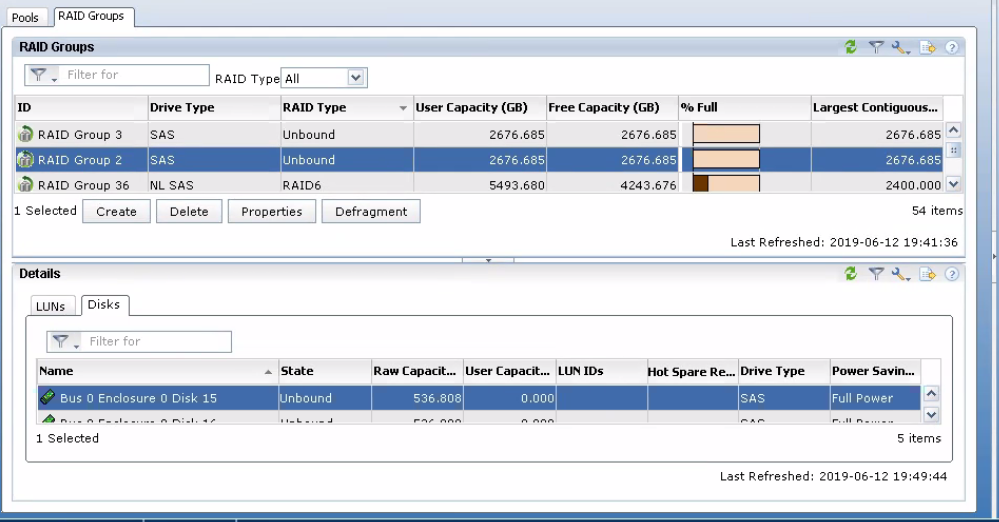
In the below logs, it can be seen the drives 0.0.15 to 0.0.19 shows as unbound but also part of Raid Group 2.
0.0.15 2 600GB SAS HITACHI Cobra-D PPGJR17B 118032767 005049250PWR C260 Unbound -- 6 6
0.0.16 2 600GB SAS HITACHI Cobra-D PPGK24ZB 118032767 005049250PWR C260 Unbound -- 6 6
0.0.17 2 600GB SAS HITACHI Cobra-D PPGHLMRB 118032767 005049250PWR C260 Unbound -- 6 6
0.0.18 2 600GB SAS HITACHI Cobra-D PZKD8URD 118032767 005049250PWR C3B2 Unbound -- 6 6
0.0.19 2 600GB SAS HITACHI Cobra-D PPGET75B 118032767 005049250PWR C260 Unbound -- 6 6
SPA/B_arrayconfig.txt file:
RAIDGroup[2]: <<<<<< Raid group 2
Capacity: 5613414400
FreeSpace: 5613414400
LargestUnboundSegmentSize: 5613414400
RGRaidType: 0
Type: 0
OperationPriority: 1
WillBeRemoved: false
IsPrivate: false
State: 3
MaxLuns: 256
RawCapacityBlocks: 5613414400
PercentDefragmented: 100
PercentExpanded: 4294967295
LunExpansionEnabled: false
LegalRaidTypes: 153
RGUserDefinedPowerSaving: false
RGUserDefinedLatencyTolerance: 0
IsRGHardwarePowerSavingEligible: true
IsRGPowerSavingEligible: true
IsRGInStandByState: false
ElementSize: 128
Disks:
Disk[0.0.19]:
Name: Bus 0 Enclosure 0 Disk 19
Bank: -1
BankAsInteger: 4294967295
Disk[0.0.18]:
Name: Bus 0 Enclosure 0 Disk 18
Bank: -1
BankAsInteger: 4294967295
Disk[0.0.17]:
Name: Bus 0 Enclosure 0 Disk 17
Bank: -1
BankAsInteger: 4294967295
Disk[0.0.16]:
Name: Bus 0 Enclosure 0 Disk 16
Bank: -1
BankAsInteger: 4294967295
Disk[0.0.15]:
Name: Bus 0 Enclosure 0 Disk 15
Bank: -1
BankAsInteger: 4294967295
In the screen shot it can be seen that disk Bus 0 Enclosure 0 Disk 15 drives shows as unbound. It also shows that this drive is part of raid group "RAID Group 2" and the RAID Type shows as unbound.
In the below logs, it can be seen the drives 0.0.15 to 0.0.19 shows as unbound but also part of Raid Group 2.
0.0.15 2 600GB SAS HITACHI Cobra-D PPGJR17B 118032767 005049250PWR C260 Unbound -- 6 6
0.0.16 2 600GB SAS HITACHI Cobra-D PPGK24ZB 118032767 005049250PWR C260 Unbound -- 6 6
0.0.17 2 600GB SAS HITACHI Cobra-D PPGHLMRB 118032767 005049250PWR C260 Unbound -- 6 6
0.0.18 2 600GB SAS HITACHI Cobra-D PZKD8URD 118032767 005049250PWR C3B2 Unbound -- 6 6
0.0.19 2 600GB SAS HITACHI Cobra-D PPGET75B 118032767 005049250PWR C260 Unbound -- 6 6
SPA/B_arrayconfig.txt file:
RAIDGroup[2]: <<<<<< Raid group 2
Capacity: 5613414400
FreeSpace: 5613414400
LargestUnboundSegmentSize: 5613414400
RGRaidType: 0
Type: 0
OperationPriority: 1
WillBeRemoved: false
IsPrivate: false
State: 3
MaxLuns: 256
RawCapacityBlocks: 5613414400
PercentDefragmented: 100
PercentExpanded: 4294967295
LunExpansionEnabled: false
LegalRaidTypes: 153
RGUserDefinedPowerSaving: false
RGUserDefinedLatencyTolerance: 0
IsRGHardwarePowerSavingEligible: true
IsRGPowerSavingEligible: true
IsRGInStandByState: false
ElementSize: 128
Disks:
Disk[0.0.19]:
Name: Bus 0 Enclosure 0 Disk 19
Bank: -1
BankAsInteger: 4294967295
Disk[0.0.18]:
Name: Bus 0 Enclosure 0 Disk 18
Bank: -1
BankAsInteger: 4294967295
Disk[0.0.17]:
Name: Bus 0 Enclosure 0 Disk 17
Bank: -1
BankAsInteger: 4294967295
Disk[0.0.16]:
Name: Bus 0 Enclosure 0 Disk 16
Bank: -1
BankAsInteger: 4294967295
Disk[0.0.15]:
Name: Bus 0 Enclosure 0 Disk 15
Bank: -1
BankAsInteger: 4294967295
Resolution
Destroy the Raid Group in which the RAID Type shows as "unbound" and the disks in the raid group shows as unbound. Then these drives can be used to create new pool or raid group. Destroying the raid group will delete all the LUNs. Ideally such Raid Group will not have any LUNs in them. Incase if there are any LUNs in such type of Raid group, Raid group can be destroyed after deleting the LUN. If the LUNs are required, then donot delete the LUN or Raid Group.
Affected Products
VNX/VNXeProducts
VNX1 Series, VNX2 Series, VNX/VNXeArticle Properties
Article Number: 000055356
Article Type: Solution
Last Modified: 20 Oct 2025
Version: 4
Find answers to your questions from other Dell users
Support Services
Check if your device is covered by Support Services.