Exportieren von Windows-Ereignisprotokollen
Summary: Erfahren Sie, wie Sie Windows-Ereignisprotokolle mithilfe der Ereignisanzeige exportieren und System-, Anwendungs- oder Sicherheitsprotokolle für Troubleshooting und technischen Support speichern. ...
This article applies to
This article does not apply to
This article is not tied to any specific product.
Not all product versions are identified in this article.
Instructions
- Drücken Sie die Windows-Taste ().
- Geben Sie
Event Viewerund wählen Sie dann Event Viewer aus der Liste aus. - Wählen Sie im linken Fensterbereich den zu exportierenden Protokolltyp aus.
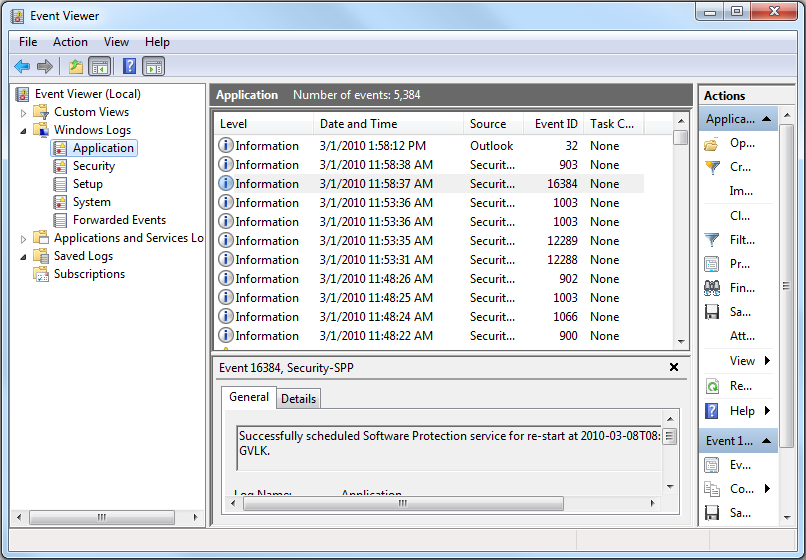
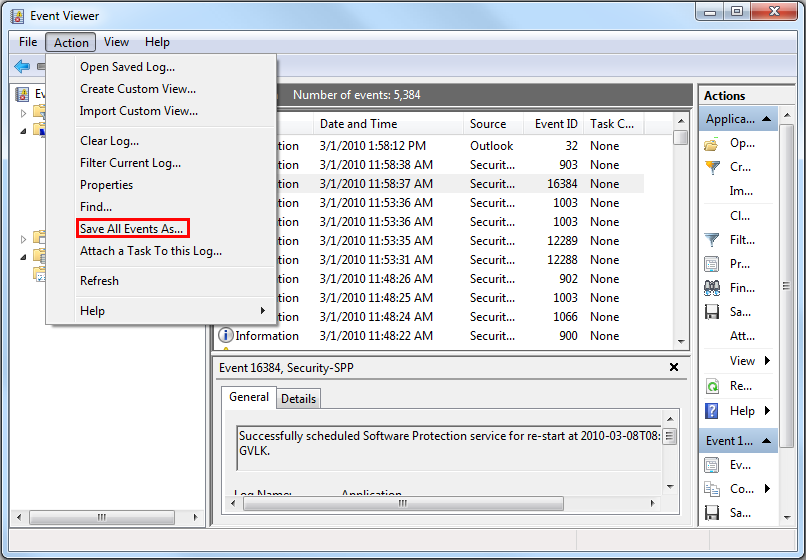
- Speichern Sie das Protokoll, indem Sie auf Action und dann auf Save All Events As klicken.
Weitere Informationen finden Sie unter Speichern von Ereignisprotokollen
Weitere Informationen zu BIOS-Ereignisprotokollen für Dell Laptops finden Sie unter BIOS-Ereignisprotokolle und Diagnoseprotokollierung auf Dell Laptops.
Additional Information
Empfohlene Artikel
Hier sind einige empfohlene Artikel zu diesem Thema, die für Sie von Interesse sein könnten.
Affected Products
Alienware, Dell All-in-One, Dell Pro All-in-One, Dell Pro Max Micro, Dell Pro Max Slim, Dell Pro Max Tower, Dell Pro Micro, Dell Pro Slim, Dell Pro Tower, Dell Slim, Dell Tower, Inspiron, Legacy Desktop Models, OptiPlex, Vostro, XPS, G Series
, G Series, Alienware, Dell Plus, Dell Pro, Dell Pro Max, Dell Pro Plus, Dell Pro Premium, Inspiron, Latitude, Dell Pro Rugged, Vostro, XPS, Legacy Laptop Models, Fixed Workstations, Mobile Workstations, Dell Pro Max Micro XE FCM2250, Dell Pro Max Slim XE FCS1250, Dell Pro Max Tower T2 XE FCT2250, Dell Pro Max 16 XE MC16250, Dell Pro Micro Plus XE QBM1250, Dell Pro Slim Plus XE5 QBS1250, Dell Pro Tower Plus XE5 QBT1250
...
Article Properties
Article Number: 000124382
Article Type: How To
Last Modified: 10 Aug 2026
Version: 10
Find answers to your questions from other Dell users
Support Services
Check if your device is covered by Support Services.