在 Dell Data Protection Enterprise Edition 中,如何故障診斷原則代理記錄錯誤:伺服器說:“VFS錯誤。將裝置清查檔案放入 VFS 時發生錯誤」
Summary: 如何故障診斷原則代理記錄錯誤:伺服器說:“VFS 錯誤。將裝置清查檔放入 VFS 時發生錯誤」 |Enterprise Edition。
This article applies to
This article does not apply to
This article is not tied to any specific product.
Not all product versions are identified in this article.
Symptoms
受影響的產品:
- Dell Data Protection | Enterprise Edition
此錯誤表示伺服器發生災難性錯誤。當它嘗試將清單放入 VFS 表中時,它可以停止所有清單的流。
清查不會流向伺服器。這可能會影響一個或多個客戶端清單數據。
Cause
原則代理在提供清查時失敗,並出現下列錯誤:
DATE TIME [W] Bundle server upload error on [device.inventory; scid=XXXXXXXX; ucid= YYYYYYYY] Server unable to understand bundle. Server said, " VFS error. Error putting device inventory file into VFS"
Resolution
這表示當伺服器查詢 Shield ID XXXXXXXX (來自使用者 ID YYYYYYY) 時,資料會錯誤,且清查傳送會失敗。在 Shield 傳送的資料中,有一些災難性的東西會破壞電腦。這是用戶端問題,我們必須在用戶端上執行wsdeactivate.exe,才能嘗試修復。如果這樣做無法解決,請解除安裝,然後在此機器上重新安裝用戶端,以嘗試進行修復。
您可以使用下列針對 CMG 資料庫的 SQL 查詢,從 Shield ID 取得主機名稱:
Select eu.UID as hostname, es.CID as SCID, AssociationDate as Date From DeviceShieldAssociationArchive
Join Entity as es on es.EID = ShieldEid
Join Entity as eu on eu.EID = DeviceEid
Where es.cid = 'XXXXXXXX'
將 XXXXXXXX 替換為 DCID (SCID 是伺服器中 DCID 的另一個名稱),即可找到主機名稱。
或者,您也可以在 Dell Data Security Console Web 介面中使用 SCID (DCID) 來找到主機名稱。
- 登入 Dell Data Security Console。
- 選取 端點。
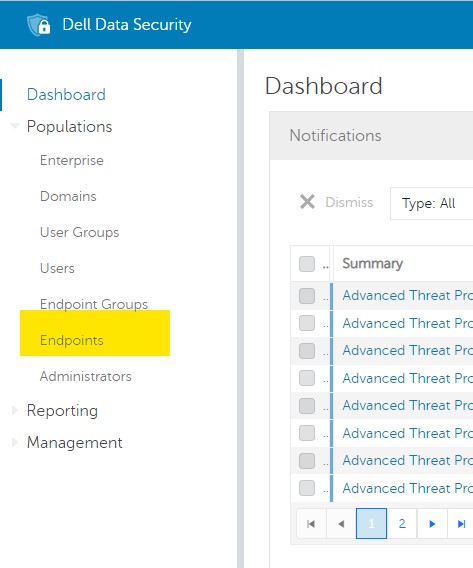
圖 1:(僅英文)選取端點
- 在 搜尋 方塊中輸入 SCID,然後按一下 放大鏡圖示:
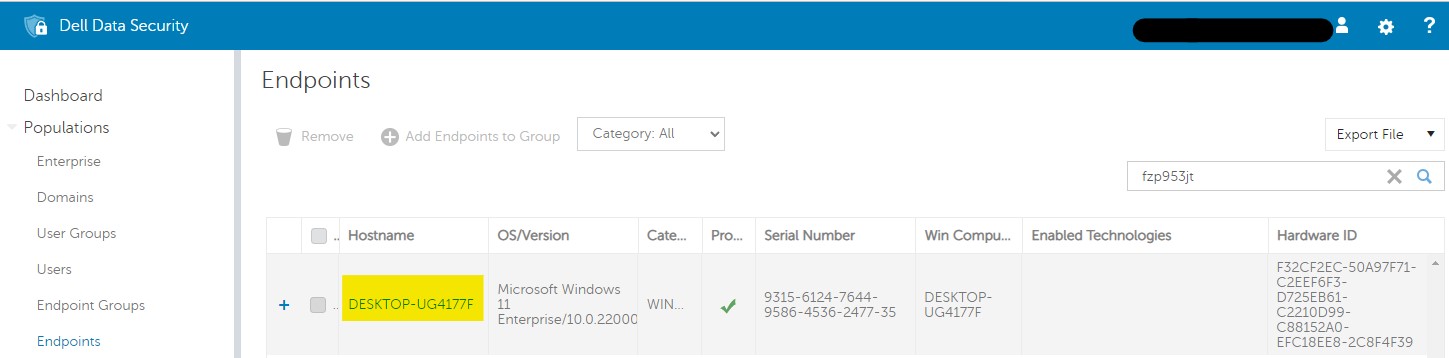
圖 2:(僅英文)搜尋 SCID
如要聯絡支援部門,請參閱 Dell Data Security 國際支援電話號碼。
請前往 TechDirect,以線上產生技術支援要求。
如需更多深入見解與資源,請加入 Dell 安全性社群論壇。
Affected Products
Dell EncryptionArticle Properties
Article Number: 000126045
Article Type: Solution
Last Modified: 03 Apr 2024
Version: 10
Find answers to your questions from other Dell users
Support Services
Check if your device is covered by Support Services.