Avamar: Navigazione del cluster SQL AlwaysOn non riuscita
Summary: Questo articolo della Knowledge Base descrive una soluzione alternativa per risolvere gli errori di ricerca e backup del cluster AlwaysOn (AO) AlwaysOn (AO) di Structured Query Language (SQL) a causa di errori relativi alla rete o specifici dell'istanza quando il cluster SQL AlwaysOn è configurato per l'ascolto su una porta non predefinita. ...
This article applies to
This article does not apply to
This article is not tied to any specific product.
Not all product versions are identified in this article.
Symptoms
Il cluster SQL AlwaysOn (AO) potrebbe non riuscire a eseguire la ricerca o il backup con un messaggio di errore simile al seguente:
avsql Error <9072>: sqlconnectimpl_smo::connect Microsoft.SqlServer.Management.Common.ConnectionFailureException: Failed to connect to server EMClistener. ---> System.Data.SqlClient.SqlException: A network-related or instance-specific error occurred while establishing a connection to SQL Server. The server was not found or was not accessible. Verify that the instance name is correct and that SQL Server is configured to allow remote connections. (provider: Named Pipes Provider, error: 40 - Could not open a connection to SQL Server) ---> System.ComponentModel.Win32Exception: The system cannot find the file specifiedCause
Il listener SQL AO è configurato per l'ascolto su una porta non predefinita. Per impostazione predefinita, è configurato per l'ascolto sulla porta TCP 1433.
Resolution
Creare un file avsql.cmd nella cartella var condivisa designata per il gruppo di disponibilità Avamar SQL AlwaysOn e aggiungere il flag seguente:
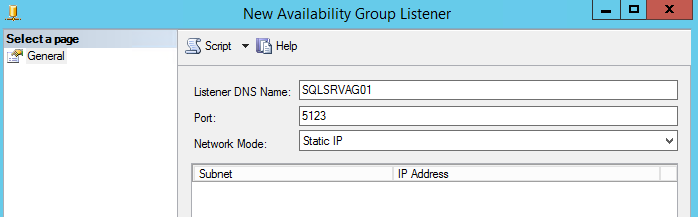
--sqlserver=<availability group listener's IP address>,<listener port>
Esempio:
--sqlserver=172.1.1.1,5123
L'indirizzo IP e la porta configurati per la porta listener AO sono reperibili accedendo a SQL Server Management Studio:
Affected Products
Avamar, Avamar Plug-in for SQLArticle Properties
Article Number: 000162984
Article Type: Solution
Last Modified: 23 Sept 2025
Version: 4
Find answers to your questions from other Dell users
Support Services
Check if your device is covered by Support Services.