Dell Unity:无法将 ESXi 主机添加到主机组
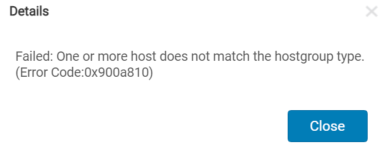
Summary: 将自动注册的 ESXi 主机添加到常规或 ESXi 主机组类型失败,并导致错误:“Failed:一个或多个主机与主机组类型不匹配(错误代码:0x900a810)。
This article applies to
This article does not apply to
This article is not tied to any specific product.
Not all product versions are identified in this article.
Symptoms
自动注册的 ESXi 主机不可见,并且无法添加到 ESXi 类型的主机组。此问题通常发生在光纤通道 (FC) 分区之后,启动器自动注册到 Unity 阵列时。
如果主机组类型更改为常规,并且将自动注册的 ESXi 主机添加到主机组,则会发生以下错误。
Cause
UnityOS 5.1 无法正确处理创建主机组过程的“Type”参数(General 或 ESXi)。
Resolution
修复:
此问题已在 UnityOS 5.2.0.0.5.173 及更高版本中得到修复。
解决方法:
1.通过主机 UI:向 Unity 阵列注册 vCenter 服务器,并在 ACCESS > VMware> ESXi 主机下查找或添加主机。
2.通过用户界面(无 vCenter 服务器/从 ESXi 主机自动注册):必须删除“访问> 主机”下自动注册的 ESXi 主机,并且必须改为创建手动 ESXi 主机配置文件。
3.通过 CLI(具有逻辑单元号码 (LUN) 的现有主机):使用以下命令创建 ESXi 主机组。
此问题已在 UnityOS 5.2.0.0.5.173 及更高版本中得到修复。
解决方法:
1.通过主机 UI:向 Unity 阵列注册 vCenter 服务器,并在 ACCESS > VMware> ESXi 主机下查找或添加主机。
2.通过用户界面(无 vCenter 服务器/从 ESXi 主机自动注册):必须删除“访问> 主机”下自动注册的 ESXi 主机,并且必须改为创建手动 ESXi 主机配置文件。
提醒:在主机组创建向导中,“Type”必须选择为“ESXi”。
3.通过 CLI(具有逻辑单元号码 (LUN) 的现有主机):使用以下命令创建 ESXi 主机组。
uemcli -d x.x.x.x -u admin -p xxxx /remote/hostgroup create -name xxxxx -type ESX -hosts xxxxx
提醒:Hosts 参数接受主机标识号(主机 ID),但不接受主机名(例如:Host_7/8)
Affected Products
Dell EMC Unity, VMware ESXiArticle Properties
Article Number: 000198405
Article Type: Solution
Last Modified: 10 Oct 2025
Version: 6
Find answers to your questions from other Dell users
Support Services
Check if your device is covered by Support Services.