Data Domain: DD Boost configuratiehandleiding voor CommVault
Summary: Dit artikel bevat basisinformatie over de configuratie van DD Boost met de CommVault-applicatie. In dit artikel worden ook de vereisten beschreven die nodig zijn voor het configureren van DD Boost met CommVault en ondersteunde configuratie/workflows met CommVault 11.30.x en 11.32.x softwareversies. ...
This article applies to
This article does not apply to
This article is not tied to any specific product.
Not all product versions are identified in this article.
Instructions
Softwareconfiguratie
Tabel: vereiste versies voor Data Domain (DD) en Commvault.
| DDOS-versie | DDBoostSDK | Versie CommServe/Media Agent |
| DDOS 7.8 of hoger | DD Boost SDK 7.11 - geïntegreerd in Commvault 11.30.x en 11.32.x Media Agent-pakket | 11.30.x (DD Boost-toegang) |
| DDOS 7.8 of hoger | DD Boost SDK 7.11 - geïntegreerd in Commvault 11.30.x en 11.32.x Media Agent-pakket | 11.32.x (DD Boost Client Direct) |
Opmerking: DD Boost Client wordt ondersteund met nieuwe implementaties, er wordt geen migratie ondersteund vanaf DD Boost Access (CV 11.30.x) of vanaf eerdere CV-versies.
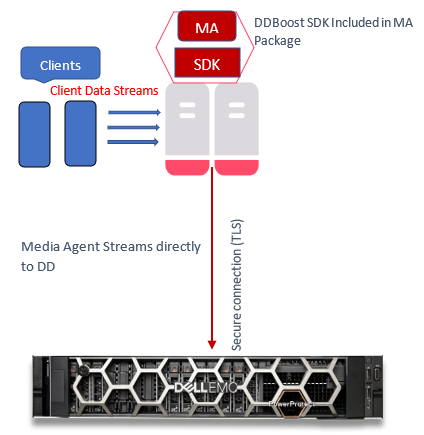
Ondersteunde configuratie/workflows met Commvault 11.30.x
Workflow I: Data Path Media Agent naar Data Domain
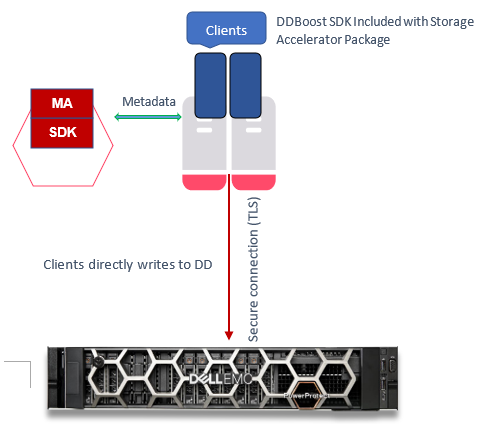
Workflow II: Datapad client naar Data Domain
Ondersteunde workflows voor 11.32.x
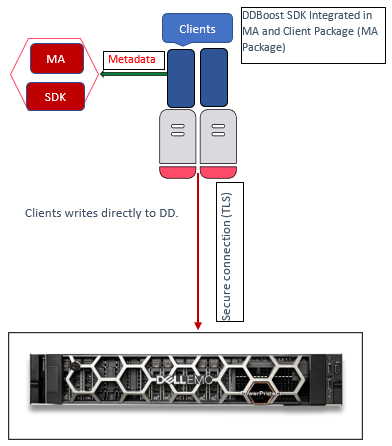
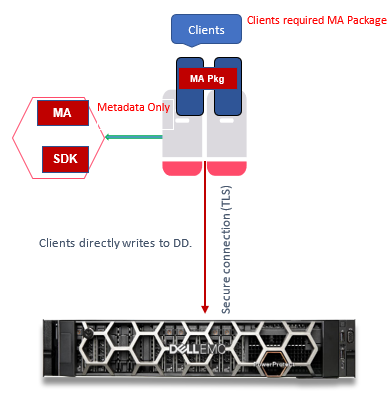
Workflow I: Datapad is client naar Data Domain (DD deduplicatie aan clientzijde)
Opmerking: Alleen voor volledige back-ups en incrementele back-ups, alleen herstellen.
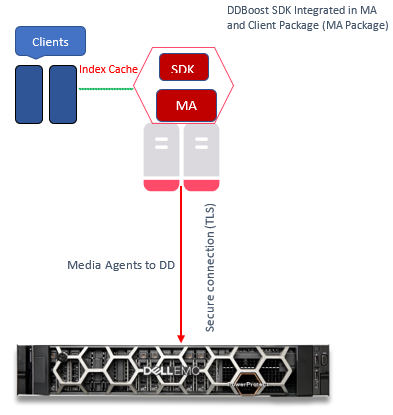
Workflow II: Datapad is client naar Data Domain (DD deduplicatie aan clientzijde)
Opmerking: Alleen voor synthetisch volledig (DD VS - Virtual Synthetics) back-up
Workflow III: Clients naar Media Agent naar Data Domain
Data Path is Media Agent naar Data Domain.
Opmerking: Voorkeur voor DD niet-client-side deduplicatie
Configuratiestappen
In dit gedeelte worden de stappen uitgelegd die nodig zijn om een DD-apparaat te configureren.
Opmerking: DD Boost SDK wordt standaard geïnstalleerd wanneer CommVault Media Agent en CommServe op hosts zijn geïnstalleerd.
Controleer of de DD een geldige licentie heeft en of het bestandssysteem en DD Boost zijn ingeschakeld.
- Licentie controleren:
sysadmin@DataDomain# elicense show Licensing scheme: EMC Electronic License Management System (ELMS) node-locked mode Capacity licenses: ## Feature Shelf Model Capacity Type State Expiration Date Note -- ------------------ ----------- ----------- --------------- ------ --------------- ---- 1 CAPACITY-ACTIVE ES40 1135.04 TiB permanent (int) active n/a 2 CLOUDTIER-CAPACITY n/a 9.09 TiB permanent (int) active n/a -- ------------------ ----------- ----------- --------------- ------ --------------- ---- Licensed Active Tier capacity: 1135.04 TiB* * Depending on the hardware platform, usable filesystem capacities may vary. Feature licenses: ## Feature Count Type State Expiration Date Note -- ------------------------- ----- --------------- ------ --------------- ---- 1 REPLICATION 1 permanent (int) active n/a 2 VTL 1 permanent (int) active n/a 3 DDBOOST 1 permanent (int) active n/a 4 RETENTION-LOCK-GOVERNANCE 1 permanent (int) active n/a 5 ENCRYPTION 1 permanent (int) active n/a - Controleer de status van het bestandssysteem:
sysadmin@DataDomain# filesys status The filesystem is enabled and running. - Controleer de DD Boost status:
sysadmin@DataDomain# ddboost status DD Boost status: enabled - Controleer DD Boost-opties voor DSP:
sysadmin@DataDomain# ddboost option show Option Value ------------------------------ -------- distributed-segment-processing enabled virtual-synthetics enabled fc disabled global-authentication-mode none global-encryption-strength none ------------------------------ -------- - DD Boost Storage Unit maken:
sysadmin@DataDomain# ddboost storage-unit create DDSTU_P2WIN_COMP_3 user sysadmin Created storage-unit "DDSTU_P2WIN_COMP_3" for "sysadmin". - Maak een lijst van de DD Boost Storage Unit:
sysadmin@DataDomain# ddboost storage-unit show
Name                 Pre-Comp (GiB)   Status   User       Report Physical
                                                             Size (MiB)
------------------   --------------   ------   --------   ---------------
DDSTU_P2WIN_COMP_3              0.0   RW       sysadmin                 -
------------------   --------------   ------   --------   ---------------
 D    : Deleted
 Q    : Quota Defined
 RO   : Read Only
 RW   : Read Write
 RD   : Replication Destination
 M    : Mobile
 m    : Migratable
Opmerking: Zie Commvault Data Domain Boost Storage Library in de Commvault-documentatie voor meer informatie over de functie Commvault DD Boost-storagebibliotheek, inclusief het configureren van een DD Boost-storagebibliotheek.
Een DD Boost-clientbibliotheek maken met CommVault 11.32.x
Nadat u aan alle vereisten voor het configureren van een Commvault DD Boost-storagebibliotheek hebt voldaan, maakt u een Client Direct DD Boost-clientbibliotheek:
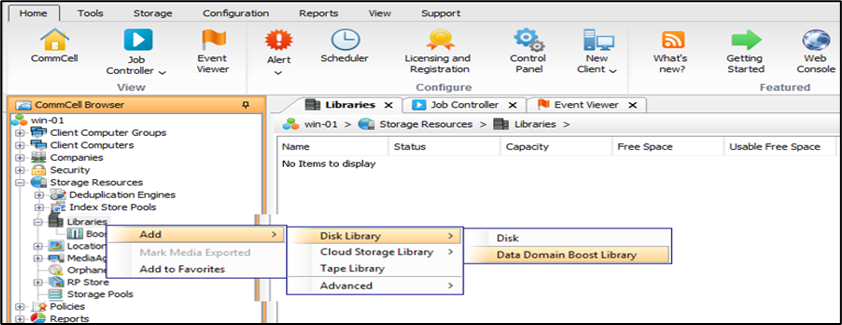
- Vouw in de CommCell-browser "Storage Resources" uit.
- Klik met de rechtermuisknop op Libraries en klik vervolgens op "Add > Disk Library > Data Domain Boost Library".
- Het "
Add DD Boost Storage" wordt weergegeven. - Typ in het vak Name een naam voor de bibliotheek.
- Selecteer in het vak Type de optie
DD Boost Client. - Selecteer in de lijst Mediaagent de juiste Client.
- Typ in het hostvak DD-apparaat het IP-adres dat is gekoppeld aan de Data Domain-bibliotheek.
- Kies in de lijst Referenties een vooraf gedefinieerde referentie of klik op
Create Newom een referentie te maken voor toegang tot de apparaatbibliotheek uit de DD-serie. - Typ in het vak Opslageenheid de naam van de opslageenheid in de apparaatconsole van de DD-serie.
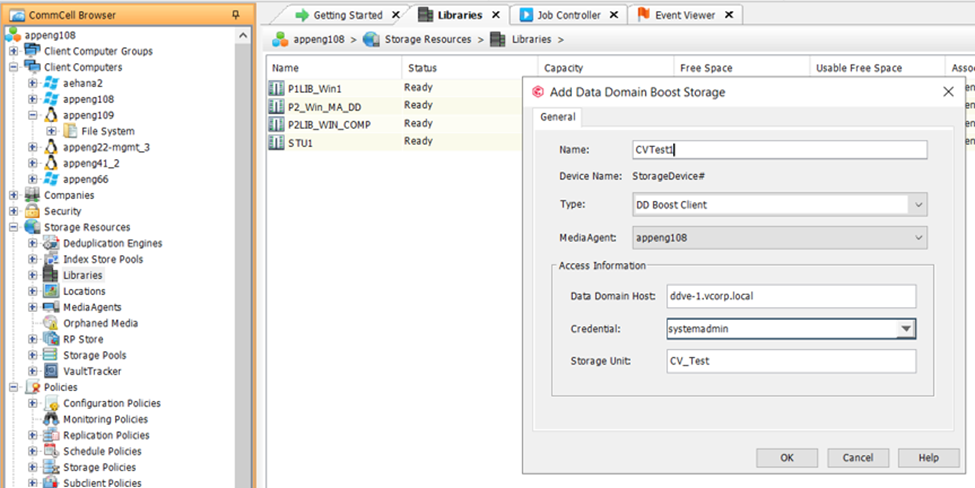
- Klik op
OK.
De nieuwe Client Direct DD Boost Storage Library wordt weergegeven in de CommCell-browser onder "Storage Resources | Bibliotheken."
Affected Products
Data Domain, Data Domain BoostArticle Properties
Article Number: 000219165
Article Type: How To
Last Modified: 27 Jan 2026
Version: 1
Find answers to your questions from other Dell users
Support Services
Check if your device is covered by Support Services.