APEX for Microsoft Azure (Orcas): Unable to Install the NIM Image onto a new or redeploy Node
Summary: NIM Image was unable to locate the BOSS disk for installation.
This article applies to
This article does not apply to
This article is not tied to any specific product.
Not all product versions are identified in this article.
Symptoms
Unable to Install the NIM Image onto a new or redeploy Node. The installation stops at the page shown below: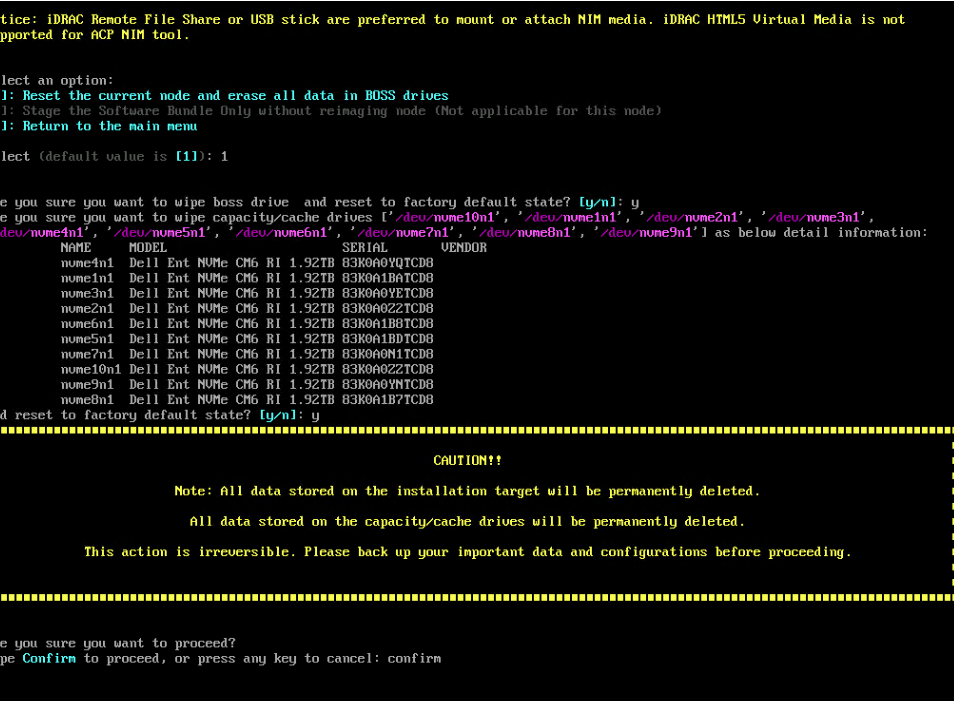
Cause
No virtual disk was created in the BOSS Disk utility. The NIM Image utility is unable to locate the Virtual Disk (BOSS disks) for installation.
A Virtual Disk is required to create onto BOSS Disks in prior before kick start the NIM Image installation.
Resolution
To resolve this issue, create a virtual disk from the BOSS disk utility in the Server BIOS. See the link below for more information about the steps.
https://www.dell.com/support/manuals/poweredge-t140/boss_s1_ug/creating-a-virtual-disk?guid=guid-54f4d147-55cc-4875-917e-482bafc6199a
Entering the UEFI configuration utility
Perform the following steps to boot to the UEFI configuration utility:
 -Turn on the system.
 -While the system is booting, press <F2> to enter System Setup.
 -Click Device Settings.
 -Device Settings lists all the RAID controllers in the system.
 -To access the management menu for the controller, use the arrow keys or the mouse.
Entering the BOSS-S1 configuration utility
Enter the UEFI configuration utility. See Entering the UEFI RAID configuration utility
The Device Settings screen displays a list of NIC ports and the BOSS-S1 configuration utility.
 -To enter BOSS-S1 configuration utility, click BOSS-S1 Configuration Utility.
The list of Configuration Options appears:
 -Physical/Virtual Disk Information — view the properties of physical disks and virtual disks
 -Create RAID Configuration — configure a virtual disk
 -Delete RAID Configuration — delete a virtual disk
 -RAID Rebuild — rebuild a degraded RAID volume, if a suitable peer drive is available
 -Erase Physical Disk — clear data on a physical disk
 -Controller Information — view BOSS-S1 adapter information
Creating a virtual disk
Enter the BOSS-S1 Configuration Utility. See Entering the BOSS-S1 Configuration Utility.
 -Click Create RAID Configuration.
 -Select the physical disks.
 -Click Next.
 -Type a name for the virtual disk in the Name field.
NOTE Adding special characters in the virtual disk name is not supported.
 -Select Yes for the option Would you like to create this virtual disk? and click OK.
 -Click Next, and then click OK.
A virtual disk is created with quick initialization by default.
Article Properties
Article Number: 000226322
Article Type: Solution
Last Modified: 04 Mar 2025
Version: 1
Find answers to your questions from other Dell users
Support Services
Check if your device is covered by Support Services.