ECS: How to disable the Transformsvc transformation service
Summary: Transformsvc can be used for the migration process from Centera to Content Address Storage (CAS) on ECS. Instances were found where it was not disabled after migration finished. This KB article outlines how to disable Transformsvc. ...
This article applies to
This article does not apply to
This article is not tied to any specific product.
Not all product versions are identified in this article.
Instructions
Verify that Transformsvc is enabled. If it displays as 'False', no further action is required:
# svc_node services status
svc_node v1.2.19 (svc_tools v2.25.0)                 Started 2025-10-09 11:15:52

Node r1n1:
    Transformsvc enabled: True

    Services running:
        fabric-agent

        blobsvc        (96597)  Started: 2025-10-03 09:41:35      cm             (29921)  Started: 2025-10-01 09:56:10
        coordinatorsvc (14197)  Started: 2025-09-01 09:11:54      dataheadsvc    (29795)  Started: 2025-10-01 09:56:09
        dm             (124970) Started: 2025-09-08 20:47:45      dtquery        (17963)  Started: 2025-09-01 09:13:02
        ecsportalsvc   (14353)  Started: 2025-09-01 09:11:54      eventsvc       (14326)  Started: 2025-09-01 09:11:54
        georeceiver    (14328)  Started: 2025-09-01 09:11:54      metering       (14320)  Started: 2025-09-01 09:11:54
        nginx          (19072)  Started: 2025-09-01 09:13:38      objcontrolsvc  (53652)  Started: 2025-10-09 01:04:16
        resourcesvc    (66887)  Started: 2025-09-02 12:17:50      rm             (60137)  Started: 2025-09-05 10:09:05
        sr             (14315)  Started: 2025-09-01 09:11:54      ssm            (14294)  Started: 2025-09-01 09:11:54
        stat           (36257)  Started: 2025-09-24 00:53:27      storageserver  (14291)  Started: 2025-09-01 09:11:54
        vnest          (14200)  Started: 2025-09-01 09:11:54

    Services not running:
        <none>
[...]
Confirm if the transformation is running an ongoing migration before disabling:
# svc_cas transformation status

v2.15.0)                 Started 2025-08-07 09:22:43

 Transformation Id                  urn:Transformation:Centera:4838df96-xxxx
 Transformation Current Phase       Reconciliation

 Enumeration                        Succeeded
 Indexing                           Succeeded
 Migration                          Succeeded
 PreCheck                           Succeeded
 Reconciliation                     Succeeded

 Namespace                          centera_xxxx
 Rg                                 urn:storageos:ReplicationGroupInfo:57796d33-6106-44fc-a343-eb826ef6xxxx:global
 Access_IP                          x.x.x.x
 Management_IP                      x.x.x.x

 Source_ID                          default/xxx
 Source_ID                          default/xxx

 Total Objects                      61561962
 Total Bytes                        13169033319403
 Total Bytes Migrated               13169033230680
 Total Objects Migrated             61561962
 Total Mismatch                     0
# svc_cas transformation progress
svc_cas v1.0.1 (svc_tools v2.15.0)                 Started 2024-08-07 09:23:09

 Transformation Id                  urn:Transformation:Centera:4838df96-1dd2-11b2-8dc8-c9a50c86cfba
 Transformation Current Phase       Reconciliation

 Tasks Succeeded                    615995
 Tasks Failed                       0
 Tasks Pending                      0
From the above, the CAS migration is complete. If tasks are still pending, it is advised to complete those tasks before disabling.
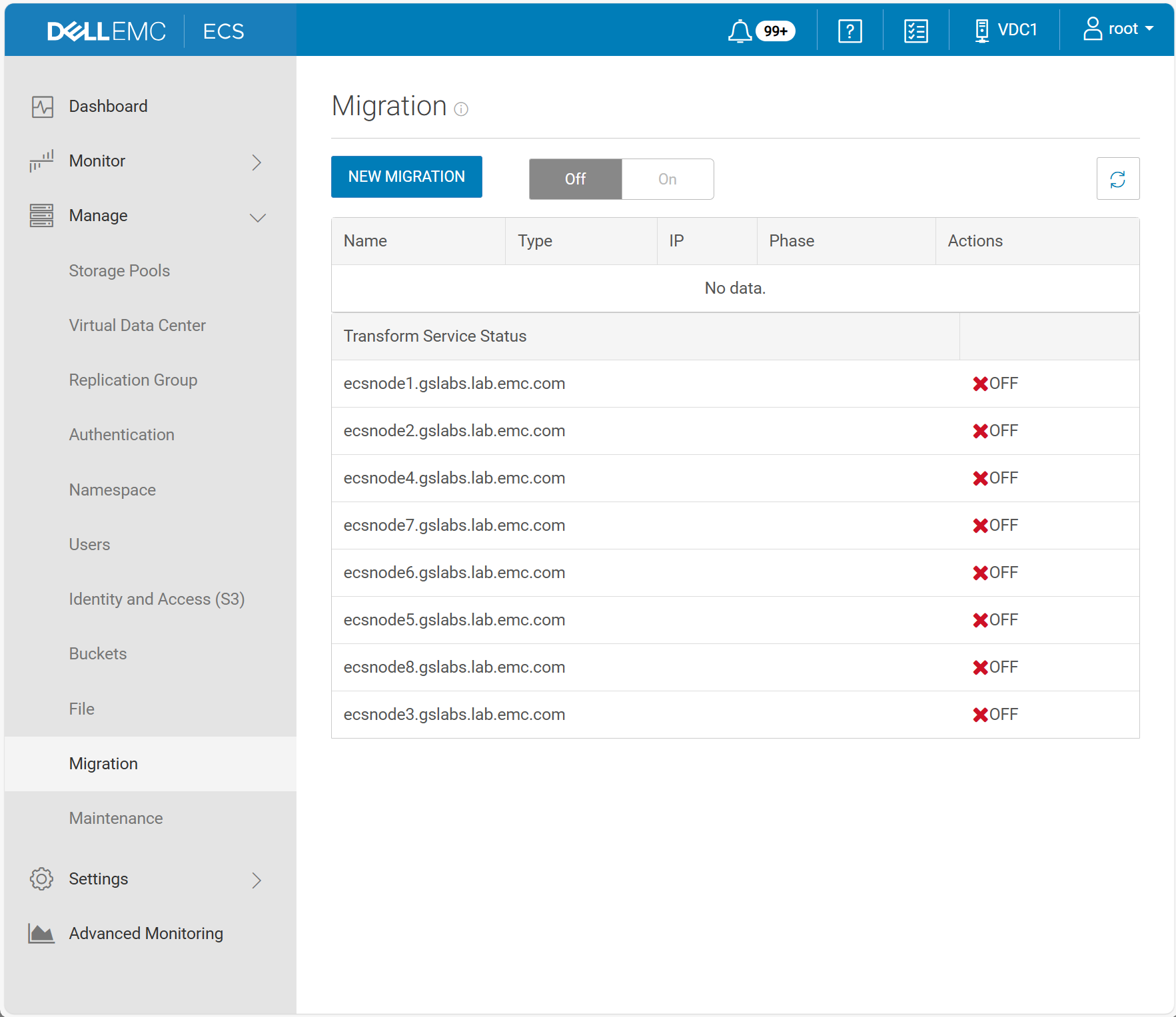
In the UI as management user root, press keys:
Ctrl + Alt + Shift + MA new menu entry appears:
Manage -> MigrationThere, you can disable Transformsvc as follows:
Affected Products
ECS, ECS Appliance Hardware Gen3 EX5000, ECS Appliance, ECS Appliance Gen 3, ECS Appliance Hardware Gen3 EX300, ECS Appliance Hardware Gen3 EX3000, ECS Appliance Hardware Gen3 EX500, ECS Appliance Hardware Gen3 EXF900, ECS Appliance Hardware Series
, ECS Appliance Software with Encryption, ECS Appliance Software without Encryption
...
Article Properties
Article Number: 000379360
Article Type: How To
Last Modified: 12 Dec 2025
Version: 2
Find answers to your questions from other Dell users
Support Services
Check if your device is covered by Support Services.