PowerEdge:當有無法使用的開機項目時,PXE 開機會失敗
Summary: 當開機順序中的最後一個「無法使用」項目時,PowerEdge 14G、15G、16G 和 17G 伺服器會略過開機前執行環境 (PXE) 開機。
This article applies to
This article does not apply to
This article is not tied to any specific product.
Not all product versions are identified in this article.
Symptoms
系統表現出以下行為:
- PowerEdge 14G、15G、16G 和 17G 伺服器無法從 PXE 裝置開機。
- 當
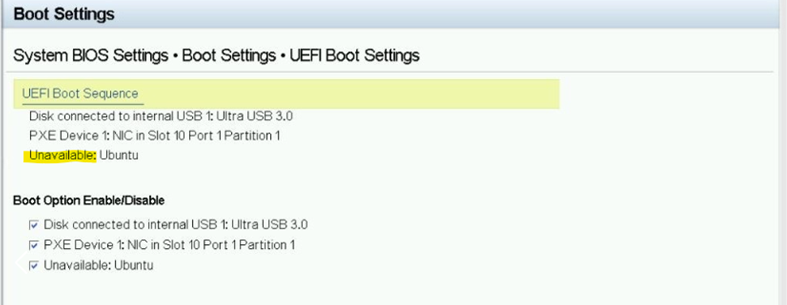
Unavailable啟動項顯示為啟動序列中的最後一個專案。 - 系統略過 PXE 裝置,並從第一個可用的開機裝置開機。
範例如下:
Cause
當有一個 Unavailable 裝置中,系統 BIOS 會略過 PXE 開機裝置,並使用第一個開機裝置開機。
Resolution
下一個 BIOS 版本將包含此修正。
以下是 BIOS 版本排程:
| 14G | 2026 年 6 月 |
| 15G | 2026 年 3 月 |
| 16G | 2026 年 3 月 |
| 17克 | 2026 年 3 月 |
短期因應措施:移除無法使用的開機選項。
- 重新開機伺服器,並在 POST 期間按下 F2 (或 F11) 以開啟 Boot Manager。
- 瀏覽至一次性 UEFI 開機功能表。
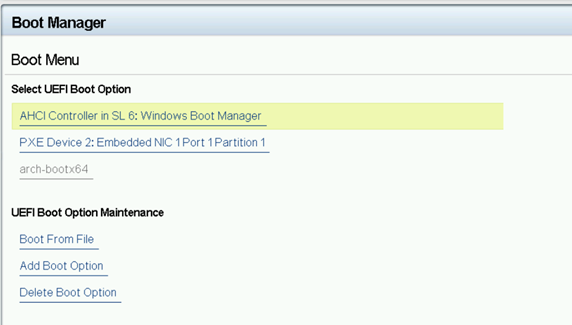
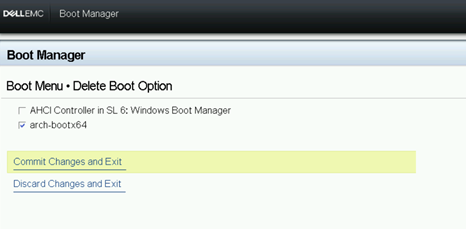
- 選取刪除開機選項。
- 突顯標註的每個項目
Unavailable。選擇 提交更改並退出 以將其刪除。
- 返回開機順序畫面,將 PXE 裝置置於所需位置。
套用 BIOS 更新後,就不再需要短期因應措施。
Affected Products
Rack Servers, Tower ServersArticle Properties
Article Number: 000396285
Article Type: Solution
Last Modified: 24 May 2026
Version: 3
Find answers to your questions from other Dell users
Support Services
Check if your device is covered by Support Services.