NetWorker: How to Identify Windows Operating System net helpmsg Codes
Summary: This article is to help identify errors which originate outside of, but are passed by applications.
This article applies to
This article does not apply to
This article is not tied to any specific product.
Not all product versions are identified in this article.
Instructions
Method 1 (Microsoft Documentation):
See: Tutorial - Debug system error codes - Win32 apps | Microsoft Learn

Method 2 (Single Query):
When an operation fails with a generic system error code, you can query the single error code using the net helpmsg command.
- Open an Administrator Command Prompt or PowerShell Prompt.
- Run:
net helpmsg error_code_number
Example:

Method 3 (Generate a Full List of Error Codes):
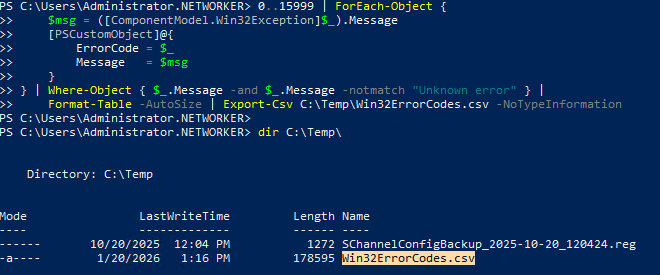
- Open an Administrator command prompt and run the following (change output location or filename as needed):
0..15999 | ForEach-Object {
    $msg = ([ComponentModel.Win32Exception]$_).Message
    [PSCustomObject]@{
        ErrorCode = $_
        Message   = $msg
    }
} | Where-Object { $_.Message -and $_.Message -notmatch "Unknown error" } |
    Format-Table -AutoSize | Export-Csv C:\Temp\Win32ErrorCodes.csv -NoTypeInformation
- Review the .csv file and cross-reference that any system errors observed.
Example:
Affected Products
NetWorkerProducts
NetWorkerArticle Properties
Article Number: 000061764
Article Type: How To
Last Modified: 18 Apr 2026
Version: 6
Find answers to your questions from other Dell users
Support Services
Check if your device is covered by Support Services.