PowerScale OneFS: File intermittente non trovato, errori correlati quando si utilizzano variabili di espansione del nome utente per le condivisioni principali SMB
Summary: Errori intermittenti durante il salvataggio di un file in una directory principale espansa con nome utente quando anche l'account del computer si connette alla condivisione ma non riesce a trovare il file. ...
This article applies to
This article does not apply to
This article is not tied to any specific product.
Not all product versions are identified in this article.
Symptoms
Quando si tenta di salvare, modificare o rinominare il file nelle directory principali create automaticamente utilizzando l'espansione del percorso variabile o le variabili di espansione del nome utente (%U), è possibile che venga visualizzato in modo intermittente un errore indicante che il file non si trova più in tale percorso o qualcosa di simile. Il file potrebbe quindi scomparire e riapparire dopo l'aggiornamento della pagina.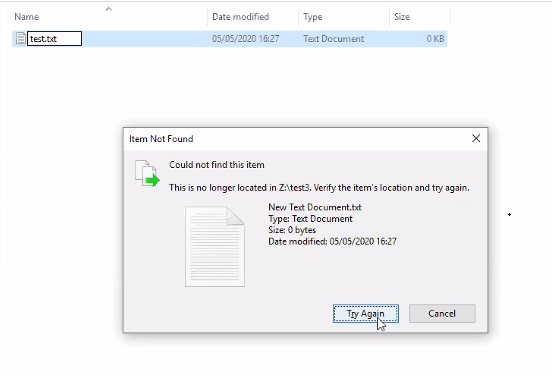
Cause
Una share SMB configurata con una variabile di espansione del nome utente (%U) significa che la directory principale viene creata automaticamente per ogni utente che si connette alla share. Questo indipendentemente dal fatto che si tratti di un computer o di un account utente:
PowerScale-1# isi smb shares list --zone=SMBzone
Share Name  Path
-------------------------------------
homedir     /ifs/home/%U
-------------------------------------
Total: 1

PowerScale-1# ls -l /ifs/home/
total 5
drwx------     2 user0                   Isilon Users              27 May 15 11:32 user0
drwx------     3 EXAMPLE\dell-rabie-pc$  EXAMPLE\domain computers  28 May 15 11:36 dell-rabie-pc$ <<----- Computer account
drwx------     3 EXAMPLE\paul            EXAMPLE\domain users      28 May 15 11:36 paul           <<----- User account using computer "dell-rabie-pc$"
Nell'acquisizione dei pacchetti seguente, l'utente paul crea un file nella condivisione \\homedir\profiles che viene espanso in \\homedir\profiles\paul\. L'account del computer tenta di trovare lo stesso file e pensa di connettersi alla stessa condivisione \\homedir\profiles. Sta cercando in \\homdir\profiles\dell-rabie-pc$\, quindi il file non viene trovato. \\homedir\profiles\paul\test non è uguale a \\homdir\profiles\dell-rabie-pc$\test.
6600 48.216535 10.148.x.x   10.45.x.x SMB2 166 Session Setup Request, NTLMSSP_AUTH, User: EXAMPLE\paul    <<----- User account using computer "dell-rabie-pc$"
6661 48.216535 10.45.x.x   10.148.x.x SMB2 146 Session Setup Response
6662 48.800589 10.148.x.x   10.45.x.x SMB2 166 Tree Connect Request Tree: \\homedir\profiles
6663 48.801463 10.45.x.x   10.148.x.x SMB2 138 Tree Connect Response
6646 48.213583 10.148.x.x   10.45.x.x SMB2 422 Create Request File: test3\test\New Text Document.txt
6650 48.215117 10.45.x.x   10.148.x.x SMB2 374 Create Response File: test3\test\New Text Document.txt
6659 48.216535 10.148.x.x   10.45.x.x SMB2 166 Session Setup Request, NTLMSSP_AUTH, User: EXAMPLEdell-rabie-pc$ <<----- Computer account
6660 48.216535 10.45.x.x   10.148.x.x SMB2 146 Session Setup Response
6813 48.800589 10.148.x.x   10.45.x.x SMB2 166 Tree Connect Request Tree: \\homedir\profiles
6814 48.801463 10.45.x.x   10.148.x.x SMB2 138 Tree Connect Response
6819 48.802674 10.148.x.x   10.45.x.x SMB2 266 Create Request File: test3\test\New Text Document.txt
6820 48.803106 10.45.x.x   10.148.x.x SMB2 131 Create Response, Error: STATUS_OBJECT_PATH_NOT_FOUND

In frames 6646 and 6650, the file is created successfully. Frame 6819 shows a request to access "New Text Document.txt",  but frame 6820 shows that the file was not found.
Further inspection of the information in frame 6819, shows that the create request came from the computer account and not the user account:
6819 48.802674 10.148.x.x   10.45.x.x SMB2 266 Create Request File: test3\test\New Text Document.txt
Session Id: 0x07b5cf4100d5a9be
    [Account: dell-rabie-pc$ Acct:dell-rabie-pc$]
    [Domain: DDMI Domain:EXAMPLE]
    [Host: dell-rabie-pc Host:dell-rabie-pc]
Resolution
Questo problema non si verifica quando si utilizzano directory principali che non vengono create automaticamente utilizzando l'espansione del percorso variabile.
Soluzione alternativa:
- Se è possibile impedire al gruppo "computer di dominio" di accedere alla condivisione, si evitano errori di file non trovati. Questa operazione deve essere eseguita prima in un ambiente di test per verificare ogni possibile impatto negativo:
# isi smb shares view varexp
                                     Share Name: varexp
                                           Path: /ifs/varexp-home/%U
                                    Description:
                     Client-side Caching Policy: manual
Automatically expand user names or domain names: True
Automatically create home directories for users: True
                                      Browsable: True
Permissions:
Account                  Account Type  Run as Root  Permission Type  Permission
--------------------------------------------------------------------------------
EXAMPLE\domain computers group         0            deny             full
Everyone                 wellknown     0            allow            full
--------------------------------------------------------------------------------
Total: 2
2. Disabilitare il client dal caching dell'evento not found, anche se ciò potrebbe ridurre le prestazioni:
Per eventuali domande o dubbi sulla modifica di queste impostazioni, contattare il supporto tecnico Microsoft.
Per aggiungere le voci di registro, effettuare le seguenti operazioni:
- Digita 'regedit' nella barra di ricerca di Windows
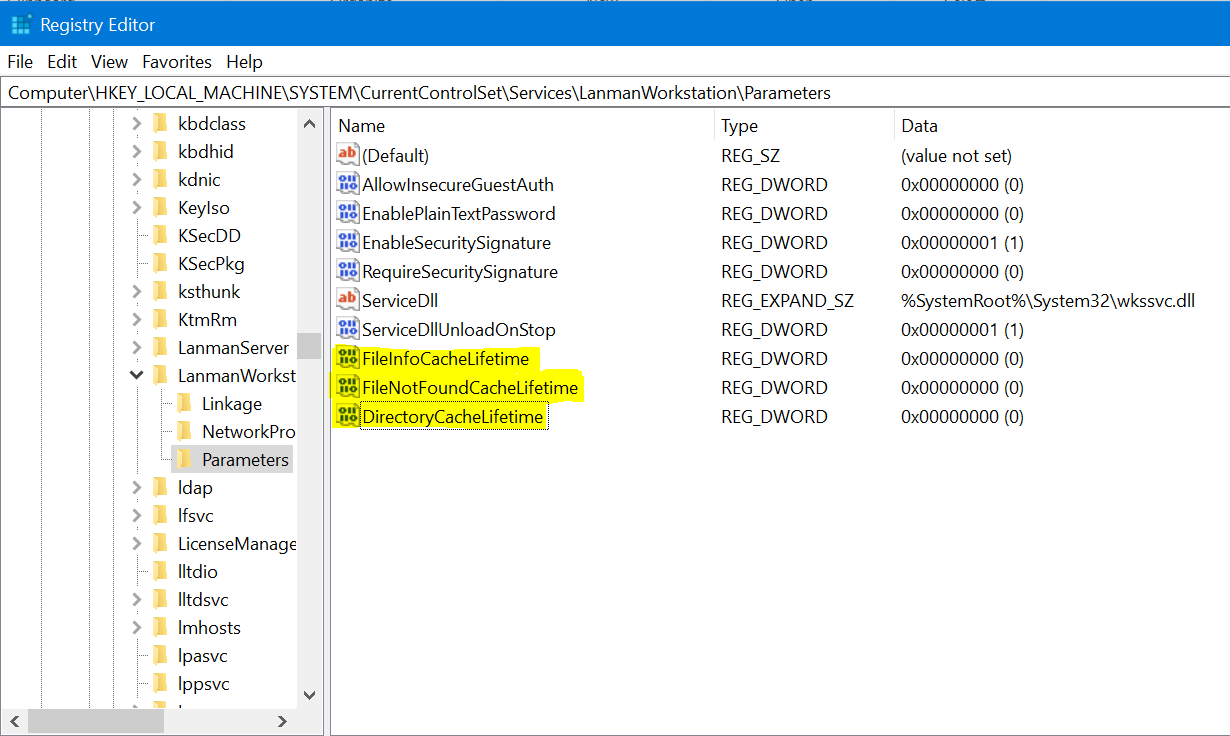
- Passare alla posizione riportata di seguito: Computer\HKEY_LOCAL_MACHINE\SYSTEM\CurrentControlSet\Services\LanmanWorkstation\Parameters
- Una volta nella posizione sopra, crea un nuovo valore DWORD (fai clic con il pulsante destro del mouse sul > nuovo > valore DWORD)
- Indicare il nome del registro riportato di seguito. Il valore appena creato è zero per impostazione predefinita
FileNotFoundCacheLifetime Dword=0 >> The file not found cache timeout period.
Se il problema persiste o si verifica anche in una sottodirectory e non nella directory root di condivisione, aggiungere i seguenti registri insieme alla voce precedente:
FileInfoCacheLifetime Dword=0                               >> The file information cache timeout period.
DirectoryCacheLifetime Dword=0                            >> This is the directory cache timeout.
Le voci del Registro di sistema vengono visualizzate come segue:
Additional Information
- La disabilitazione della cache delle informazioni sui file può avere un effetto significativo sulle prestazioni del client e mostrare un aumento del numero di richieste di metadati inviate al server.
- Ulteriori dettagli sui valori del Registro di sistema sono disponibili qui:
https://docs.microsoft.com/en-us/windows-server/administration/performance-tuning/role/file-server/
Affected Products
Isilon, PowerScale OneFSProducts
Storage, Enterprise Storage, Isilon, Isilon, PowerScale OneFSArticle Properties
Article Number: 000079025
Article Type: Solution
Last Modified: 16 Dec 2025
Version: 4
Find answers to your questions from other Dell users
Support Services
Check if your device is covered by Support Services.