PowerScale OneFS:对 SMB 主共享使用用户名扩展变量时出现间歇性文件未找到相关错误
Summary: 当计算机帐户也连接到共享但找不到文件时,在用户名扩展的主目录中保存文件间歇性失败。
This article applies to
This article does not apply to
This article is not tied to any specific product.
Not all product versions are identified in this article.
Symptoms
当您尝试保存、修改或重命名使用变量路径扩展或用户名扩展变量 (%U) 自动创建的主目录下的文件时,可能会间歇性地收到错误,指出文件不再位于该路径中或类似路径中。然后,该文件可能会消失,并在刷新页面后重新出现。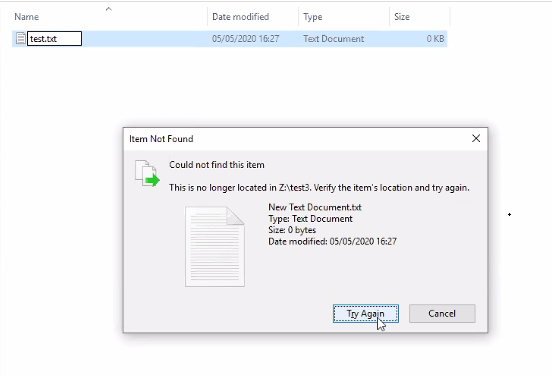
Cause
配置了用户名扩展变量 (%U) 的 SMB 共享意味着为连接到共享的每个用户自动创建主目录。不管是计算机还是用户帐户,这都是如此:
PowerScale-1# isi smb shares list --zone=SMBzone
Share Name  Path
-------------------------------------
homedir     /ifs/home/%U
-------------------------------------
Total: 1

PowerScale-1# ls -l /ifs/home/
total 5
drwx------     2 user0                   Isilon Users              27 May 15 11:32 user0
drwx------     3 EXAMPLE\dell-rabie-pc$  EXAMPLE\domain computers  28 May 15 11:36 dell-rabie-pc$ <<----- Computer account
drwx------     3 EXAMPLE\paul            EXAMPLE\domain users      28 May 15 11:36 paul           <<----- User account using computer "dell-rabie-pc$"
在以下数据包捕获中,用户 paul 在共享 \\homedir\profiles 中创建一个文件,该文件扩展到 \\homedir\profiles\paul\。计算机帐户尝试查找同一文件,并认为它正在连接到同一共享 \\homedir\profiles。它在 \\homdir\profiles\dell-rabie-pc$\ 下查找,因此未找到该文件。\\homedir\profiles\paul\test 与 \\homdir\profiles\dell-rabie-pc$\test 不同。
6600 48.216535 10.148.x.x   10.45.x.x SMB2 166 Session Setup Request, NTLMSSP_AUTH, User: EXAMPLE\paul    <<----- User account using computer "dell-rabie-pc$"
6661 48.216535 10.45.x.x   10.148.x.x SMB2 146 Session Setup Response
6662 48.800589 10.148.x.x   10.45.x.x SMB2 166 Tree Connect Request Tree: \\homedir\profiles
6663 48.801463 10.45.x.x   10.148.x.x SMB2 138 Tree Connect Response
6646 48.213583 10.148.x.x   10.45.x.x SMB2 422 Create Request File: test3\test\New Text Document.txt
6650 48.215117 10.45.x.x   10.148.x.x SMB2 374 Create Response File: test3\test\New Text Document.txt
6659 48.216535 10.148.x.x   10.45.x.x SMB2 166 Session Setup Request, NTLMSSP_AUTH, User: EXAMPLEdell-rabie-pc$ <<----- Computer account
6660 48.216535 10.45.x.x   10.148.x.x SMB2 146 Session Setup Response
6813 48.800589 10.148.x.x   10.45.x.x SMB2 166 Tree Connect Request Tree: \\homedir\profiles
6814 48.801463 10.45.x.x   10.148.x.x SMB2 138 Tree Connect Response
6819 48.802674 10.148.x.x   10.45.x.x SMB2 266 Create Request File: test3\test\New Text Document.txt
6820 48.803106 10.45.x.x   10.148.x.x SMB2 131 Create Response, Error: STATUS_OBJECT_PATH_NOT_FOUND

In frames 6646 and 6650, the file is created successfully. Frame 6819 shows a request to access "New Text Document.txt",  but frame 6820 shows that the file was not found.
Further inspection of the information in frame 6819, shows that the create request came from the computer account and not the user account:
6819 48.802674 10.148.x.x   10.45.x.x SMB2 266 Create Request File: test3\test\New Text Document.txt
Session Id: 0x07b5cf4100d5a9be
    [Account: dell-rabie-pc$ Acct:dell-rabie-pc$]
    [Domain: DDMI Domain:EXAMPLE]
    [Host: dell-rabie-pc Host:dell-rabie-pc]
Resolution
当使用不是使用可变路径扩展自动创建的主目录时,不会发生此问题。
解决办法:
- 如果您可以拒绝“domain computers”组访问共享,则可以防止出现文件未找到错误。这应首先在测试设置中完成,以验证任何可能的负面影响:
# isi smb shares view varexp
                                     Share Name: varexp
                                           Path: /ifs/varexp-home/%U
                                    Description:
                     Client-side Caching Policy: manual
Automatically expand user names or domain names: True
Automatically create home directories for users: True
                                      Browsable: True
Permissions:
Account                  Account Type  Run as Root  Permission Type  Permission
--------------------------------------------------------------------------------
EXAMPLE\domain computers group         0            deny             full
Everyone                 wellknown     0            allow            full
--------------------------------------------------------------------------------
Total: 2
2.禁用客户端缓存“not found”事件, 尽管这可能会降低性能:
有关修改这些设置的任何问题或疑虑,请联系 Microsoft 支持。
要添加注册表项,请执行以下步骤:
- 在 Windows 搜索栏中键入“regedit”
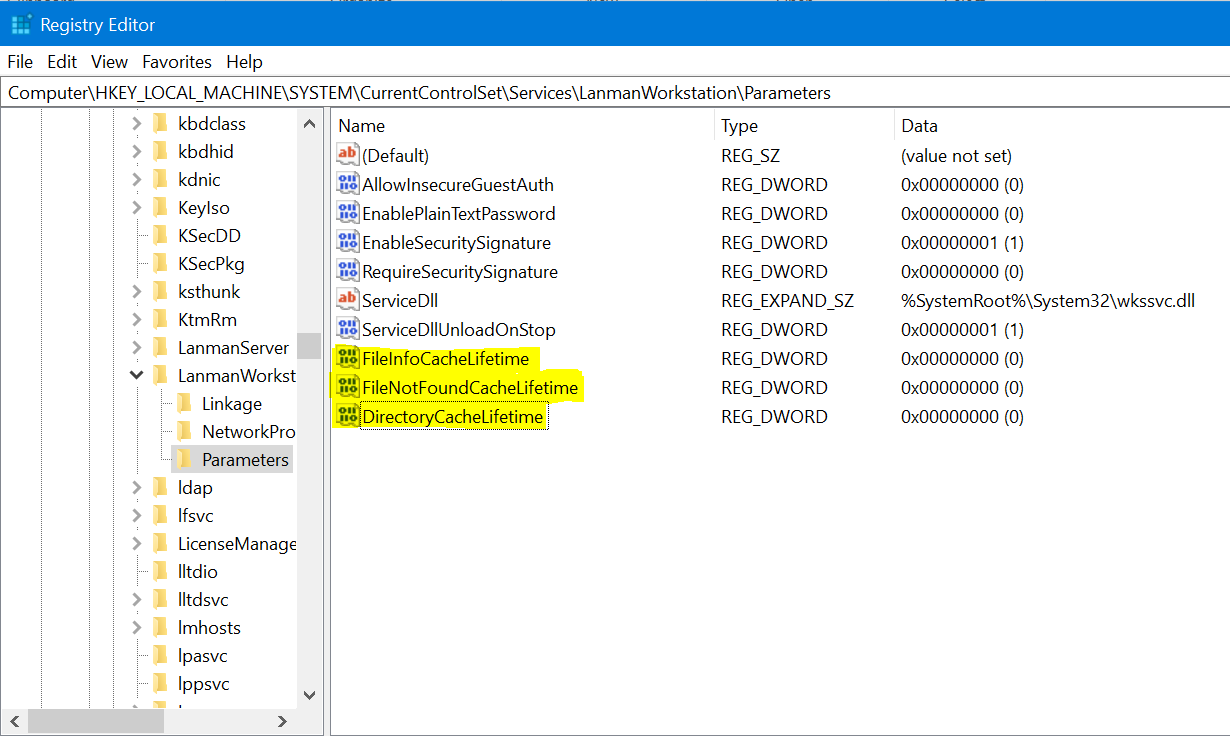
- 导航至以下位置:Computer\HKEY_LOCAL_MACHINE\SYSTEM\CurrentControlSet\Services\LanmanWorkstation\Parameters
- 进入上述位置后,创建新的 DWORD 值(右键单击 > 新的 > DWORD 值)
- 提供以下寄存器名称。默认情况下,新创建的值为零
FileNotFoundCacheLifetime Dword=0 >> The file not found cache timeout period.
如果即使在子目录而不是共享根目录中,问题仍然存在或发生,请添加以下注册表以及上述条目:
FileInfoCacheLifetime Dword=0                               >> The file information cache timeout period.
DirectoryCacheLifetime Dword=0                            >> This is the directory cache timeout.
注册表项如下所示:
Additional Information
- 禁用文件信息缓存可能会对客户端性能产生显著影响,并显示发送到服务器的元数据请求数增加。
- 可在此处找到有关注册表值的其他详细信息:
https://docs.microsoft.com/en-us/windows-server/administration/performance-tuning/role/file-server/
Affected Products
Isilon, PowerScale OneFSProducts
Storage, Enterprise Storage, Isilon, Isilon, PowerScale OneFSArticle Properties
Article Number: 000079025
Article Type: Solution
Last Modified: 16 Dec 2025
Version: 4
Find answers to your questions from other Dell users
Support Services
Check if your device is covered by Support Services.