PowerEdge:如何在系统设置中检查虚拟磁盘属性
Summary: 本文介绍如何在 PowerEdge 服务器的系统设置中检查虚拟磁盘属性。
This article applies to
This article does not apply to
This article is not tied to any specific product.
Not all product versions are identified in this article.
Instructions
管理虚拟磁盘属性屏幕允许您修改硬盘写入高速缓存策略并查看关联的硬盘及其属性和策略。
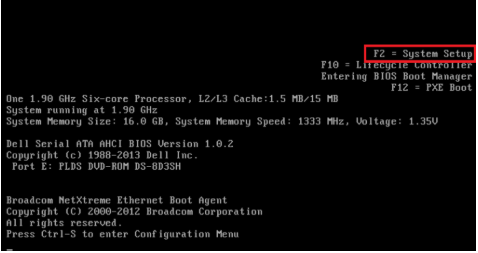
- 在开机自检期间按 F2 键进入 System Setup 页面
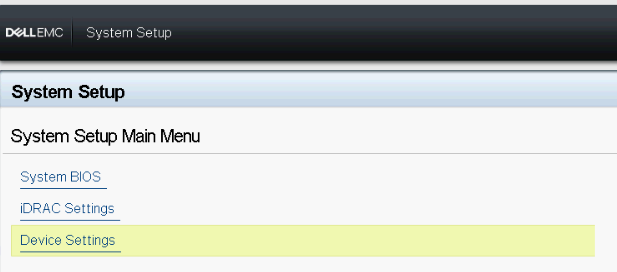
- 在系统设置主菜单中,单击设备设置
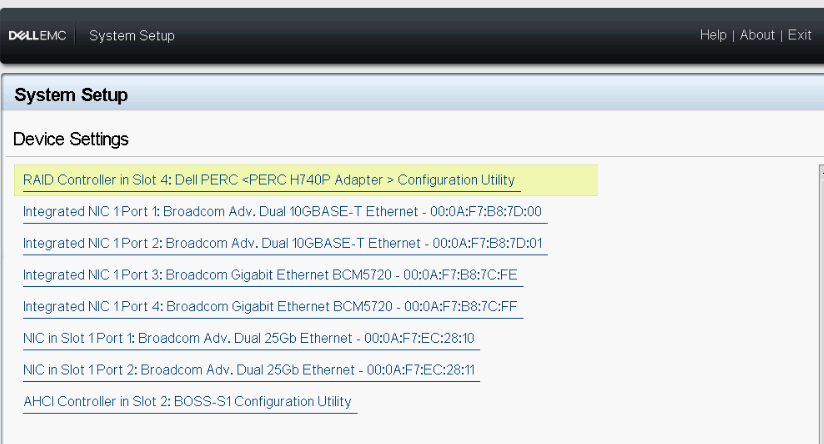
- 选择 RAID 控制器
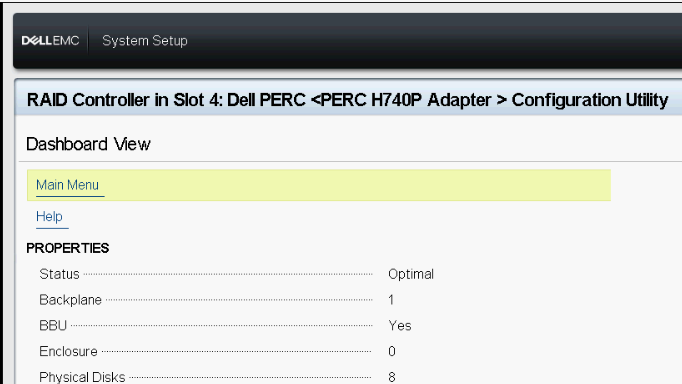
- 进入主菜单页面,然后选择管理虚拟磁盘属性
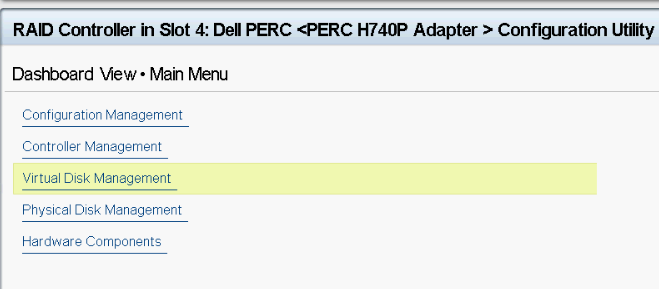
- 可以按如下方式查看虚拟磁盘属性
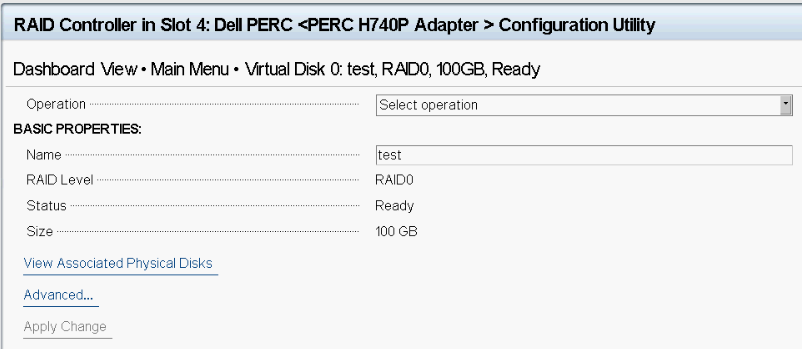
- 下表列出了管理虚拟磁盘属性屏幕的详细信息
Menu ItemDescriptionSelect Virtual DiskAllows you to select the virtual disk from the drop-down menuVirtual Disk PropertiesDisplays the ID, RAID Level, Status, Capacity, and the Sector Size of the virtual diskVirtual Disk IDDisplays the ID for the virtual diskRAID LevelDisplays the RAID level of the virtual diskVirtual Disk StatusDisplays the virtual disk statusVirtual Disk CapacityDisplays the capacity of the virtual diskSector SizeDisplays the sector size enabled for the virtual diskVirtual Disk PoliciesDisplays the read and write cache policies of the virtual disk and the write cache policy of the associated physical diskRead Cache PolicyDisplays the read cache policies associated with the virtual diskWrite Cache PolicyDisplays the write cache policies associated with the virtual diskPhysical Disk Write CacheDisplays the status of the physical disk write cache policyModify the Physical Disk Write CacheAllows you to modify the physical disk write cache policy settingsPhysical Disk Write CacheAllows you to change the physical disk write cache policy settings. The options are Default, Enable, and Disable.
提醒:如果已在系统上配置 Linux RAID,则不能修改此字段中的任何设置。
提醒:如果您在系统上配置了 Linux RAID,则只能查看硬盘写入高速缓存设置。
Affected Products
PowerEdge XR2, PowerEdge RAID Controller H745, PowerEdge RAID Controller H745P MX, PowerEdge RAID Controller H750 Adapter SAS, PowerEdge RAID Controller H755 Adapter, PowerEdge RAID Controller H755 MX Adapter
, PowerEdge RAID Controller H755N Front NVMe, PowerEdge RAID Controller H755 Front SAS, PowerEdge RAID Controller H965i Adapter, PowerEdge RAID Controller H965i Front, PowerEdge RAID Controller H965i MX, PowerEdge RAID Controller S160, Poweredge C4140, PowerEdge C6420, PowerEdge C6520, PowerEdge C6525, PowerEdge C6615, PowerEdge C6620, Poweredge FC430, Poweredge FC630, PowerEdge FC640, Poweredge FC830, PowerEdge HS5610, PowerEdge HS5620, PowerEdge M630, PowerEdge M630 (for PE VRTX), PowerEdge M640, PowerEdge M640 (for PE VRTX), PowerEdge M830, PowerEdge M830 (for PE VRTX), PowerEdge MX740C, PowerEdge MX750c, PowerEdge MX760c, PowerEdge MX840C, PowerEdge R240, PowerEdge R250, PowerEdge R260, PowerEdge R340, PowerEdge R350, PowerEdge R360, PowerEdge R440, PowerEdge R450, PowerEdge R540, PowerEdge R550, PowerEdge R640, PowerEdge R6415, PowerEdge R650, PowerEdge R650xs, PowerEdge R6515, PowerEdge R6525, PowerEdge R660, PowerEdge R660xs, PowerEdge R6615, PowerEdge R6625, PowerEdge R740, PowerEdge R740XD, PowerEdge R740XD2, PowerEdge R7415, PowerEdge R7425, PowerEdge R750, PowerEdge R750XA, PowerEdge R750xs, PowerEdge R7515, PowerEdge R7525, PowerEdge R760, PowerEdge R760XA, PowerEdge R760xd2, PowerEdge R760xs, PowerEdge R7615, PowerEdge R7625, PowerEdge R840, PowerEdge R860, PowerEdge R940, PowerEdge R940xa, PowerEdge R960, PowerEdge RAID Controller S150, PowerEdge RAID Controller H740P, PowerEdge RAID Controller H965e Adapter, PowerEdge RAID Controller S140, PowerEdge T140, PowerEdge T150, PowerEdge T160, PowerEdge T340, PowerEdge T350, PowerEdge T360, PowerEdge T440, PowerEdge T550, PowerEdge T560, PowerEdge T640, PowerEdge XE2420, PowerEdge XE7100, PowerEdge XE7420, PowerEdge XE7440, PowerEdge XE8545, PowerEdge XE8640, PowerEdge XE9640, PowerEdge XE9680, PowerEdge XE9680L, PowerEdge XR11, PowerEdge XR12
...
Article Properties
Article Number: 000125915
Article Type: How To
Last Modified: 16 Apr 2025
Version: 4
Find answers to your questions from other Dell users
Support Services
Check if your device is covered by Support Services.