Dell EMC VxRail:升级过程中捆绑包上传失败并显示“failed write to datastore”(向数据存储区写入失败)错误。
Summary: 解决了升级到 7.0.130 过程中捆绑包上传失败并显示“failed write to datastore”(向数据存储区写入失败)错误的问题。
This article applies to
This article does not apply to
This article is not tied to any specific product.
Not all product versions are identified in this article.
Symptoms
升级过程中捆绑包上传失败并显示“failed write to datastore”(向数据存储区写入失败)错误。
升级可能失败并显示
“Uploading bundle with exception: java.io.IOException: failed to write to datastore ...”
发生此问题时群集升级导航器的屏幕截图:
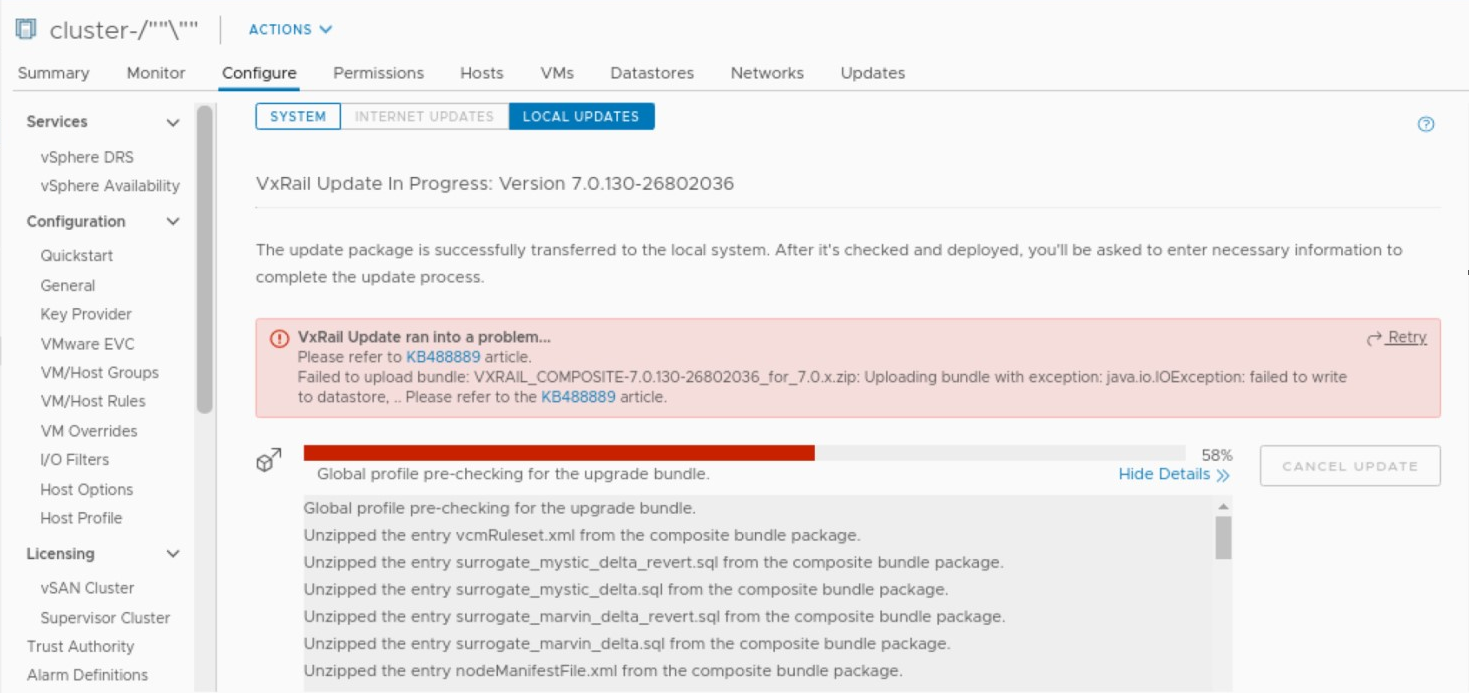
升级可能失败并显示
“Uploading bundle with exception: java.io.IOException: failed to write to datastore ...”
发生此问题时群集升级导航器的屏幕截图:
Cause
在升级开始并尝试将捆绑包上传到 vSAN 数据存储区后,会发生这种情况。
Resolution
遵循以下步骤以解决问题:
- 登录到 vCenter 并导航到要升级的 VxRail 群集。
- 导航到 vSAN 数据存储区。
- 右键单击 vSAN 数据存储区,然后选择菜单中的“Rename”按钮。
- 从弹出窗口中删除 vSAN 数据存储区名称中的“%”、“/”、“\”等字符。
- 单击“OK”按钮保存 vSAN 数据存储区名称。
- 返回到 VxRail 群集升级导航器,然后单击“Retry”按钮
Additional Information
vSAN 数据存储区名称中使用特殊字符“%”、“/”、“\”。具有这些字符的数据存储区名称存储为 ASCII“%25”、“%2f”、“%5c”,,而不是 VC MOB 中的 UTF-8。因此,在用于将捆绑包上传到 vSAN 数据存储区的 URL 中,数据存储区名称未正确编码。
Affected Products
VxRail SoftwareProducts
VxRailArticle Properties
Article Number: 000183449
Article Type: Solution
Last Modified: 03 Jun 2025
Version: 4
Find answers to your questions from other Dell users
Support Services
Check if your device is covered by Support Services.