PowerFlex 3.X: 「Update Service Details」を実行しても、認証情報は更新されません。
Summary: 「Update Service Details」を実行しても、認証情報は更新されません。
This article applies to
This article does not apply to
This article is not tied to any specific product.
Not all product versions are identified in this article.
Symptoms
PowerFlex Manager 3.6以前:
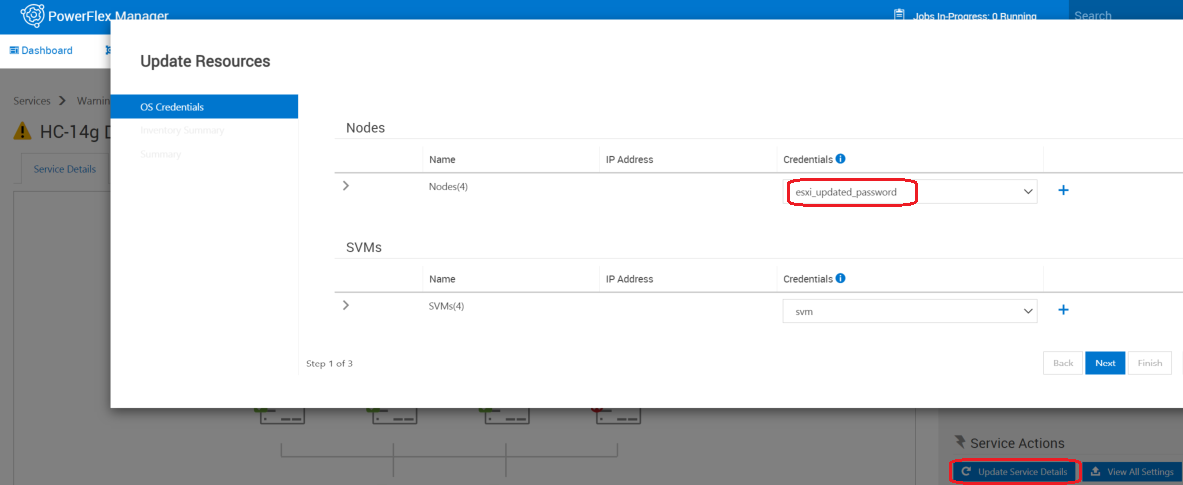

- 更新されたユーザー/パスワードを使用した新しい認証情報の作成
- [Update Service Details]を選択し、新しい認証情報に変更すると、サービスが更新されます
- [View All Settings]を選択します。OSの認証情報は元の認証情報を引き続き使用します。
Cause
ソフトウェアの問題。
Resolution
回避策:
オプション1: 既存の認証情報に変更がある場合
オプション2: 新しい認証情報を作成する場合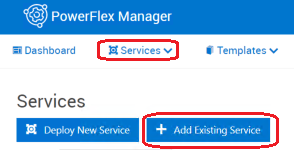
修正:
これはPowerFlex Managerリリース3.7で修正される予定です。
オプション1: 既存の認証情報に変更がある場合
- 認証情報マネージャーでパスワード フィールドを、更新されたパスワードで編集します。
- [Settings > Credential Management > edit]
オプション2: 新しい認証情報を作成する場合
- PowerFlex Manager外のコンポーネントでは、パスワードを手動で変更します。
- PowerFlex ManagerでServicesに移動し>サービスの名前をクリックして、[Remove Service]をクリックします>>Service removal type = Remove Service > Leave nodes in Managed mode > Removeをクリックします。
- 認証情報マネージャーで新しい認証情報を作成します。
- [設定] > [認証情報管理] > 作成
- [Services]に移動し > Add Existing Serviceに移動してサービスを再度追加します(新しく作成された認証情報を使用)。
修正:
これはPowerFlex Managerリリース3.7で修正される予定です。
Affected Products
PowerFlex SoftwareArticle Properties
Article Number: 000184515
Article Type: Solution
Last Modified: 25 Nov 2025
Version: 8
Find answers to your questions from other Dell users
Support Services
Check if your device is covered by Support Services.