PowerFlex 3.X: 运行“Update Service Details”时不会更新凭据。
Summary: 运行“Update Service Details”时不会更新凭据。
This article applies to
This article does not apply to
This article is not tied to any specific product.
Not all product versions are identified in this article.
Symptoms
PowerFlex Manager 3.6 及更低版本:
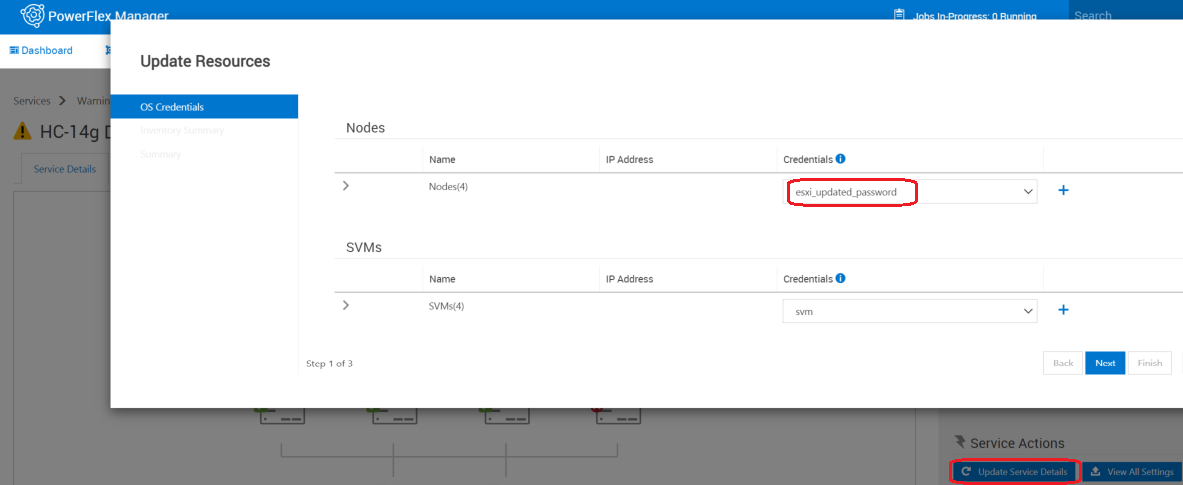
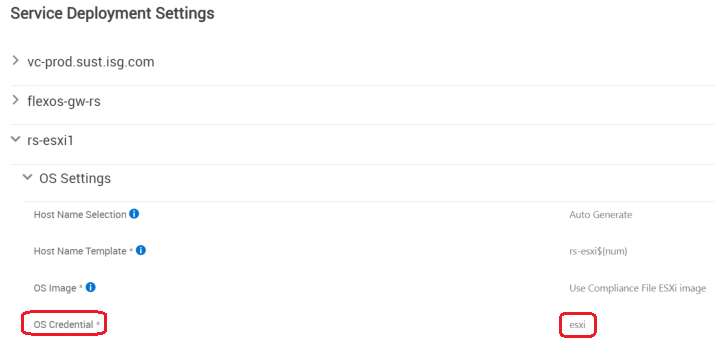
- 使用更新的用户/密码创建新凭据
- 通过选择“Update Service Details”并更改为新凭据来更新服务
- 选择“View All Settings”,作系统凭据仍使用原始凭据。
Cause
软件问题。
Resolution
解决方法:
选项 1: 如果现有凭据发生更改
选项 2:如果正在创建新凭据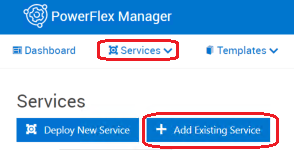
修复:
这将在 PowerFlex Manager 版本 3.7 中修复。
选项 1: 如果现有凭据发生更改
- 在 Credential Manager 中使用更新的密码编辑密码字段。
- SettingsCredential > Managementedit >
选项 2:如果正在创建新凭据
- 在 PowerFlex Manager外部的组件上手动更改密码。
- 在 PowerFlex Manager中,转至Services > ,单击服务> 的名称,单击“Remove Service” > ,Service removal type = Remove ServiceLeave > nodes in Managed mode > Remove。
- 在凭据管理器中创建新凭据:
- SettingsCredential > ManagementCreate >
- 转至ServicesAdd > Existing Service以重新添加服务(使用新创建的凭据)
修复:
这将在 PowerFlex Manager 版本 3.7 中修复。
Affected Products
PowerFlex SoftwareArticle Properties
Article Number: 000184515
Article Type: Solution
Last Modified: 25 Nov 2025
Version: 8
Find answers to your questions from other Dell users
Support Services
Check if your device is covered by Support Services.