SupportAssist OS Recovery 工具上不可用的无线网络列表
Summary: 从媒体密钥启动 SupportAssist OS Recovery Tool 时,网络选择页面上不提供无线网络列表。
This article applies to
This article does not apply to
This article is not tied to any specific product.
Not all product versions are identified in this article.
Symptoms
在这里,您可以找到有关 SupportAssist 及其功能的更多信息。
Dell SupportAssist作系统恢复工具上不可用的无线网络列表
使用媒体键启动 SupportAssist OS Recovery 工具时,即使存在无线网络,网络选择页面上的可用无线网络列表也为空。因此,用户无法使用无线连接连接到互联网。
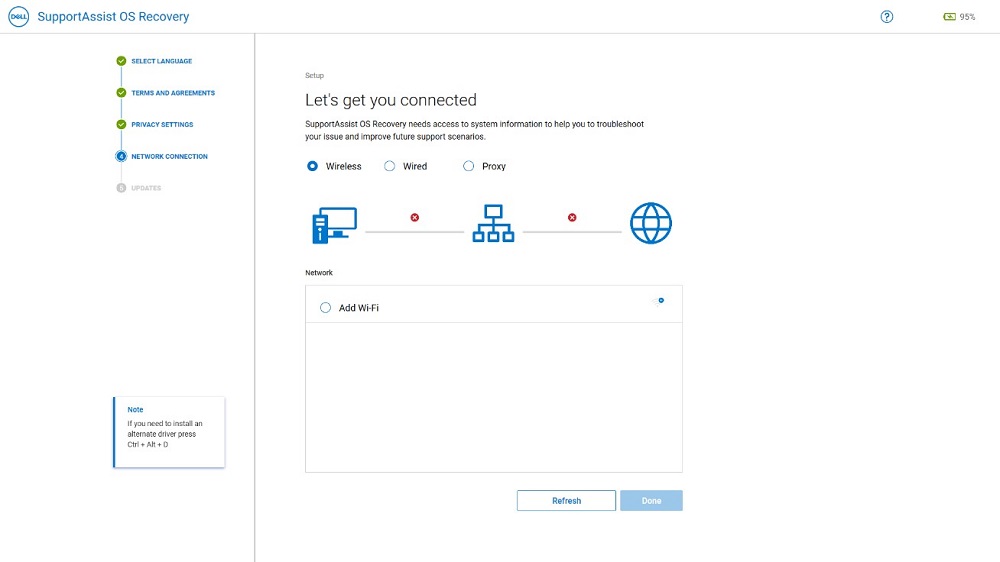
(图 1:SupportAssist OS Recovery 工具)
受影响的平台配置:
- Insp DT 24 5400/5401、Latitude 3320
受影响的版本:
- 版本 5.5.0.16041 的 SupportAssist OS Recovery 工具
Cause
Resolution
如果无线网络列表为空,用户可以使用 以太网 线建立有线连接。这提供了执行云重置和离线重置的功能。
要设置有线连接:
- 使用 以太网 线缆将系统连接到 路由器。
- 在网络选择页面上选择 有线 选项。

(图 2:SupportAssist OS Recovery 工具)
- 提供有关页面 的必要信息 。
- 单击 应用。
Affected Products
Inspiron 5400 AIO, Inspiron 5401 AIO, Latitude 3320, SupportAssist OS RecoveryArticle Properties
Article Number: 000192230
Article Type: Solution
Last Modified: 30 Sep 2025
Version: 2
Find answers to your questions from other Dell users
Support Services
Check if your device is covered by Support Services.