PowerEdge: Come installare iSM e avviare l'utilità di avvio dell'interfaccia utente di iDRAC
Summary: Questo articolo fornisce informazioni su come installare Dell iDRAC Service Module (iSM) e avviare l'utilità di avvio dell'interfaccia utente di iDRAC su Windows Server.
This article applies to
This article does not apply to
This article is not tied to any specific product.
Not all product versions are identified in this article.
Instructions
Utilizzando iDRAC Service Module, è possibile avviare l'interfaccia utente di iDRAC dal sistema locale.
Attenzione: Quando iSM è disabilitato, anche l'icona dell'utilità di avvio dell'interfaccia utente di iDRAC è disabilitata.
- Scaricare Dell iDRAC Service Module per Windows.
- Accedere alla pagina Driver e download del supporto Dell, immettere il modello del server o il codice di matricola.
- Cliccare sulla scheda Driver e download.
- Selezionare il sistema operativo in uso.
- Tipo di parola chiave - iSM
- Scaricare Dell iDRAC Service Module per Windows presentato.
- Eseguire il file scaricato e cliccare per estrarlo.
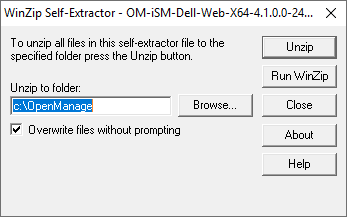
- Passare alla directory estratta e cliccare su iDRACSvcMod name per eseguire l'installazione.
- Dopo aver letto l'EULA, cliccare su Next per completare l'installazione.
- All'estremità sinistra della barra delle applicazioni, selezionare l'icona Start Windows, quindi iDRAC UI Launcher.
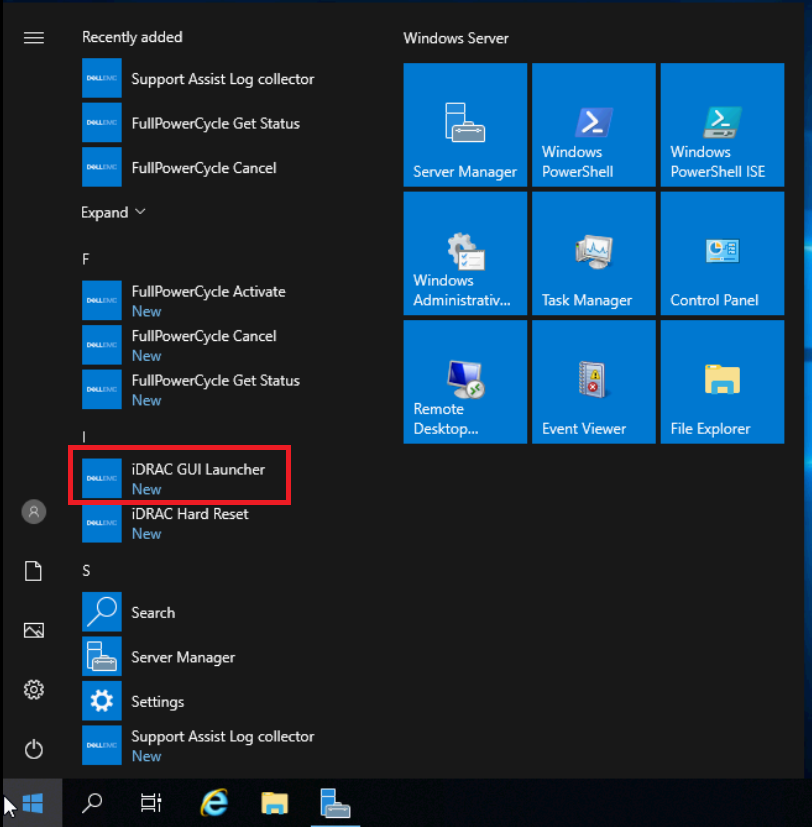
- Attendere un minuto per avviare il prompt (schermata del prompt non chiudere) e il navigatore predefinito si apre con l'accesso iDRAC.
NOTA: 1. Se il proxy del browser predefinito è impostato per utilizzare il proxy di sistema, viene visualizzato un errore di avvio dell'interfaccia utente di iDRAC. È necessario copiare l'indirizzo IP dalla barra degli indirizzi e immetterlo nell'elenco delle eccezioni delle impostazioni proxy.
NOTA: 2. Se non si è in grado di avviare il programma di avvio di iDRAC, verificare se il dispositivo compatibile con NDIS remoto non è disabilitato dalla connessione di rete. Il ruolo del "Remote NDIS Compatible Device" è quello di facilitare la comunicazione tra iDRAC e iSM.
Additional Information
Articolo correlato: Supporto per Dell iDRAC Service Module
Affected Products
iDRAC Service Module, iDRAC Service Module 4.xProducts
PowerEdge FC640, PowerEdge M640, PowerEdge M640 (for PE VRTX), PowerEdge MX740C, PowerEdge MX750c, PowerEdge MX760c, PowerEdge MX840C, PowerEdge R240, PowerEdge R250, PowerEdge R260, PowerEdge R340, PowerEdge R350, PowerEdge R360, PowerEdge R440
, PowerEdge R450, PowerEdge R540, PowerEdge R550, PowerEdge R640, PowerEdge R6415, PowerEdge R650, PowerEdge R650xs, PowerEdge R6515, PowerEdge R6525, PowerEdge R660, PowerEdge R660xs, PowerEdge R6615, PowerEdge R6625, PowerEdge R740, PowerEdge R740XD, PowerEdge R740XD2, PowerEdge R7415, PowerEdge R7425, PowerEdge R750, PowerEdge R750XA, PowerEdge R750xs, PowerEdge R7515, PowerEdge R7525, PowerEdge R760, PowerEdge R760XA, PowerEdge R760xd2, PowerEdge R760xs, PowerEdge R7615, PowerEdge R7625, PowerEdge R840, PowerEdge R860, PowerEdge R940, PowerEdge R940xa, PowerEdge R960, PowerEdge T140, PowerEdge T150, PowerEdge T160, PowerEdge T340, PowerEdge T350, PowerEdge T360, PowerEdge T440, PowerEdge T550, PowerEdge T560, PowerEdge T640, PowerEdge XR4510c, PowerEdge XR4520c
...
Article Properties
Article Number: 000194572
Article Type: How To
Last Modified: 24 Jan 2025
Version: 5
Find answers to your questions from other Dell users
Support Services
Check if your device is covered by Support Services.