MHC Azure Stack:角色 OEM 的 OEM 类型 FirmwareCheckHealth 引发异常
Summary: 角色 OEM 的 FirmwareCheckHealth 类型引发异常:Error running Test-OEMFirmwareHealth iDRAC has Critical Major faults could not proceed with Firmware update.
This article applies to
This article does not apply to
This article is not tied to any specific product.
Not all product versions are identified in this article.
Symptoms
预检查 OEM 失败错误:
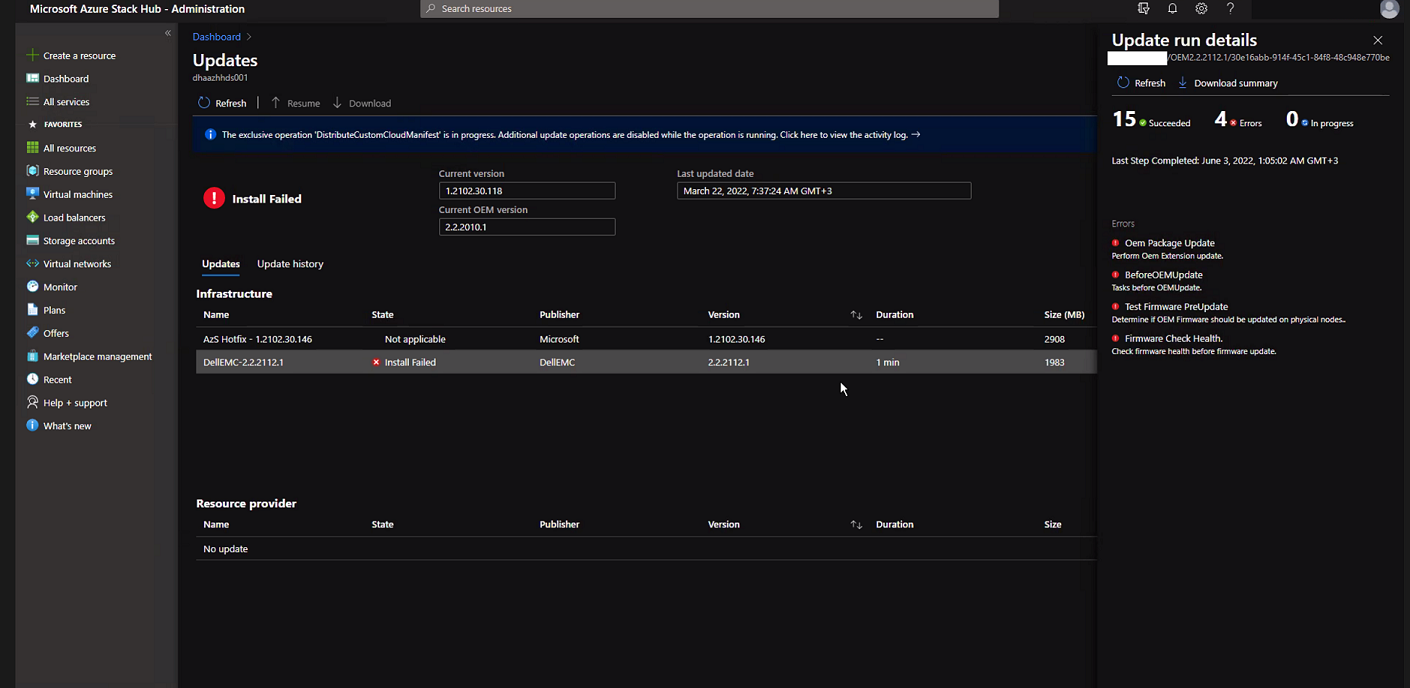
单击 “Download Summary”。
Error.json:

Oem Package Update
Perform Oem Extension update.

BeforeOEMUpdate
Tasks before OEMUpdate.

Test Firmware PreUpdate
Determine if OEM Firmware should be updated on physical nodes.

Firmware Check Health.
Check firmware health before update.
单击 “Download Summary”。
Error.json:
Type ‘FirmwareCheckHealth’ of Role ‘OEM’ raised an exception:\n\nError running Test-OEMFirmwareHealth: iDRAC: 10.224.190.3 has Critical Major faults, could not proceed with Firmware update….
Cause
四台服务器中有三台存在内存错误。在继续之前,需要解决这些问题。
The memory health monitor feature has detected a degradation in the DIMM installed in DIMM_A6. Reboot system to initiate self-heal process.
Resolution
要解决此问题,请修复内存错误。
- 使用显示故障内存的 iDRAC 排空节点。
- 排空后,在 PEP PowerShell 窗口中运行以下命令。
get-virtualdisk -cimsession "s-cluster"
get-virtualdisk -cimsession "s-cluster" | get-storagejob
- 所有存储作业完成后,从 iDRAC 冷启动服务器
- 验证 DIMM 是否已修复:
The self-heal operation successfully completed at DIMM DIMM_A6.
- 在 Azure Stack 窗口中,启动节点。
- 在 Azure Stack 窗口中,恢复节点。
Affected Products
Integrated System for Microsoft Azure Stack Hub 14GArticle Properties
Article Number: 000200301
Article Type: Solution
Last Modified: 08 Sep 2025
Version: 3
Find answers to your questions from other Dell users
Support Services
Check if your device is covered by Support Services.