PowerProtect back-up mislukt af en toe wanneer deze geen onafhankelijke schijven bevat
Summary: De geplande back-ups van de virtuele machine (VM) zijn voltooid, maar de handmatige back-ups mislukken af en toe met ABV0006. Er zijn geen onafhankelijke schijven geconfigureerd op de betreffende VM's. ...
This article applies to
This article does not apply to
This article is not tied to any specific product.
Not all product versions are identified in this article.
Symptoms
De PowerProtect Transparent Snapshot Data Mover (TSDM)-oplossing wordt gebruikt om de vSphere-omgeving te beschermen. De geplande back-ups van de virtuele machine (VM) zijn voltooid, maar de handmatige back-ups mislukken af en toe met ABV0006. Er zijn geen onafhankelijke schijven geconfigureerd op de betreffende VM's.
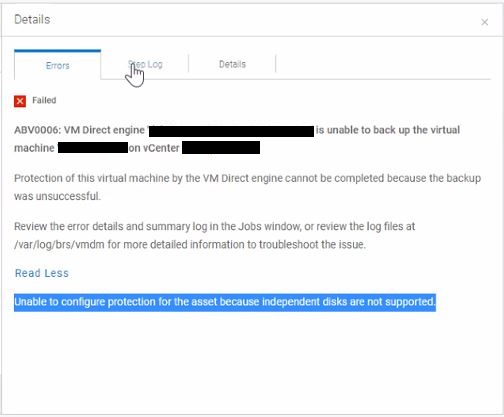
ABV0006: VM Direct engine 'my-vmdirect-engine.mydomain.com' is unable to back up the virtual machine 'my-vm-name' on vCenter 'my-vcenter'.

Protection of this virtual machine by the VM Direct engine cannot be completed because the backup was unsuccessful.

Review the error details and summary log in the Jobs window, or review the log files at /var/log/brs/vmdm for more detailed information to troubleshoot the issue.

Read Less
Unable to configure protection for the asset because independent disks are not supported.
Cause
De getroffen VM voerde ook een PowerProtect FLR-bewerking (File Level Recover) uit toen de handmatige back-up werd gestart. Door het ontwerp maakt de FLR een onafhankelijke harde schijf voor de koppelingsbewerking die beschikbaar wordt gesteld om het herstel uit te voeren. De FLR verwijdert de onafhankelijke harde schijf aan het einde van het herstelproces.
Resolution
Zorg ervoor dat FLR-bewerkingen (PowerProtect File Level Recover) niet worden uitgevoerd tijdens de geplande back-upvensters of bij het uitvoeren van handmatige back-ups.
Article Properties
Article Number: 000206604
Article Type: Solution
Last Modified: 03 Dec 2025
Version: 2
Find answers to your questions from other Dell users
Support Services
Check if your device is covered by Support Services.