VMware: How to Disable a VMware Plugin in vCenter Server Appliance
Summary: This article was written to document the process to disable a plug-in in vCenter Server Appliance.
Instructions
VMware has released some advisories (VMSA-2021-0010) that require disabling a plug-in or setting it as incompatible in order to prevent it from being exploited. Setting the plug-in as incompatible is a workaround for customers that do not want to upgrade the vCenter Server Appliance to versions 7.0 U2b, 6.7 U3n, or 6.5 U3p which fix the issue in VMSA-2021-0010.
In VMSA-2021-0010, the affected vSAN Health Check plug-in is enabled by default in all vCenter Server deployments, whether vSAN is being used.
Facts:
vCenter Server Appliance versions 6.5, 6.7, and 7.0
Solution:
- Check that the plug-in for VMware vSAN H5 Client Plugin is deployed or enabled before disabling or setting to "Incompatible."

- Open a PuTTY session to the vCenter Server Appliance.
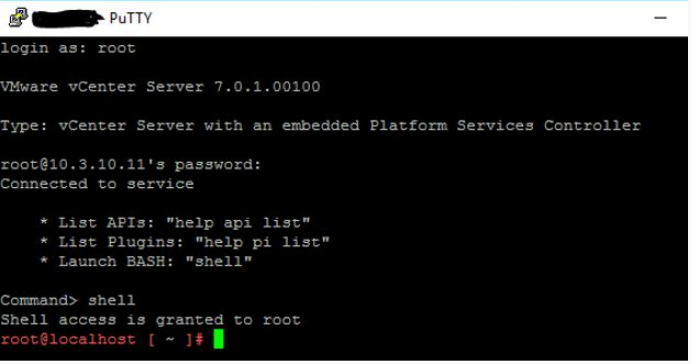
Figure 2: PuTTY Session
- Make a backup of the compatibility-matrix.xml. This file is in the following location:
/etc/vmware/vsphere-ui/compatibility-matrix.xml
To perform a backup of the file, do the following:
cp -v /etc/vmware/vsphere-ui/compatibility-matrix.xml /etc/vmware/vsphere-ui/compatibility-matrix.xml.backup
- Open the file compatibility-matrix.xml with a text editor like VI:
vi /etc/vmware/vsphere-ui/compatibility-matrix.xml
The unedited file looks like the screenshot below:
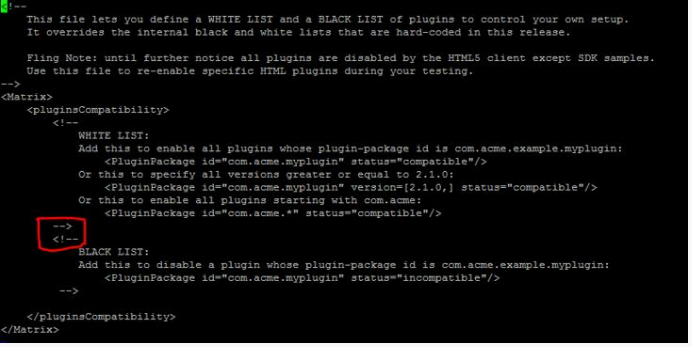
- To disable the plug-in and set it as "Incompatible," add the following line as shown in the screenshot below, Save the file, and Exit.
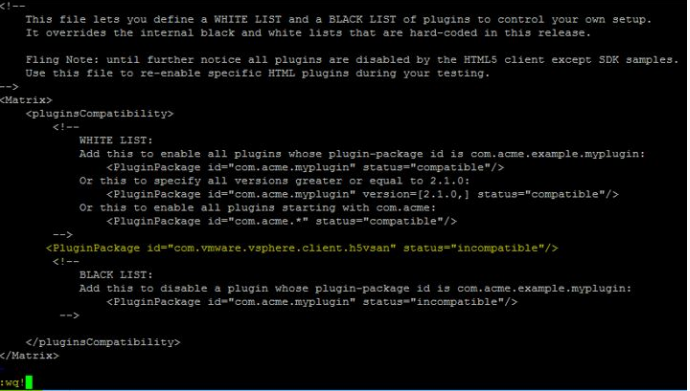
Figure 4: Set File to Incompatible
- Stop and restart the
vsphere-uiservice using the following commands:
# service-control --stop vsphere-ui

Figure 5: Stop vSphere Service.
# service-control --start vsphere-ui

Figure 6: Start vSphere Service
- Log in to the vSphere Client session again as it is no longer authenticated to validate the VMware vSAN H5 Client Plugin is set to incompatible.
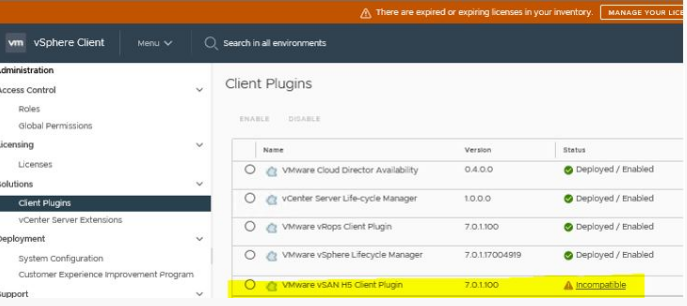
Figure 7: Confirm that the Plugin is Incompatible.