PowerProtect VM Yedeklemesi "Geçerli durumda işleme izin verilmiyor" ABV0016 başarısız oluyor
Summary: Sanal makine (VM) Transparent Snapshot Data Mover (TSDM) yedeklemeleri zaman zaman hata kodu ABV0016 vererek başarısız oluyor.
This article applies to
This article does not apply to
This article is not tied to any specific product.
Not all product versions are identified in this article.
Symptoms
PowerProtect Data Manager, vSphere ortamını Transparent Snapshot Data Mover (TSDM) çözümüyle korumak için kullanılır. vSphere Installation Bundle (VIB), kümedeki ESXi ana bilgisayarlarına karşı başarıyla dağıtıldı. Sanal makine (VM) yedeklemeleri, ABV0016 hata koduyla zaman zaman başarısız oluyor. PowerProtect Data Manager kullanıcı arayüzünde şu gösterilir:
ABV0016: VM Direct engine 'localhost' is unable to back up the virtual machine 'my-vm-name' on vCenter 'my-vcernter-name' because of a vCenter API issue.

The VM Direct engine cannot complete the backup of this virtual machine because of a vCenter API operation did not complete successfully.

To troubleshoot this issue: 1) Verify that the vCenter can be reached. 2) If the vCenter is busy, wait for some activities to complete and then retry the operation. 3) Verify that the virtual machine exists on the vCenter.

Read Less

Unable to successfully complete SDM Full Sync operation.  Unsuccessful after 41 attempts over 7m39.351435799s.  The vCenter task for 'SDM Snapshot Sync fullSync' completed with state 'error'.  The vCenter task failed.  The operation is not allowed in the current state.
Yedekleme oturumu günlüğünde şu çıktı gösterilir:
...
YYYY-MM-DD HH:MM:SS TRACE:  [ab2a1fb6155aefd7;be89174dd4d08446] SDM Data Mover: Create LWD Snapshot: vCenter SOAP call 'DpSnapshot' was accepted.
YYYY-MM-DD HH:MM:SS ERROR:  [ab2a1fb6155aefd7;be89174dd4d08446] SDM Data Mover: Create LWD Snapshot: The vCenter task failed.  The operation is not allowed in the current state.
YYYY-MM-DD HH:MM:SS ERROR:  [ab2a1fb6155aefd7;be89174dd4d08446] SDM Data Mover: Create LWD Snapshot: The vCenter task for 'Create SDM Snapshot' completed with state 'error'.
YYYY-MM-DD HH:MM:SS ERROR:  [ab2a1fb6155aefd7;be89174dd4d08446] SDM Data Mover: Create LWD Snapshot: Unable to create SDM snapshot.
YYYY-MM-DD HH:MM:SS TRACE:  [ab2a1fb6155aefd7;be89174dd4d08446] SDM Data Mover: Create LWD Snapshot: Retrying in 500ms...
...
YYYY-MM-DD HH:MM:SS TRACE:  [ab2a1fb6155aefd7;be89174dd4d08446] SDM Data Mover: Create LWD Snapshot: Retrying in 500ms...
YYYY-MM-DD HH:MM:SS TRACE:  [ab2a1fb6155aefd7;be89174dd4d08446] SDM Data Mover: Create LWD Snapshot: vCenter SOAP call 'DpSnapshot' was accepted.
YYYY-MM-DD HH:MM:SS ERROR:  [ab2a1fb6155aefd7;be89174dd4d08446] SDM Data Mover: Create LWD Snapshot: The vCenter task failed.  The operation is not allowed in the current state.
YYYY-MM-DD HH:MM:SS ERROR:  [ab2a1fb6155aefd7;be89174dd4d08446] SDM Data Mover: Create LWD Snapshot: The vCenter task for 'Create SDM Snapshot' completed with state 'error'.
YYYY-MM-DD HH:MM:SS ERROR:  [ab2a1fb6155aefd7;be89174dd4d08446] SDM Data Mover: Create LWD Snapshot: Unable to create SDM snapshot.
YYYY-MM-DD HH:MM:SS ERROR:  [ab2a1fb6155aefd7;be89174dd4d08446] SDM Data Mover: Create LWD Snapshot: Unsuccessful after 99 attempts over 1m0.536375553s.
YYYY-MM-DD HH:MM:SS TRACE:  [ab2a1fb6155aefd7;be89174dd4d08446] SDM Data Mover: Snapshot failure can't be remedied by a Full sync.
...
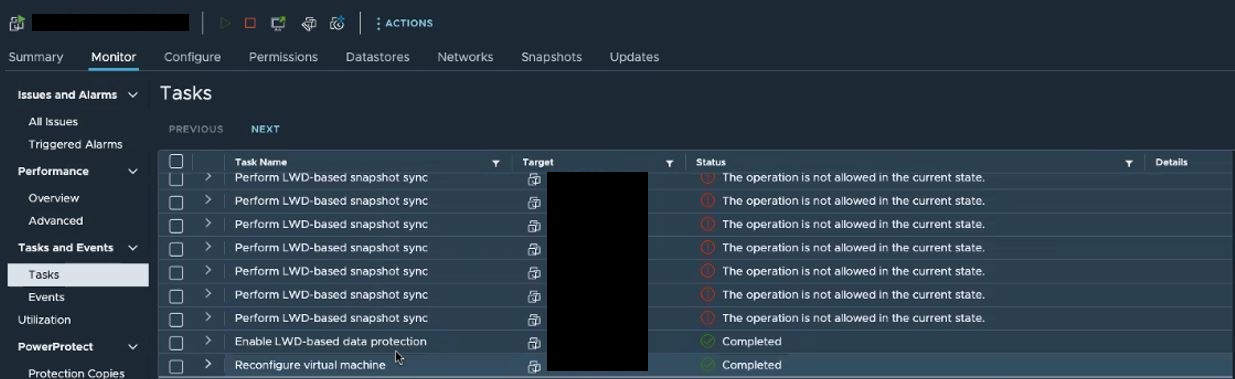
VM için vSphere Web Client görevleri şunları gösterir:
Cause
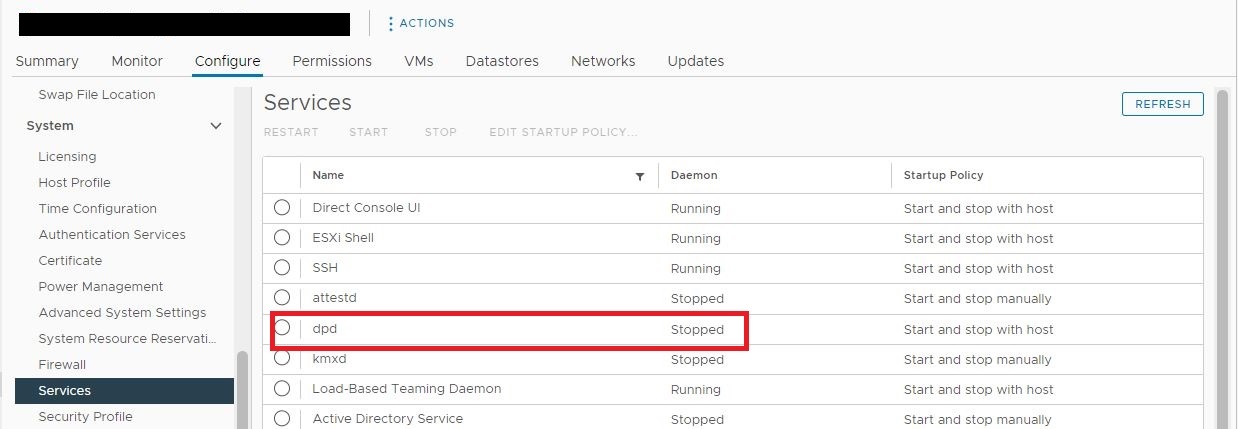
Etkilenen sanal makineyi barındıran ESXi hiper yöneticisinde Data Protection Daemon (DPD) hizmeti başlatılmamalıdır. Bu sorun, vMotion'ın etkilenen sanal makineleri durdurulmuş DPD hizmetiyle ESXi hipervizörüne taşıması nedeniyle aralıklı olarak meydana geliyordu.
Resolution
DPD hizmetinin kümedeki tüm ESXi ana bilgisayarlarında başlatıldığından emin olun. Hizmet durdurulursa DPD hizmetini ve başlat seçeneğini belirleyin.

DPD hizmeti, ESXi ana bilgisayarında bir SSH oturumu kullanılarak da yeniden başlatılabilir.
DPD hizmeti, ESXi ana bilgisayarında bir SSH oturumu kullanılarak da yeniden başlatılabilir.
[root@my_esx:~] /etc/init.d/dpd status
dpd is stopped
[root@my_esx:~] /etc/init.d/dpd start
Starting dpd:Setting the memory limit for dpd resource pool on this host to 300 MB
Setting max number of file descriptors to 800
Setting MALLOC_ARENA_MAX to 20
success
[root@my_esx:~] /etc/init.d/dpd status
dpd is running
Additional Information
DPD hizmeti çalışır durumda kalmazsa DPD hizmeti sorununun nedenini belirlemek için VMware Destek ile iletişime geçin.
Article Properties
Article Number: 000212050
Article Type: Solution
Last Modified: 03 Dec 2025
Version: 2
Find answers to your questions from other Dell users
Support Services
Check if your device is covered by Support Services.