NetWorker: REST API requests fail with error message: HTTP status 404 - Not Found "The Requested Resource is Not Available"
Summary: NetWorker REST Application Programming Interface (API) queries fail with error message: HTTP status 404 - Not Found "The Requested Resource is Not Available. The origin server did not find a current representation for the target resource or is not willing to disclose that one exists." ...
Symptoms
NetWorker REST API requests fail with error message: HTTP status 404 - Not Found "The Requested Resource is Not Available"
[root@NETWORKER_SERVER]:~# curl -ik GET -u **userid**:'***Password***' -H "Content-Type: application/json" 'https://NETWORKER_SERVER:9090/nwrestapi/v3/global/clients'
curl: (6) Could not resolve host: GET; Name or service not known
HTTP/1.1 404
Content-Type: text/html;charset=utf-8
Content-Language: en
Content-Length: 790
Date: Tue, 04 Jul 2023 12:11:41 GMT
Server: NSR SERVICES for Authentication
<!doctype html><html lang="en"><head><title>HTTP Status 404 – Not Found</title><style type="text/css">body {font-family:Tahoma,Arial,sans-serif;} h1, h2, h3, b {color:white;background-color:#525D76;} h1 {font-size:22px;} h2 {font-size:16px;} h3 {font-size:14px;} p {font-size:12px;} a {color:black;} .line {height:1px;background-color:#525D76;border:none;}</style></head><body><h1>HTTP Status 404 – Not Found</h1><hr class="line" /><p><b>Type</b> Status Report</p><p><b>Message</b> The requested resource [/nwrestapi/v3/global/clients] is not available</p><p><b>Description</b> The origin server did not find a current representation for the target resource or is not willing to disclose that one exists.</p><hr class="line" /><h3>Apache Tomcat/9.0.52</h
The NetWorker server installation is missing the nwrestapi directory.
/nsr/authc/webapps/nwrestapi/
Windows:
C:\Program Files\EMC NetWorker\nsr\authc-server\tomcat\webapps\nwrestapi
The restapi.log does not exist or is not updating:
/nsr/logs/restapi/restapi.log
Windows:
C:\Program Files\EMC NetWorker\nsr\logs\restapi\restapi.log
Cause
The nwrestapi path does not exist. The REST API queries are unable to find any of the endpoints or correlate how it should present data from the other NetWorker databases.
Resolution
nwrestapi is configured along with NetWorker's authc service which uses Java Runtime Environment (JRE). It is recommended to use NetWorker Runtime Environment (NRE) to avoid potential Java-related issues when configuring authc. The latest NRE packages are available for downloaded from the Dell Support NetWorker Drivers & Downloads page.
Linux:
- Log in to the NetWorker server and switch to root:
sudo su -
- Confirm if NRE is installed and what Java instance NetWorker is configured to use:
rpm -qa | grep nre
cat /nsr/authc/conf/installrc

[root@networker-mc]:~# rpm -qa | grep nre
nre-8.0.15-1.x86_64
[root@networker-mc]:~#
[root@networker-mc]:~# cat /nsr/authc/conf/installrc
JAVA_HOME=/opt/nre/java/latest
- Run the following script to reconfigure the NetWorker
authcserver.
/opt/nsr/authc-server/scripts/authc_configure.sh

[root@networker-mc]:~# /opt/nsr/authc-server/scripts/authc_configure.sh

Specify the directory where the Java Standard Edition Runtime Environment (JRE) software is installed [/opt/nre/java/latest]:

The installation process will install an Apache Tomcat instance. For optimum security, EMC NetWorker Authentication Service will use a non-root user (nsrtomcat) to start the Apache Tomcat instance.
If your system has special user security requirements, ensure that proper operational permissions are granted to this non-root user (nsrtomcat).
Please refer to NetWorker Installation Guide.

WARNING: Port 9090 is already in use.

Do you wish to specify a different port number [y]? n

The Apache Tomcat will use "networker-mc.emclab.local" as the host name.
The Apache Tomcat will use "9090" as the port number.

The NetWorker Authentication Service requires a keystore file to configure encryption and to provide SSL support.

EMC recommends that you specify a keystore password that has a minimum of six characters.

Do you want to use the existing keystore /nsr/authc/conf/authc.keystore [y]?

Specify password for the existing keystore:
The install will use the existing certificate "emcauthctomcat" for Apache Tomcat.
The install will use the existing certificate "emcauthcsaml" for Authentication Service.

Creating the installation log in /opt/nsr/authc-server/logs/install.log.

Performing initialization. Please wait...

The installation completed successfully.
authc. This can be done with the following systemctl commands:
systemctl stop networker
and
systemctl start networker
- Confirm that the following folder was created:
/nsr/authc/webapps/nwrestapi

[root@networker-mc]:~# ls -l /nsr/authc/webapps/nwrestapi/
total 0
drwx------. 2 nsrtomcat nsrtomcat  44 Jul  6 12:22 META-INF
drwx------. 3 nsrtomcat nsrtomcat  21 Jul  6 12:22 v1
drwx------. 3 nsrtomcat nsrtomcat  21 Jul  6 12:22 v2
drwx------. 3 nsrtomcat nsrtomcat  21 Jul  6 12:22 v3
drwx------. 6 nsrtomcat nsrtomcat 107 Jul  6 12:22 WEB-INF
- If the
nwrestapidirectory was created, run REST API queries.
Windows:
- Confirm if NRE is installed and what Java instance NetWorker is configured to use:
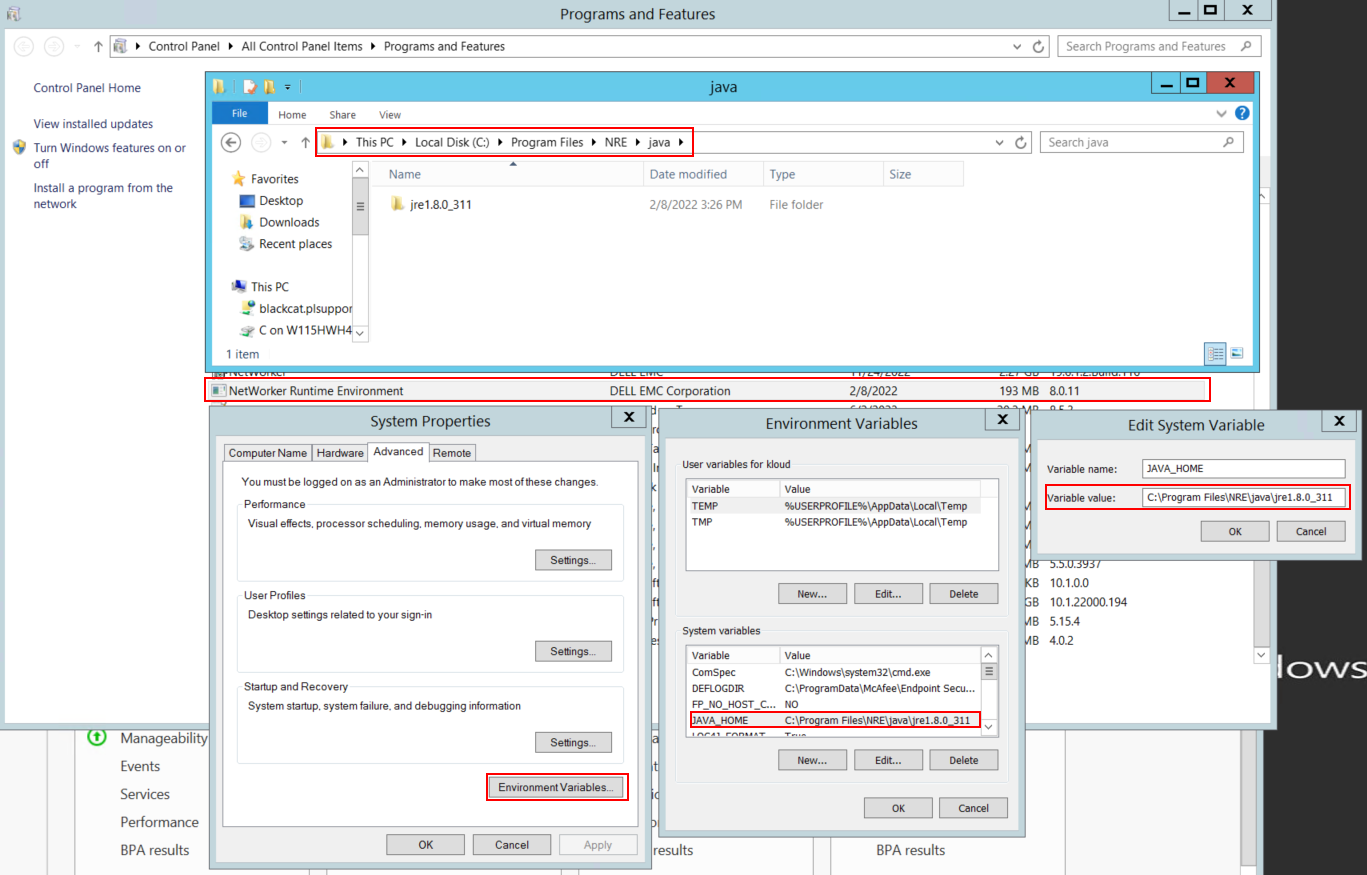
Figure 1: Confirm what Java Instance NetWorker is Using. The variable may appear as JAVA_HOME or NSR_JAVA_HOME.
- Uninstall the NetWorker package. This does not remove any of the NetWorker databases or configuration resources.
- Reinstall NetWorker over the existing installation path. Reinstalling NetWorker reconfigures NetWorker's authentication service.
- Confirm that the following path exists:
C:\Program Files\EMC NetWorker\nsr\authc-server\tomcat\webapps\nwrestapi
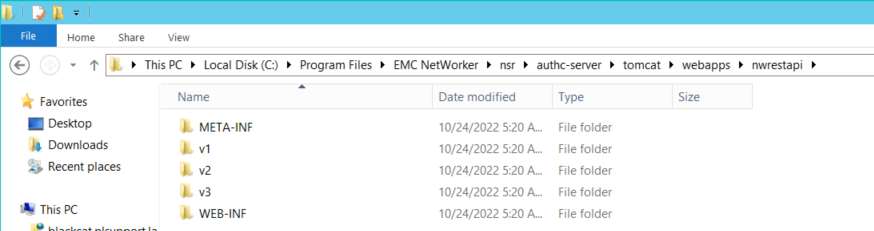
Figure 2: Confirm that the nwrestapi Path Exists.
- If the
nwrestapidirectory was created, run REST API queries.