Dell Precision Intel 圖形驅動程式安裝程式啟動時間過長
Summary: 是否在 Dell Precision 工作站的 Intel 圖形驅動程式安裝程式啟動時間過長時遇到問題?瞭解如何有效地進行故障診斷並解決效能問題。
This article applies to
This article does not apply to
This article is not tied to any specific product.
Not all product versions are identified in this article.
Symptoms
在下列系統組態情況下, Intel 圖形驅動程式 版本 31.0.101.5382 安裝程式 (Intel-UHD-GraphicsDriver_Y85G9_WIN64_31.0.101.5382_A08.exe) 按一下 安裝 以在 Windows 11 作業系統下出現下列 開始安裝 需要很長時間。
- Windows 作業系統病毒和威脅防護的安全情報版本為 1.405.355.0
您可以檢查「病毒與威脅防護」的版本:開啟「設定」,→按一下「隱私權與安全性」,→按一下「Windows 安全性」,→按一下「病毒與威脅防護」,→按一下「保護更新」。
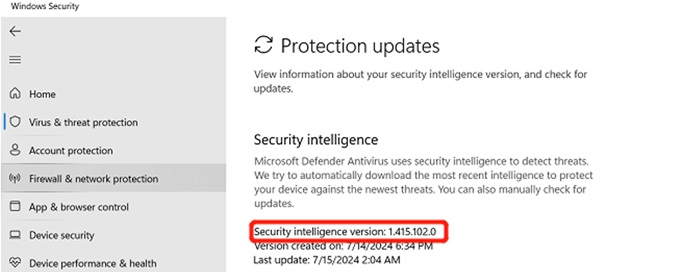
(圖 1 - Windows 安全性)
受影響的平台:
- Precision 7780
- Precision 7680
- Precision 7770
- Precision 7670
Cause
Windows病毒和威脅原型需要一些時間來掃描新添加的圖形部件,安裝新的 version_1.415.102.0 和更新版本可以解決此問題。
Resolution
要解決此問題,您可以按照以下兩個選項將安全智慧版本更新為 1.415.102.0 或更高版本。
選項 1 - 在系統設定中更新病毒與威脅防護版本:
- 開啟 「設定」
- 在左側窗格中,按一下 隱私權與安全性
- 按一下 Windows 安全性
- 然後按一下 病毒 > 威脅防護
- 按一下 保護更新
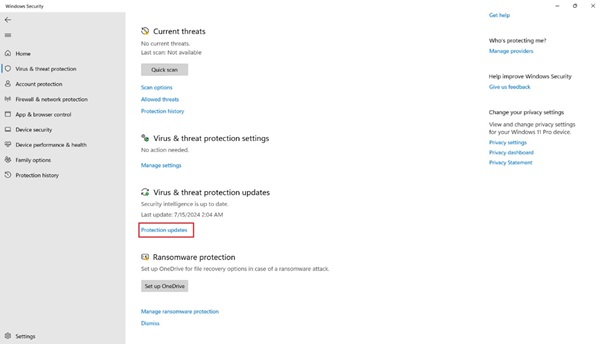
(圖 2 - Windows 安全性)
- 按一下 檢查更新 ,並等待更新完成
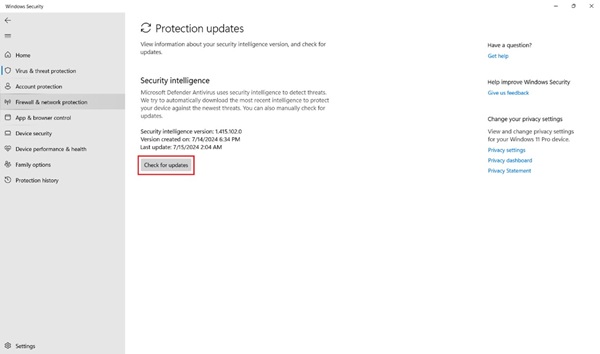
(圖 3 - Windows 安全性)
選項 2 - Windows 更新:
- 開啟 「設定」
- 然後按一下 Windows Update
- 按一下 檢查更新 ,並等待更新完成
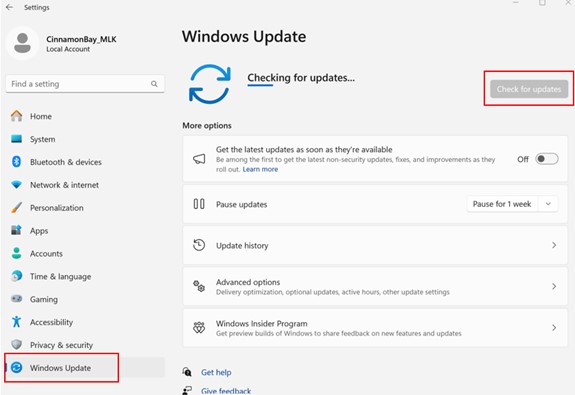
(圖 4 - Windows 更新)
如果客戶對作為客戶體驗 (CE) 故障的解決方案感到不滿意,請遵循 L2 呈報路徑到您的 TL。
如果問題持續發生,請依照您的 L2/QL 呈報路徑,依照系統保固的規定,聯絡 L3/REC 團隊。
Affected Products
Precision 7670, Precision 7680, Precision 7770, Precision 7780Article Properties
Article Number: 000227473
Article Type: Solution
Last Modified: 22 Apr 2025
Version: 3
Find answers to your questions from other Dell users
Support Services
Check if your device is covered by Support Services.