Dell Precision Intel 显卡驱动程序安装程序需要很长时间才能启动
Summary: Dell Precision 工作站英特尔显卡驱动程序安装程序启动时间过长,有问题吗?了解如何高效地排查和解决性能问题。
This article applies to
This article does not apply to
This article is not tied to any specific product.
Not all product versions are identified in this article.
Symptoms
在以下系统配置情况下, 英特尔显卡驱动程序 版本 31.0.101.5382 安装程序 (Intel-UHD-GraphicsDriver_Y85G9_WIN64_31.0.101.5382_A08.exe) 需要很长时间才能单击 “安装 ”,直到 Windows 11 操作系统下出现以下 开始安装 。
- Windows 操作系统病毒和威胁防护的安全情报版本为 1.405.355.0
您可以检查病毒和威胁防护的版本:打开设置 → 单击“隐私和安全”→单击“Windows 安全”→单击“病毒和威胁防护”→然后单击“保护更新”。
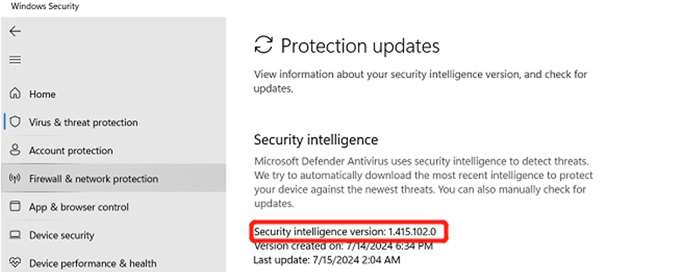
(图 1 — Windows 安全)
受影响的平台:
- Precision 7780
- Precision 7680
- Precision 7770
- Precision 7670
Cause
Windows 病毒和威胁原型设计需要花费时间来扫描图形中新添加的部分,安装新的 version_1.415.102.0 和更新版本可以解决此问题。
Resolution
要解决此问题,您可以按照以下两个选项将安全情报版本更新到 1.415.102.0 或更高版本。
选项 1 - 在系统设置中更新病毒和威胁防护版本:
- 打开Settings(设置)
- 在左窗格中,单击“隐私和安全”
- 单击 Windows 安全中心
- 然后单击“病毒和威胁防护”
- 单击 Protection updates
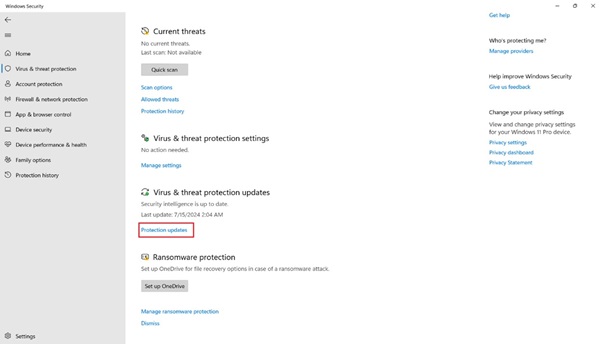
(图 2 — Windows 安全性)
- 单击 检查更新 ,然后等待更新完成
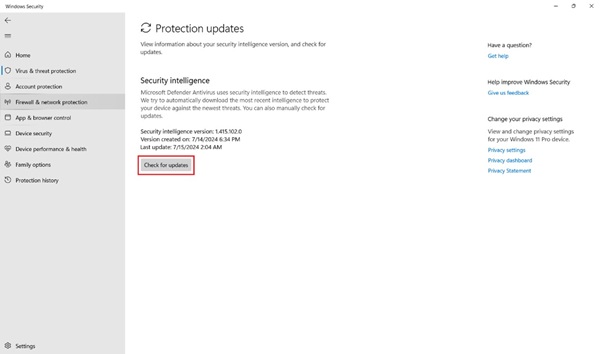
(图 3 — Windows 安全)
选项 2 - Windows 更新:
- 打开Settings(设置)
- 然后单击 Windows 更新
- 单击 检查更新 ,然后等待更新完成
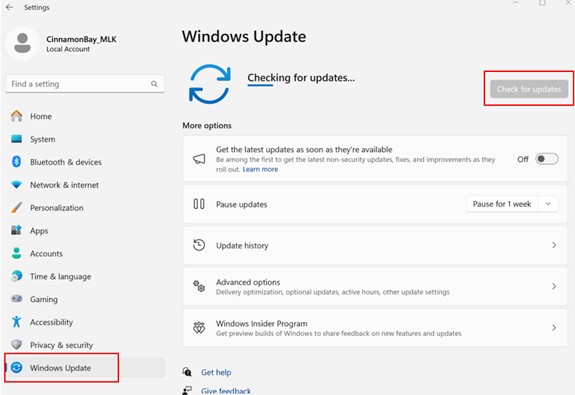
(图 4 — Windows 更新)
如果客户因客户体验 (CE) 糟糕而对解决方案不满意,请遵循 L2 上报路径向您的团队领导寻求支持。
如果问题仍然存在,请按照您的上报路径,通过 L2/QL 联系 L3/REC 团队 - 由系统保修决定。
Affected Products
Precision 7670, Precision 7680, Precision 7770, Precision 7780Article Properties
Article Number: 000227473
Article Type: Solution
Last Modified: 22 Apr 2025
Version: 3
Find answers to your questions from other Dell users
Support Services
Check if your device is covered by Support Services.