使用命令行设置麦克风静音可取消 Dell P3424WEB 显示屏扬声器静音
Summary: 本文提供有关为什么使用命令行 (CLI) 将显示屏的麦克风静音设置为显示器取消静音的信息。
This article applies to
This article does not apply to
This article is not tied to any specific product.
Not all product versions are identified in this article.
Symptoms
使用 Dell Display Manager for macOS (DDPM Mac) 命令行设置显示麦克风静音时,显示扬声器可能会被取消静音。运行 /Microphone mute 命令行后会出现此问题。
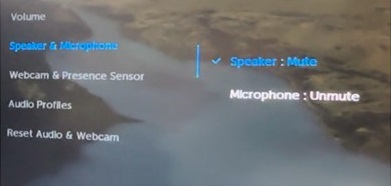
运行/Microphone mute 命令行之前,P3424WEB的屏上显示 (OSD) 如下所示:
- 议长:静音
- 麦克风:取消静音
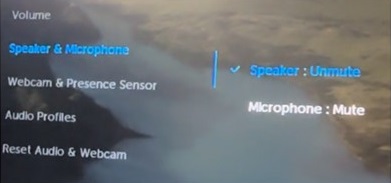
运行 /Microphone mute 命令行后,P3424WEB的 OSD 如下所示:
- 议长:取消静音
- 麦克风:静音
受影响的显示器:
- Dell P3424WEB
受影响的软件:
- 适用于 macOS 1.3.2 及更高版本的 Dell Display Manager
Cause
这是由于显示屏固件造成的。显示固件不能很好地配合 DDPM Mac 中的 CLI 设置。
Resolution
始终成对设置麦克风和扬声器静音/取消静音状态。
- 将麦克风静音和扬声器取消静音时:
- 通过 DDPM CLI 命令设置麦克风静音:
./DDPM /Microphone mute - 通过 DDPM CLI 命令设置扬声器取消静音:
./DDPM /Speaker unmute
- 通过 DDPM CLI 命令设置麦克风静音:
- 设置麦克风静音和扬声器静音时:
- 通过 DDPM CLI 命令设置麦克风静音:
./DDPM /Microphone mute - 通过 DDPM CLI 命令设置扬声器静音:
./DDPM /Speaker mute
- 通过 DDPM CLI 命令设置麦克风静音:
Affected Products
Dell Display and Peripheral Manager, Dell P3424WEBArticle Properties
Article Number: 000263750
Article Type: Solution
Last Modified: 22 Apr 2025
Version: 5
Find answers to your questions from other Dell users
Support Services
Check if your device is covered by Support Services.