Data Protection Advisor:“请求历史记录”报告生成错误 500
Summary: “Request History”报告生成错误 500。
This article applies to
This article does not apply to
This article is not tied to any specific product.
Not all product versions are identified in this article.
Symptoms
在 DPA 版本 19.11 中执行“Request History”报告时,显示以下错误:
- 错误 500
此外,以下条目可能会出现在 server.log:
-
2024-09-17 13:45:47,495 ERROR [com.emc.dpa.reportengine.ComplexReportItem] (ReportEngineMessageListener #3:Request History:8bcb8628-7d93-42af-b09c-6d2a890304c1) Input returned error Unable to obtain data from remote plugin 'Request History'. Error message: Inbound closed before receiving peer's close_notify: possible truncation attack?
示例: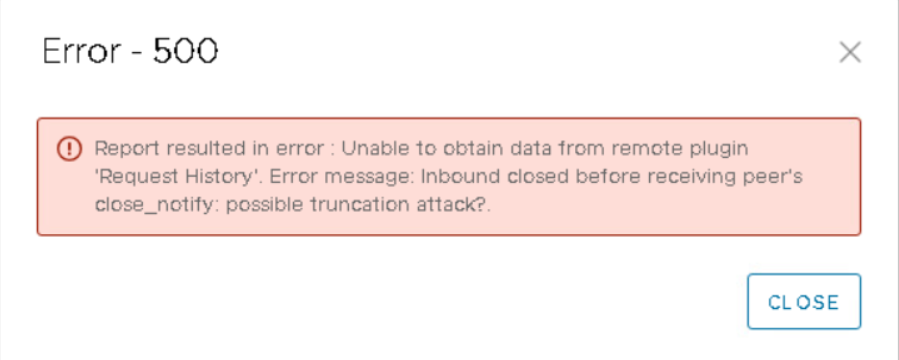
Cause
此问题是由在与“请求历史记录”插件程序进行安全通信期间使用的不兼容或不受支持的加密套件引起的。这会导致连接过早关闭,从而触发错误 500。
Resolution
可以应用以下解决方法步骤。
-
例如,复制现有standalone.xml“<install dir>\EMC\DPA\services\standalone\configuration”,并将其命名为 standalone_bkup.xml。
-
更新原始 standalone.xml 文件并替换密码列表,使其如下所示:
enabled-cipher-suites="TLS_ECDHE_RSA_WITH_AES_256_GCM_SHA384,TLS_DHE_RSA_WITH_AES_128_CBC_SHA256,TLS_DHE_RSA_WITH_AES_256_CBC_SHA256,TLS_DHE_RSA_WITH_AES_128_GCM_SHA256,TLS_DHE_RSA_WITH_AES_256_GCM_SHA384"
-
必须按以下顺序停止和启动 DPA 服务:
- 停止应用程序服务器和代理程序;
- 停止数据存储和代理;
- 启动数据存储区和代理;
- 启动应用程序服务器和代理程序。
提醒:更新后的密码套件将是未来版本中的默认密码套件。这意味着不应应用该解决方法。查看发行说明以确认包含修复。
Products
Data Protection Advisor, Data Protection Suite SeriesArticle Properties
Article Number: 000286176
Article Type: Solution
Last Modified: 07 Nov 2025
Version: 2
Find answers to your questions from other Dell users
Support Services
Check if your device is covered by Support Services.