启用 DASH 支持的 Dell Pro 上的 BIOS 更新锁定
Summary: 了解如果在更新 BIOS 时Dell Pro 微小型机箱QCM1255、Dell Pro 小型机箱QCS1255或Dell Pro 塔式机箱QCT1255启用了 DASH 支持锁定该怎么办。
This article applies to
This article does not apply to
This article is not tied to any specific product.
Not all product versions are identified in this article.
Symptoms
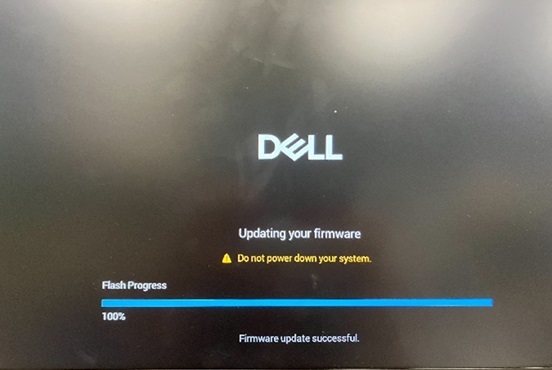
启用 DASH 支持时,Dell Pro 微小型机箱 QCM1255、Dell Pro 小型机箱 QCS1255 或 Dell Pro 塔式机箱 QCT1255可能会在 BIOS 更新屏幕上锁定。BIOS 更新屏幕显示“更新固件 - 请勿关闭系统电源。闪存进度 100% - 固件更新成功。”
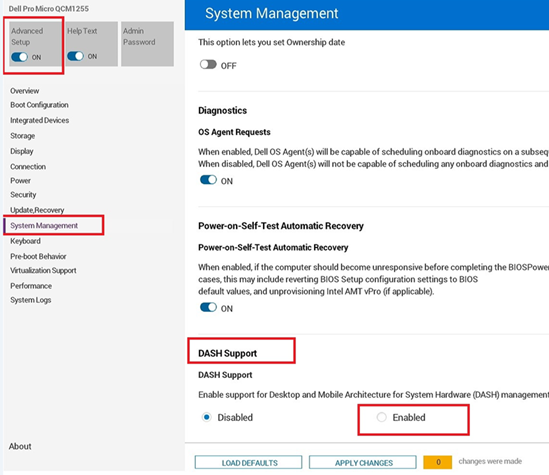
DASH 支持可在 BIOS 中的 高级设置、 系统管理和 DASH 支持下找到。
计算机在手动重新启动后启动。BIOS 版本已成功更新。BIOS 更新完成后,计算机预计会自动重新引导。
受影响的平台:
- Dell Pro 微小型机箱QCM1255
- Dell Pro 小型机箱QCS1255
- Dell Pro 塔式机箱QCT1255
Cause
BIOS 编码问题会导致此行为。
Resolution
短期解决方法
如果计算机仍然卡在 BIOS 更新屏幕,请执行以下步骤:
- 按住电源按钮约 25 秒钟,直到计算机关闭。
- 如果计算机未关闭,请拔下电源线,然后重新插入。
- 按电源按钮以重新打开计算机。
长期解决方案
在计算机上更新到 BIOS 版本 1.6.2 或更高版本可解决此问题。要下载并安装 BIOS,请参阅 BIOS 更新指南。
Affected Products
Dell Pro Micro QCM1255, Dell Pro Slim QCS1255, Dell Pro Tower QCT1255Article Properties
Article Number: 000355943
Article Type: Solution
Last Modified: 13 Jul 2026
Version: 6
Find answers to your questions from other Dell users
Support Services
Check if your device is covered by Support Services.