Data Protection Advisor:Windowsでのアップグレードが「.iawin32.dll Not Found」で失敗します。
Summary: Windows ServerでDPAをアップグレードすると、iawin32.dllファイルが見つからないため失敗します。DPAバージョンは関係ありません。
This article applies to
This article does not apply to
This article is not tied to any specific product.
Not all product versions are identified in this article.
Symptoms
Windows ServerでDPAをアップグレードすると、ライブラリー ファイルが見つからないため失敗します。
Application Exception Details: "...iawin32.dll not found":
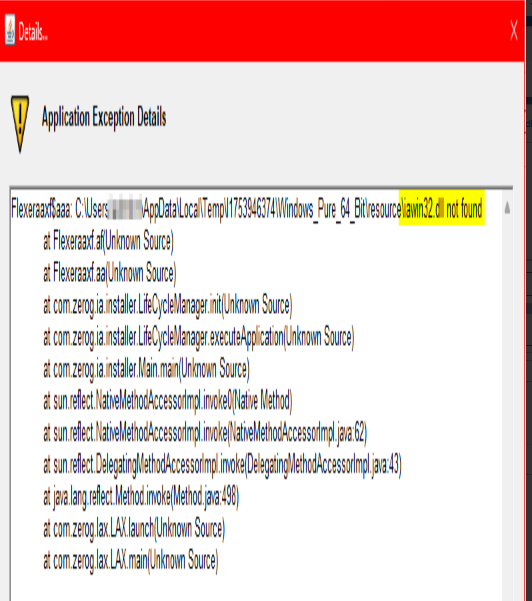
オペレーティング システム(OS): Windows 2025 64ビット サーバー
インストーラーは、次のファイルを探しています。 iawin32.dllの詳細を確認してください。インストーラー ディレクトリー パスの一時的な場所に、ファイルが存在することが示されます。
Cause
この問題の原因は、DPAのすべてのバージョンが Windows 2025で認定されていないことです。最新のDPAバージョン19.12 SP1はまだサポートされていません。これは、以前のバージョンも認定されていないことを意味します。
参考:E-Lab NavigatorのDPA 19.12 SP1互換性ガイド
DPA_19_12_SP1.pdf
Resolution
次の回避策を適用できます。
- 環境変数をWindows 2019に設定します。
C:\inst> SET JAVA_TOOL_OPTION=-Dos.name=”Windows 2019”
- アップグレードを再度実行します。
Affected Products
Data Protection AdvisorArticle Properties
Article Number: 000361080
Article Type: Solution
Last Modified: 04 Dec 2025
Version: 2
Find answers to your questions from other Dell users
Support Services
Check if your device is covered by Support Services.