Inläsning av standardvärden i BIOS ändrar inte Secure Boot Mode från granskningsläge till faktiskt läge
Summary: Ta reda på varför Secure Boot Mode inte ändras från granskningsläge till distribuerat läge efter att standardinställningarna har lästs in i BIOS.
This article applies to
This article does not apply to
This article is not tied to any specific product.
Not all product versions are identified in this article.
Symptoms
Secure Boot Mode kanske inte ändras från granskningsläge till distribuerat läge efter att standardinställningarna har lästs in i BIOS.
Berörda plattformar:
- Alienware m16 R1 AMD
- Alienware m18 R1 AMD
- Inspiron 14 5425
- Inspiron 14 5435
- Inspiron 14 7425 2-i-1
- Inspiron 14 7415 2-i-1
- Inspiron 16 5625
- Inspiron 16 5635
- Inspiron 16 7635 2-i-1
- Inspiron 7415 2-i-1
- Vostro 16 5635
- Vostro 5625
Cause
Det här alternativet är inte definierat i standardinställningen för belastning i den ursprungliga designen.
Resolution
Följ stegen för att ändra Secure Boot Mode manuellt, från granskningsläge till distribuerat läge.
- Tryck på F2-tangenten upprepade gånger efter att du har startat datorn för att starta till BIOS-inställningsmenyn.
- Välj Säkerhet.
- Välj Säker start.
- Välj Distribuerat läge.
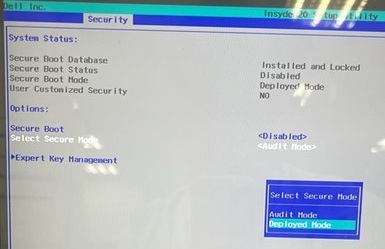
- Bekräfta meddelandet och välj Ja.

- Se om den ändras till distributionsläge.
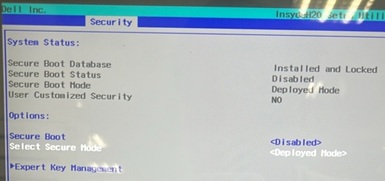
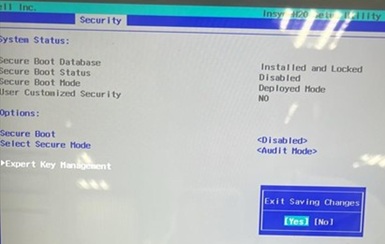
- Tryck på F10. Välj Ja när Exit Saving Changes visas.
Affected Products
Alienware m16 R1 AMD, Alienware m18 R1 AMD, Inspiron 14 5425, Inspiron 14 5435, Inspiron 7415 2-in-1, Inspiron 14 7425 2-in-1, Inspiron 14 7435 2-in-1, Inspiron 16 5625, Inspiron 16 5635, Inspiron 16 7635 2-in-1, Vostro 5625, Vostro 16 5635Article Properties
Article Number: 000388366
Article Type: Solution
Last Modified: 24 May 2026
Version: 2
Find answers to your questions from other Dell users
Support Services
Check if your device is covered by Support Services.