在 BIOS 中加载默认设置不会将安全启动模式从审核模式更改为已部署模式
Summary: 了解在 BIOS 中加载默认设置后,安全引导模式为何未从审核模式更改为部署模式。
This article applies to
This article does not apply to
This article is not tied to any specific product.
Not all product versions are identified in this article.
Symptoms
在 BIOS 中加载默认设置后,安全启动模式可能不会从审核模式更改为部署模式。
受影响的平台:
- Alienware m16 R1 AMD
- Alienware m18 R1 AMD
- Inspiron 灵越 14 5425
- Inspiron灵越14 5435
- Inspiron 灵越 14 7425 二合一电脑
- Inspiron灵越14 7435 2合1电脑
- Inspiron 灵越 16 5625
- Inspiron灵越16 5635
- Inspiron灵越16 7635 2合1电脑
- Inspiron 灵越 7415 二合一电脑
- Vostro 成就 16 5635
- Vostro 成就 5625
Cause
此选项未在原始设计的加载默认设置中定义。
Resolution
按照步骤手动将安全启动模式从审核模式更改为部署模式。
- 打开计算机后反复按 F2键以引导至 BIOS 设置菜单。
- 选择 Security。
- 选择 Secure Boot。
- 选择 部署模式。
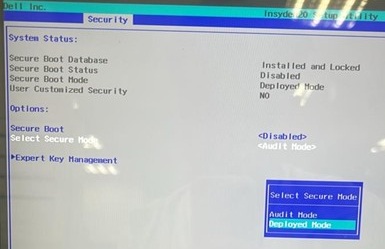
- 确认消息,然后选择 是。

- 查看是否已更改为 部署模式。
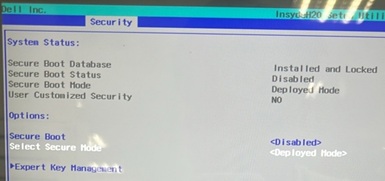
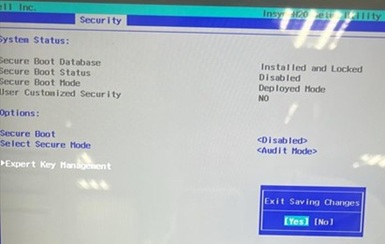
- 按 F10 键。当出现Exit Saving Changes时,选择Yes。
Affected Products
Alienware m16 R1 AMD, Alienware m18 R1 AMD, Inspiron 14 5425, Inspiron 14 5435, Inspiron 7415 2-in-1, Inspiron 14 7425 2-in-1, Inspiron 14 7435 2-in-1, Inspiron 16 5625, Inspiron 16 5635, Inspiron 16 7635 2-in-1, Vostro 5625, Vostro 16 5635Article Properties
Article Number: 000388366
Article Type: Solution
Last Modified: 24 May 2026
Version: 2
Find answers to your questions from other Dell users
Support Services
Check if your device is covered by Support Services.