VxRail:受管理 ESXi 節點的 VCF- SDDC Manager 密碼已中斷連線
Summary: VCF 已將帳戶與 ESXi 節點帳戶中斷連結,以供根帳戶和內建服務帳戶使用。
This article applies to
This article does not apply to
This article is not tied to any specific product.
Not all product versions are identified in this article.
Symptoms
從 SDDC Manager 密碼管理員,同一網域或叢集中的多個 ESXi 節點已中斷連線:
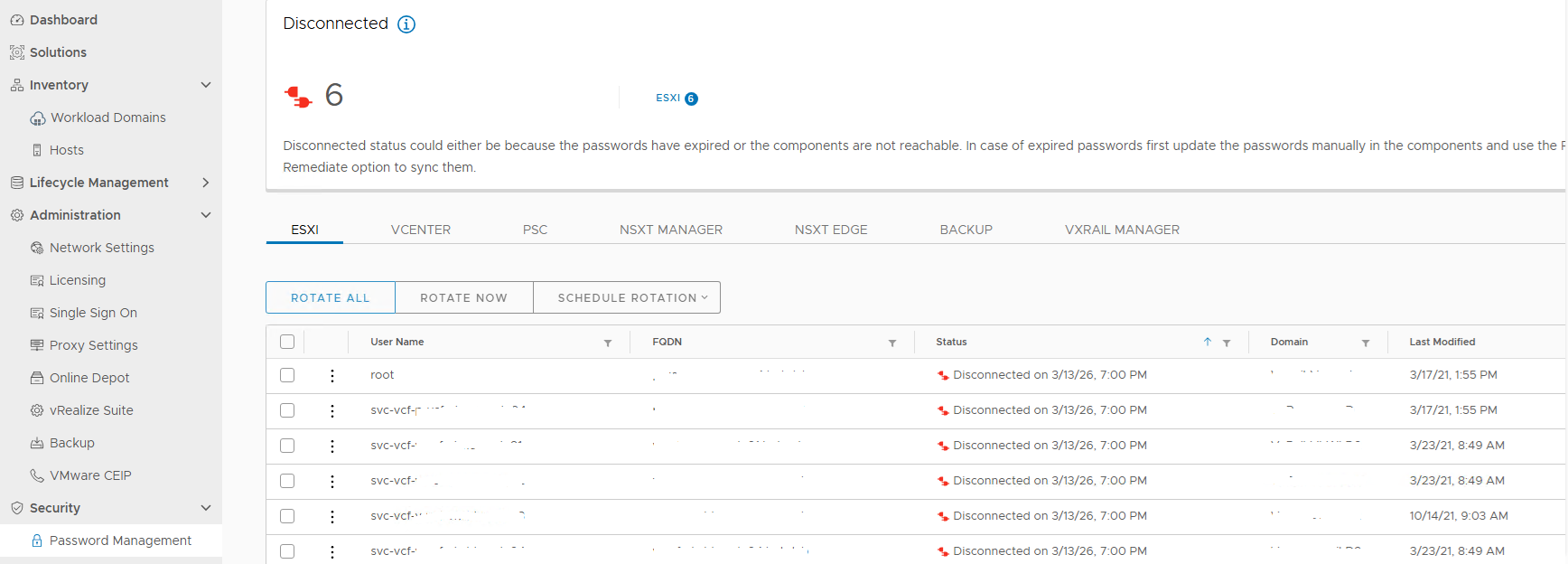
圖 1.已中斷連線的帳戶
已嘗試執行 lookup_password 若要擷取帳戶登入資料,請按一下中斷連線的帳戶以執行補救工作流程,但失敗:
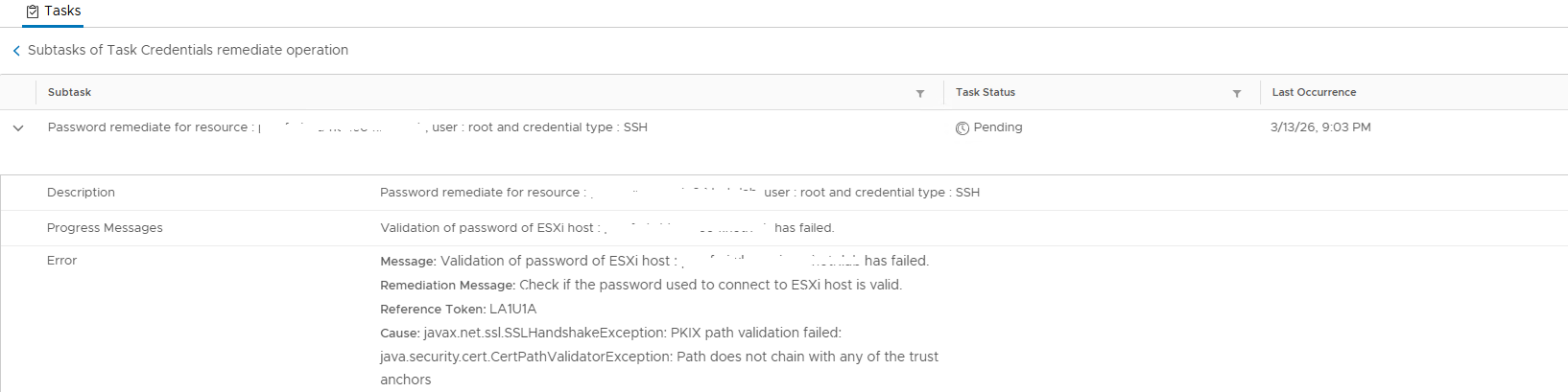
圖 2.密碼驗證失敗
檢閱 /var/log/vmware/vcf/operationsmanager/operationsmanager.log 並搜尋輸出相同內容的主機名稱:
2026-03-14T01:00:10.660+0000 DEBUG [vcf_om,30208561d26fe9a5,8e8b] [c.v.v.p.s.PasswordExpirationService,pool-6-thread-1] Expiry retrieval status : UNKNOWN , Diagnostic message : {"errorCode":"PASSWORD_MANAGER_VALIDATE_ESXI_CREDENTIALS_FAILED","arguments":["hostname"],"errorMessage":"javax.net.ssl.SSLHandshakeException: PKIX path validation failed: java.security.cert.CertPathValidatorException: Path does not chain with any of the trust anchors","referenceToken":"1SN3RL","remediationMessage":"Please verify that the account is active and is not locked, you might need to fix the workflow(s) for resources marked in error state. If the password of the account has expired, manually reset the password in the product and then perform a REMEDIATE operation in the SDDC Manager, to update its stored copy of the password."}
登入相關的 ESXi 節點,檢查根帳戶和服務帳戶,查看其是否未鎖定。此外,請使用從 lookup_password 用於登入伺服器的輸出。
venter 中同一叢集中的所有 ESXi 節點都會顯示連線狀態。已執行步驟以重新整理憑證上的 CA 憑證,但問題仍然存在。
Cause
SDDC Manager 上遺失簽署 ESXi 主機憑證的根憑證 commonsvcs 和 jre cacerts 存儲。
SDDC Manager 會嘗試透過主機憑證連線 ESXi 主機,並找到受信任的定位點。
Resolution
若要解決此問題並連接帳戶,請將根證書安裝到 SDDC Manager 中 commonsvcs 和 jre cacerts 憑證。
在進行任何變更之前,請先取得 SDDC Manager 快照。
- 將 SSH 工作階段記錄至主機,以確認用於簽署主機憑證的根憑證:
openssl x509 -in /etc/vmware/ssl/rui.crt -fingerprint -noout -text
- 檢查輸出時使用
Authority Key Identifier:
X509v3 Authority Key Identifier:
                keyid:E9:13:3D:13:2A:3F:0F:7C:EE:DA:5D:BF:C4:0B:D3:AF:E9:E3:67:54
- 使用 SSH 工作階段登入管理 ESXi 主機的 vCenter 伺服器,並尋找根憑證的相關項目:
CN(id):         E9133D132A3F0F7CEEDA5DBFC40BD3AFE9E36754
Subject DN:     CN=CA, DC=vsphere, DC=local, C=US, ST=California, O=vcenter, OU=VMware Engineering
CRL present:    yes
- 在終端機內執行以下命令:將此根憑證輸出到憑證檔案,然後使用檔案傳輸工具將憑證的內容複製到 SDDC Manager:
/usr/lib/vmware-vmafd/bin/dir-cli  trustedcert list

/usr/lib/vmware-vmafd/bin/dir-cli trustedcert get  --id E9133D132A3F0F7CEEDA5DBFC40BD3AFE9E36754 --outcert /tmp/rootca.cer
- 憑證檔案準備就緒後,請執行下列命令,將憑證匯入憑證存放區:
cat /etc/vmware/vcf/commonsvcs/trusted_certificates.key

keytool -import -v -alias xxx -file /home/vcf/xxx.cer -keystore /etc/vmware/vcf/commonsvcs/trusted_certificates.store

keytool -import -v -alias v-vcf-vsca-root -file /home/vcf/xxx.cer -keystore /etc/alternatives/jre/lib/security/cacerts --storepass changeit
- 完成上述匯入作業後,請重新啟動 SDDC Manager 服務,然後重新執行工作流程,以使用顯示的密碼補救有問題的帳戶登入資料。
/opt/vmware/vcf/operationsmanager/scripts/cli/sddcmanager_restart_services.sh
Affected Products
VxRailProducts
VxRail Appliance Series, VxRail G Series Nodes, VxRail E Series Nodes, VxRail E560 VCF, VxRail E560F VCF, VxRail E560N VCF, VxRail G560 VCF, VxRail G560F VCF, VxRail P Series Nodes, VxRail P570 VCF, VxRail P570F VCF, VxRail P580N VCF
, VxRail S Series Nodes, VxRail S570 VCF, VxRail V Series Nodes, VxRail V570 VCF, VxRail V570F VCF
...
Article Properties
Article Number: 000439374
Article Type: Solution
Last Modified: 30 Jul 2026
Version: 2
Find answers to your questions from other Dell users
Support Services
Check if your device is covered by Support Services.