PowerScale OneFS:SNMPがクラスターからアラートを送信しない
Summary: OneFS WebUIでSNMPアラート チャネルを構成する場合、Simple Network Management Protocol (SNMP)トラップは設定されません。
This article applies to
This article does not apply to
This article is not tied to any specific product.
Not all product versions are identified in this article.
Instructions
『Web管理者ガイド』からSNMPモニタリングを作成する手順:
SNMPアラートを動作させるために必要な手順:
- Cluster Management>General Settings>SNMP Monitoringをクリックします。
- SNMP Service Settingsで、Enable SNMP Serviceチェック ボックスをクリックします。
- 使用する管理情報ベース(MIB)ファイル(ベースまたはトラップ)をダウンロードします。お使いのブラウザーに固有のダウンロード プロセスに従います。
- SNMPツールがMIBファイルを検出できるディレクトリーにMIBファイルをコピーします。以下はその例です。
/usr/share/snmp/mibs/の詳細を確認してください。
To have Net-SNMP tools read the MIB to provide automatic name-to-OID mapping, add '-m All' to the command, as in the following example:

snmpwalk -v2c -c public -m All isilon
- プロトコルが SNMPv2の場合は、 SNMPv2アクセスを許可する チェック ボックスが選択されていることを確認します。
- [SNMPv2 Read-Only Community Name] フィールドに、適切なコミュニティ名を入力します。デフォルトは
I$ilonpublicの詳細を確認してください。 - SNMPv3を有効にするには、SNMPv3アクセスを許可チェック ボックスをクリックします。
- SNMP v3設定を構成します。
- SNMPv3読み取り専用ユーザー名フィールドに、SNMPv3セキュリティ名を入力して、読み取り専用権限を持つユーザーの名前を変更します。デフォルトの読み取り専用ユーザーは general です。
- SNMPv3読み取り専用パスワードフィールドに、読み取り専用ユーザーの新しいパスワードを入力して、新しいSNMPv3認証パスワードを設定します。デフォルトのパスワードはpasswordです。セキュリティ向上のため、パスワードを変更することをお勧めします。パスワードは 8 文字以上で、スペースは使用できません。
- 新しいパスワードを確認します。
- [SNMP Reporting] 領域で、[ Cluster Description ] フィールドにクラスタの説明を入力します。
- System Contact Emailフィールドに、連絡先のEメール アドレスを入力します。
- [Save Changes]をクリックします。
SNMPアラートを動作させるために必要な手順:
クラスターのCLIで、次の手順を実行します。
- すべてのイベント チャネル名を一覧表示します。
# isi event channels list
- 特定のチャネルの設定を表示します。
# isi event channels view <name>
Use Snmp Trap: -
- SNMPトラップを有効にします。
# isi event channels modify <name> --use-snmp-trap true
- 設定の変更を確認します。
# isi event channels view <name>
Use Snmp Trap: Yes
例
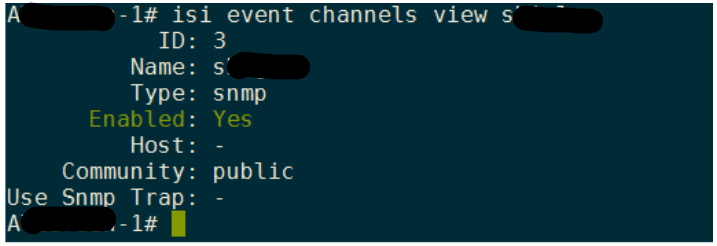
isi event channels view アウトプット:
Additional Information
PowerScale OneFS管理ガイド: PowerScale OneFS情報ハブ
Affected Products
Isilon, PowerScale OneFSArticle Properties
Article Number: 000008897
Article Type: How To
Last Modified: 07 Oct 2025
Version: 5
Find answers to your questions from other Dell users
Support Services
Check if your device is covered by Support Services.