CloudIQ: Cloud IQ sendet keine Daten an Dell Technologies
Summary: CloudIQ: Cloud IQ sendet keine Daten an Dell Technologies.
Instructions
Dieser Wissensdatenbank-Artikel enthält einige Prüfungen, die vom Support-Mitarbeiter auf Cloud IQ-SRs durchgeführt werden müssen, um sicherzustellen, dass er korrekt konfiguriert ist und die Daten korrekt an Dell Technologies gesendet werden:
-
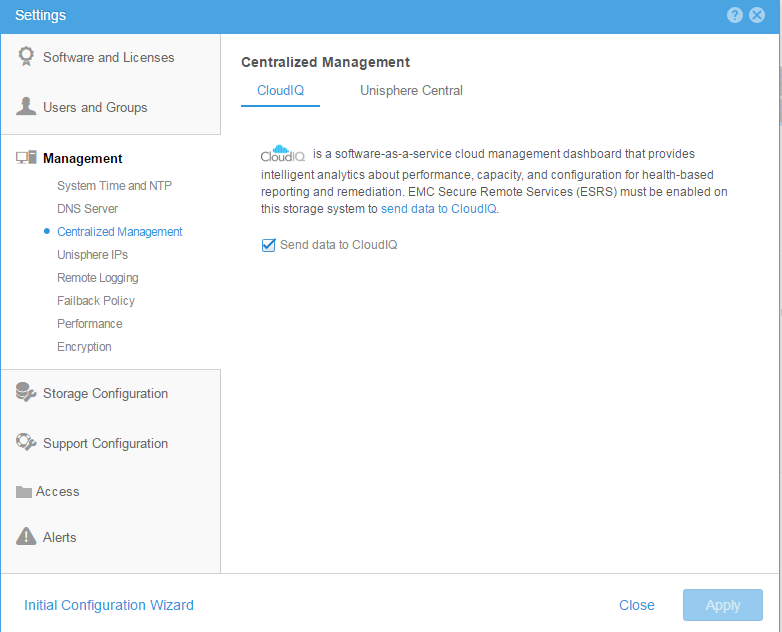
Stellen Sie sicher, dass Cloud IQ sowohl über die CLI als auch über die Benutzeroberfläche
aktiviert ist. Über die CLI: Verwenden Sie den Befehl, um zu überprüfen, ob das Cloud-Management aktiviert ist oder nicht10:58:34 service@(none) spb:~> uemcli /sys/support/config show -detail Storage system address: 127.0.0.1 Storage system port: 443 HTTPS connection 1: Support proxy server enabled = no Support proxy server address = Support proxy server port = 0 Support proxy user name = Support proxy protocol = Unknown Automatic support contracts update enabled = no Cloud management enabled = yes From GUI: Please make sure that the check box of send data to CloudIQ is checked as below :
-
Stellen Sie sicher, dass ESRS ordnungsgemäß konfiguriert ist und der angegebene Status grün verbunden ist
-
Sicherstellen, dass sich alle Arrays von Dell Technologies in der Installationsbasis des Kunden befinden.
-
Stellen Sie sicher, dass das CloudIQ-Konto des Kunden mit den Supportzugangsdaten auf der Dell Technologies Seite übereinstimmt.