CloudIQ: Cloud IQ non invia dati a Dell Technologies
Summary: CloudIQ: CloudIQ non invia dati a Dell Technologies.
This article applies to
This article does not apply to
This article is not tied to any specific product.
Not all product versions are identified in this article.
Instructions
Questo articolo della Knowledge Base include alcuni controlli che devono essere eseguiti dall'agente del supporto sulle SR Cloud IQ per garantire che sia configurato correttamente e che i dati vengano inviati correttamente a Dell Technologies:
-
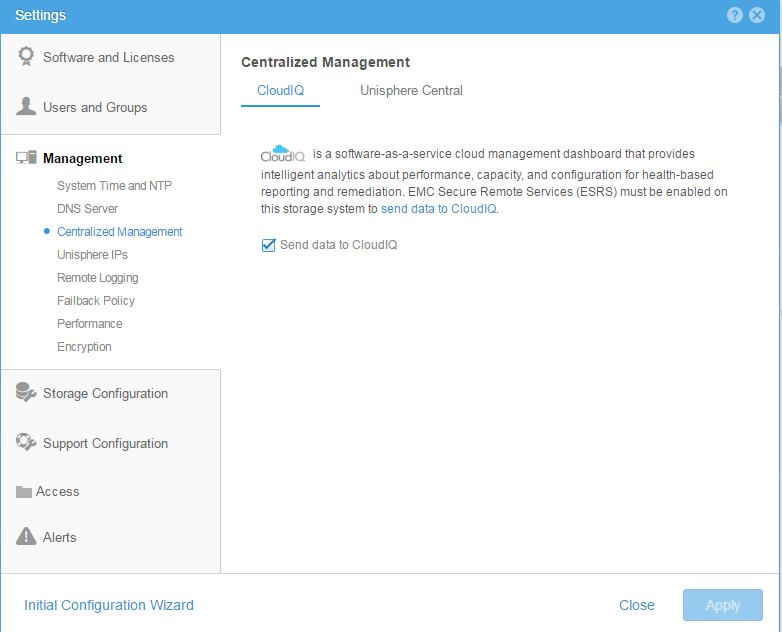
Assicurarsi che cloud iq sia abilitato sia dalla CLI che dall'interfaccia utente
Dalla CLI: Utilizzare il comando per verificare che la gestione cloud sia abilitata o meno10:58:34 service@(none) spb:~> uemcli /sys/support/config show -detail Storage system address: 127.0.0.1 Storage system port: 443 HTTPS connection 1: Support proxy server enabled = no Support proxy server address = Support proxy server port = 0 Support proxy user name = Support proxy protocol = Unknown Automatic support contracts update enabled = no Cloud management enabled = yes From GUI: Please make sure that the check box of send data to CloudIQ is checked as below :
-
Assicurarsi che ESRS sia configurato correttamente e, dato che viene visualizzato lo stato connesso in verde
-
Accertarsi che gli array Dell Technologies siano tutti nell'IB della base installata del cliente.
-
Assicurarsi che l'account cloud IQ del cliente sia uguale a una credenziale di supporto sul lato Dell Technologies.
Affected Products
Dell EMC Unity FamilyProducts
CloudIQ, PowerMax, PowerMax 2000, PowerMax 8000, PowerMaxOS 5978, Unisphere for VMAX, Unisphere for PowerMax, Dell Unity 300, Dell EMC Unity 300F, Dell EMC Unity 350F, Dell EMC Unity 400, Dell EMC Unity 450F, Dell EMC Unity 500, Dell EMC Unity 500F
, Dell EMC Unity 600, Dell EMC Unity 600F, Dell EMC Unity 650F, Dell EMC Unity Family |Dell EMC Unity All Flash, Dell EMC Unity Family, Dell EMC Unity Hybrid, Dell EMC UnityVSA Professional Edition/Unity Cloud Edition, VMAX, VMAX 100K, VMAX 200K, VMAX 250F, VMAX 400K, VMAX 450F, VMAX 50K, VMAX 850F, VMAX 950F, VMAX All Flash, VMAX3 Series
...
Article Properties
Article Number: 000022684
Article Type: How To
Last Modified: 20 Oct 2025
Version: 5
Find answers to your questions from other Dell users
Support Services
Check if your device is covered by Support Services.