PowerFlex:SDC 安裝失敗或無法載入
Summary: SDC 套件安裝失敗,或無法載入 SDC 驅動程式。
This article applies to
This article does not apply to
This article is not tied to any specific product.
Not all product versions are identified in this article.
Symptoms
無法載入 SDC 核心驅動程式。符合下列條件之一:
- 首次嘗試在主機上安裝 SDC
- 對節點所做的硬體變更,會影響或重設 BIOS 組態。
- 虛擬硬體可能具有預先設定的 BIOS 選項。
初始模組安裝:在嘗試安裝 SDC 套件期間,可在 journalctl -xe。
現有模組負載:在 Linux 主機上,載入 SDC 核心模組時, scini,在內核中,會顯示以下錯誤。
insmod: ERROR: could not insert module /bin/emc/scaleio/scini.ko: Required key not available
insmod: ERROR: could not insert module /bin/emc/scaleio/scini_sync/driver_cache/RH/4.5.2000.125/5.14.0-284.11.1.el9_2.x86_64/scini.ko: Key was rejected by service
在 Linux 以外的平台上,錯誤訊息和行為可能會有所不同。
影響
無法安裝或載入 SDC。
Cause
已在實體或虛擬主機的 BIOS 中啟用安全開機選項。
啟用 BIOS 安全開機選項時,可防止沒有有效金鑰的模組載入至核心。
Resolution
停用 BIOS 中的「安全開機」選項。
實體硬體:
如需詳細說明,請參閱硬體廠商的說明文件。
虛擬硬體:
在 VM 設定的開機選項中停用安全開機。
VMware 的 VM 範例: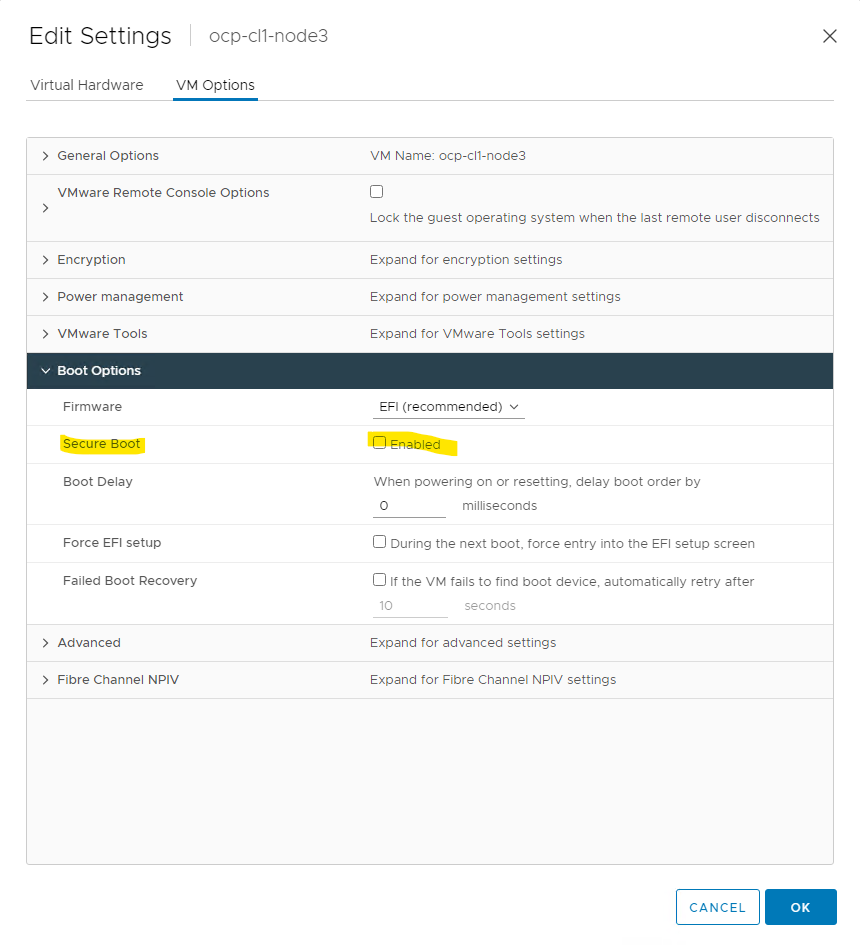
受影響的版本
全部 - 不是 PowerFlex 的問題
已修正問題的版本
不適用 - 不是 PowerFlex 問題
Affected Products
PowerFlex custom node, ScaleIO, PowerFlex Software, VxFlex Ready NodeArticle Properties
Article Number: 000049254
Article Type: Solution
Last Modified: 27 Oct 2025
Version: 4
Find answers to your questions from other Dell users
Support Services
Check if your device is covered by Support Services.