VxRail: Node Stuck in a Booting Loop trying to Mount RASR
Summary: The node gets stuck in a loop after rebooting, where it keeps "trying to mount RASR" due to incorrect boot order settings.
This article applies to
This article does not apply to
This article is not tied to any specific product.
Not all product versions are identified in this article.
Symptoms
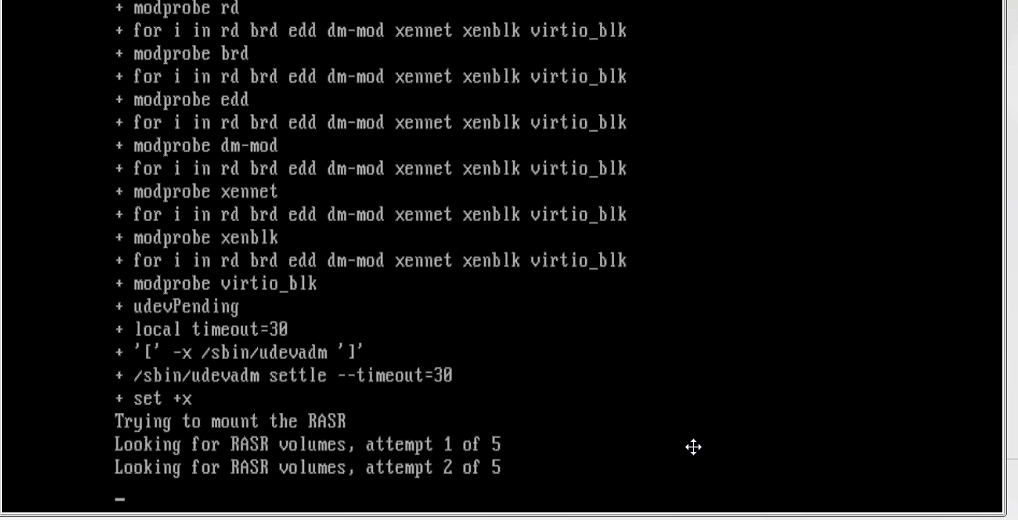
While rebooting a node, the node's console shows trying to mount RASR. After attempting to find RASR volumes five times, the upgrade process kicks you to the VxRail RASR menu.
When quitting this menu, it would throw you into a loop that brings you back to the VxRail RASR menu (where you can choose reset/rasr/quit menu).

Cause
Boot sequences in the BIOS settings are set incorrectly. The boot order does not have the Satadom/BOSS module listed as the primary boot device.
Resolution
Verify boot order option:
- Reboot node.
- Press F2 during the Power On Self-test (POST) to enter the System Setup
- Enter password:
emcbios. - Select System BIOS.
- On the System BIOS Settings menu, select Boot Settings.
- Select the BIOS Boot Settingselection.
- Select Hard-Disk Drive Sequence.
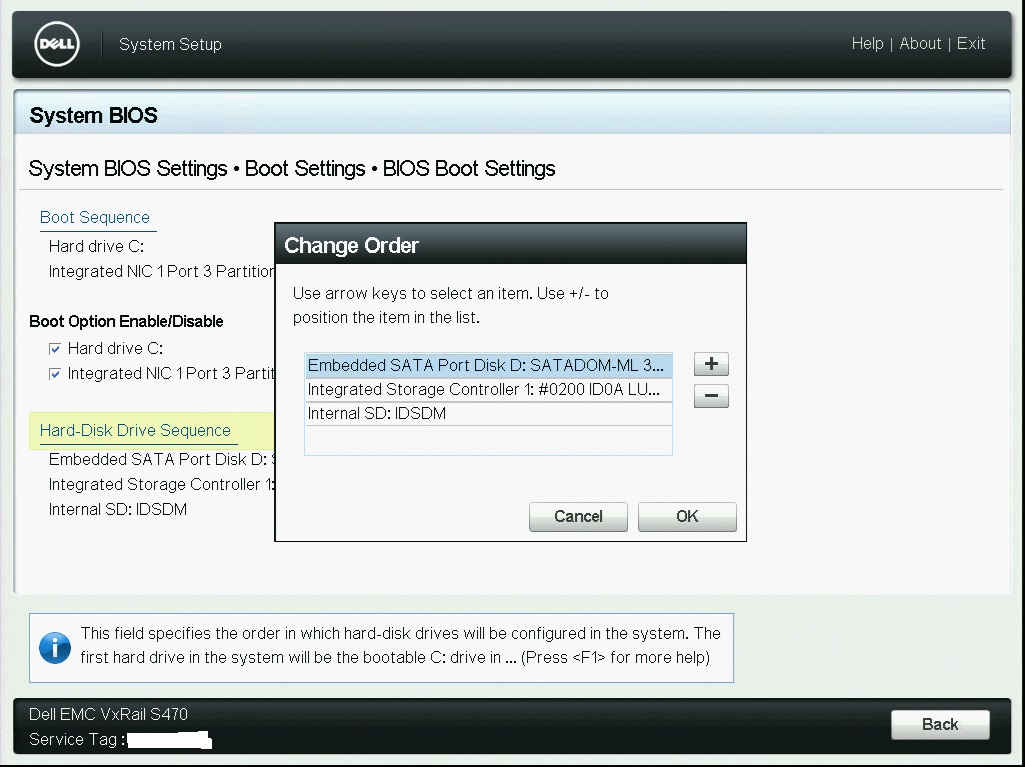
- In the Change Order window, use the " + " (and) button to set the
Embedded SATA Port DiskD: SATADOMas the top selection and click OK.
Ensure that the following two boxes are checked:
Check: Hard Drive C:

Check: Integrated NIC 1 Port 1 Partition 1: IBA XE Slot 0100 v2364
Change the order of the boot Sequence in the BIOS to:
1) Embedded Sata Port Disk J: SATADOM-ML 3SE (or BOSS)
2) Integrated Storage Controller 1: #0300 IDOA LUNO TOSHIBA PX05SMB040Y
3) Internal SD: IDSDM
Screenshot Example:
Affected Products
VxRail, VxRail Appliance Series, VxRail D Series Nodes, VxRail D560, VxRail D560F, VxRail E Series Nodes, VxRail E460, VxRail E560, VxRail E560F, VxRail E560N, VxRail E660, VxRail E660F, VxRail E660N, VxRail G560, VxRail G560F, VxRail P Series Nodes
, VxRail P470, VxRail P570, VxRail P570F, VxRail P580N, VxRail P670F, VxRail P670N, VxRail S Series Nodes, VxRail S470, VxRail S570, VxRail S670, VxRail V Series Nodes, VxRail V470, VxRail V570, VxRail V570F, VXRAIL V670F, VxRail VD-4510C, VxRail VD-4520C, VxRail VD Series Nodes
...
Article Properties
Article Number: 000051702
Article Type: Solution
Last Modified: 22 Oct 2025
Version: 5
Find answers to your questions from other Dell users
Support Services
Check if your device is covered by Support Services.