Dell EMC Unity: O servidor CIFS está inacessível devido ao erro "Nenhuma resposta do KDC" (corrigível pelo usuário)
Summary: Este artigo aborda as etapas necessárias para verificar e resolver problemas de resposta do serviço Kerberos ao tentar adicionar ou modificar servidores NAS em um ambiente LDAP.
Symptoms
Ao tentar executar uma tarefa para adicionar ou modificar um servidor NAS, uma mensagem de erro é recebida do sistema indicando problemas de conexão com o serviço Kerberos. A mensagem de erro recebida deve ser a seguinte:
ADVERTÊNCIA: nenhuma resposta do KDC xx.xx.xx.xx
Nos arquivos de log do sistema Unity, os seguintes detalhes podem ser localizados:
Nos logs do Ktrace do Unity (caminho: /EMC/C4Core/log/c4_safe_ktrace.log), os seguintes erros podem ser encontrados abaixo:
2018/08/20-15:48:29.177142 10 7FF16C907703 sade:KERBEROS: 4:[VDM] WARNING: nenhuma resposta do KDC xx.xx.xx.xx
2018/08/20-15:48:29.532994 5540 7FF16C96D705 sade:SMB: 4:[VDM] Modo de autenticação incompatível: authMethod:4, kerberosSupport:1, negoMethod:0
2018/08/20-15:48:29.533033 40 7FF16C96D705 sade:SMB: 3: [VDM] OpenAndBind[NETLOGON] DC=xxx falhou:
Bind_OpenXFailed NO_SUCH_PACKAGE 2018/08/20-15:48:29.533042 10 7FF16C96D705 sade:SMB: 3:[VDM] Não é possível abrir o arquivo NETLOGON para DC=xxx
2018/08/20-15:48:29.760148 6 7FF16C96D703 sade:KERBEROS: 3:[VDM] krb5_sendto_kdc: udp RecvFromStream do addr xx.xx.xx.xx falhou 91
No EMCSystemLogFile.log do Unity (caminho: /EMC/backend/log_shared) o sistema relatará a seguinte mensagem:
"2018-08-20T15:50:53.588Z" "xxx_spa" "Kittyhawk_safe" "356" "unix/spa/root" "WARN" "13:10380008" :: "Para o servidor NAS xxx no domínio xxx, o DC xxxtem o seguinte erro: compname xxx DC=xxx Step='Logon IPC$' get Kerberos credential failed, gssError=Miscellaneous failure. Não é possível entrar em contato com nenhum KDC para obter o realm solicitado. . compname xxx DC=xxx Step='Open NETLOGON Secure Channel' ' ' 'DC cannot open NETLOGON pipe: status=DOMAIN_CONTROLLER_NOT_FOUND '. " :: Category=Componente de auditoria=DART_SMB
Cause
- Problemas de configuração de rede/firewall, fazendo com que o tráfego seja bloqueado.
- Configurações de tamanho de MTU incompatíveis na configuração do ambiente (controladores de domínio, switch e dispositivo Dell EMC Unity).
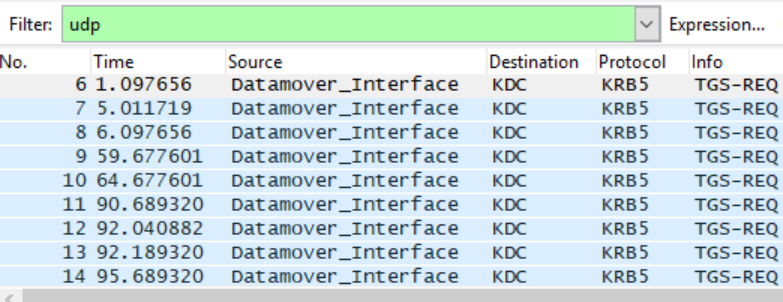
Como resultado, o tíquete Kerberos do Controlador de domínio não pode ser entregue à interface do Datamover/SP via UDP. No rastreamento de rede, há apenas TGS-REQ, mas nenhum TGS-REP.
Resolution
Se o sistema Dell EMC Unity estiver executando o OE 4.2.x ou superior, as alterações de parâmetro do servidor NAS poderão ser feitas por meio do seguinte comando de serviço: svc_nas
Se estiver executando uma versão mais antiga do Dell EMC Unity OE (4.0.x ou 4.1.x), a recomendação é fazer upgrade do Unity OE para a versão de destino ou a versão mais recente do OE disponível. Consulte a KB 000489694 (Matriz de revisão do OE do Dell EMC Unity).
Para executar essa tarefa, use as seguintes etapas:
- Execute o comando svc_nas ALL -param -f security -info kerbTcpProtocolpara verificar o status atual do status do protocolo TCP Kerberus para os servidores NAS.
service@(none) spa:~# svc_nas ALL -param -f security -info kerbTcpProtocol
SPA :
name = kerbTcpProtocol
facility_name = segurança
default_value = 0
current_value = 0
configured_value = 0
param_type = global
user_action = nenhum
change_effective = intervalo imediato
= (0,1)
descrição = 1=Kerberos usará apenas TCP, 0=Kerberos tentará UDP e, em seguida, TCP
SPB :
name = kerbTcpProtocol
facility_name = segurança
default_value = 0
current_value = 0
configured_value = 0
param_type = global
user_action = nenhum
change_effective = intervalo imediato
= (0,1)
description = 1=Kerberos usará apenas TCP, 0=Kerberos tentará UDP e, em seguida, TCP
- Após a verificação do status atual do serviço kerbTcpProtocol, o seguinte comando pode ser usado para modificar as configurações de protocolo:
SPA : concluído
SPB : concluído
- Depois que a modificação acima for executada, execute o primeiro comando mais uma vez svc_nas ALL -param -f security -info kerbTcpProtocol para validar se as configurações foram aplicadas a todos os servidores NAS:
service@(none) spa:~# svc_nas ALL -param -f security -info kerbTcpProtocol
SPA :
name = kerbTcpProtocol
facility_name = segurança
default_value = 0
current_value = 1
configured_value = 1
param_type = global
user_action = nenhum
change_effective = intervalo imediato
= (0,1)
description = 1=Kerberos usará apenas TCP, 0=Kerberos tentará UDP e, em seguida, TCP
SPB :
name = kerbTcpProtocol
facility_name = segurança
default_value = 0
current_value = 1
configured_value = 1
param_type = global
user_action = nenhum
change_effective = intervalo imediato
= (0,1)
description = 1=Kerberos usará apenas TCP, 0=Kerberos tentará UDP e, em seguida, TCP
NOTA IMPORTANTE: Essa alteração entra em vigor imediatamente e precisa ser aplicada a todo o sistema. Nenhuma reinicialização é necessária para aplicar totalmente as configurações.