Dell Unity:已停止回應複寫程序 (錯誤代碼:0x9ef4、0x6701140)
Summary: Failed: 來源正由另一個複寫程序使用 (錯誤代碼:0x9ef4) 失敗:已保留指定的 LUN 名稱,或具有此名稱的 LUN 已存在。(錯誤代碼:0x6701140) (Dell 可修正)
This article applies to
This article does not apply to
This article is not tied to any specific product.
Not all product versions are identified in this article.
Symptoms
最初的刪除嘗試可能只是部分刪除,並且可能需要後續命令行清理。
從目的地而非來源刪除 LUN 複製工作階段可能會導致複製程序停止回應,進而導致以下錯誤。
Non recoverable error on source side
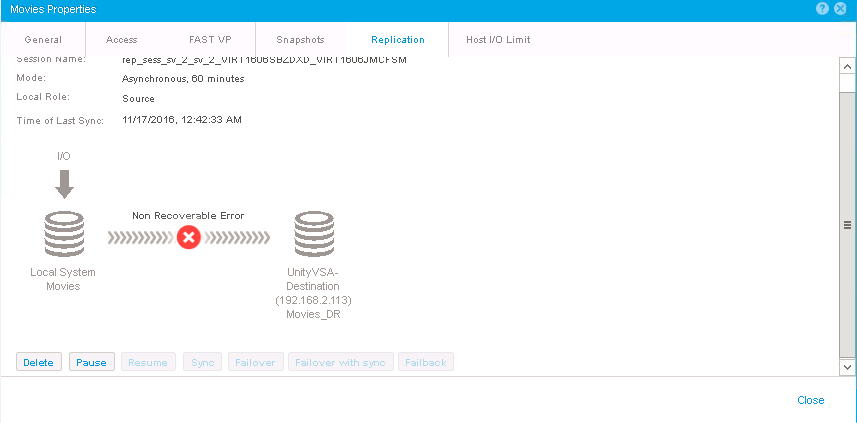
嘗試從來源端刪除工作階段會導致錯誤:(錯誤代碼:0x6500051)
嘗試建立另一個複寫工作階段可能會導致以下情況:
Failed: Source in use by another replication process (Error Code:0x9ef4)
Failed: The specified LUN name has already been reserved or LUN with this name already exists. (Error Code:0x6701140)

這也可能導致無法刪除的孤立系統(複寫)快照。
Cause
N/A
Resolution
您可以使用服務工具svc_dataprotection使用命令行介面刪除複製工作階段。
如果需要執行此清理的協助,請聯絡 Dell 技術支援或您的授權服務代表,並引述此 Dell 知識文章 ID。
Additional Information
在說明輸出svc_dataprotection範例:
依工作階段 ID 刪除複寫工作階段:
svc_dataprotection -r repsess -a delete -s 42949673102_FCNCH0972C30C3_0000_42949673096_FCNCH0972C30C3_0000
依工作階段 ID 僅在複寫工作階段上刪除工作:
svc_dataprotection -r repsess -a deletetaskonly -s 42949673102_FCNCH0972C30C3_0000_42949673096_FCNCH0972C30C3_0000
依 LU 名稱刪除 LU 的複寫工作階段:
svc_dataprotection -r repsess -a delete -n srcLun1 -t LU
刪除 FS OID 的 FS 複寫工作階段:
svc_dataprotection -r repsess -a delete -o 0x2800000003
設定工作階段的同步速率:
svc_dataprotection -r repsess -a syncrate=high -s 81604378625_FNM00151702100_0000_81604378625_FNM00151702099_0000
將同步速率設定為「所有同步工作階段」:
svc_dataprotection -r repsess -a syncrate=low -s ALL
顯示工作階段的同步速率:
svc_dataprotection -r repsess -a showsyncrate -s 42949673102_FCNCH0972C30C3_0000_42949673096_FCNCH0972C30C3_0000
列出具有每個同步速率的所有同步複製工作階段:
svc_dataprotection -r repsess -a showsyncrate -s ALL
顯示具有每個成員同步速率的 cg 複製工作階段:
svc_dataprotection -r repsess -a showsyncrate -s 81604378625_FNM00151702100_0000_81604378625_FNM00151702099_0000
當 FS 同步複製工作階段處於暫停狀態且來源中斷時,還原目的地 NAS 伺服器和 FS。
svc_dataprotection -r repsess -a restore -i FNM00151702100
資源快照範例:
根據快照名稱刪除快照操作中的物件:
svc_dataprotection -r snap -a delete -n UTC_2017-11-16_03:38:31
根據快照 OID 在捕捉操作中恢復物件:
svc_dataprotection -r snap -a recover -o 0x280000000F
Affected Products
Dell EMC Unity FamilyProducts
Dell Unity 300, Dell EMC Unity 300F, Dell EMC Unity 400, Dell EMC Unity 400F, Dell EMC Unity 500, Dell EMC Unity 500F, Dell EMC Unity 600, Dell EMC Unity 600F, Dell EMC Unity Family |Dell EMC Unity All Flash, Dell EMC Unity Family
, Dell EMC Unity Hybrid, Dell EMC UnityVSA Professional Edition/Unity Cloud Edition
...
Article Properties
Article Number: 000052823
Article Type: Solution
Last Modified: 16 Dec 2025
Version: 4
Find answers to your questions from other Dell users
Support Services
Check if your device is covered by Support Services.