Dell Unity:ESRS (集中式組態) 狀態在 UI 中顯示為遺失
Summary: UI 顯示遺失 ESRS (集中式組態) 狀態。
This article applies to
This article does not apply to
This article is not tied to any specific product.
Not all product versions are identified in this article.
Symptoms
Unity UI 遺失 ESRS 狀態。
ESRS 頁面遺失 ESRS 裝置狀態。
Cause
用戶進行了影響一個或多個設備與閘道之間連接的網路更改。
存在影響裝置的硬體/軟體問題,導致連線問題。
埠 (80,443,8443,9443) 被阻止。
Resolution
請遵循以下步驟,針對 ESRS 遺失問題進行故障診斷:
- 從 ESRS 頁面確認 ESRS 裝置和閘道狀態。(esrs3.emc.com)
- 從 ESRS 頁面將裝置設定為離線/線上。
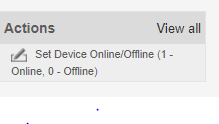
- 重新啟動 ESRS 閘道的連線,並監控裝置的狀態。

- 重新開機 ESRS 閘道並等待時間。在此期間監視狀態。
- 如果狀態仍然缺失,請移除裝置,然後將其重新加入至 ESRS 閘道。
- 一段時間後,從 UI 設定 ESRS,如果狀態變更為「驗證中」,則會在 16 分鐘內上線。
如果上述程序無法運作,請嘗試執行清理,並再次設定 ESRS。
Affected Products
Dell EMC Unity FamilyProducts
Secure Remote Services, EMC Secure Remote Services Gateway Configuration, Dell EMC Unity FamilyArticle Properties
Article Number: 000053000
Article Type: Solution
Last Modified: 16 Dec 2025
Version: 5
Find answers to your questions from other Dell users
Support Services
Check if your device is covered by Support Services.