PowerFlex:重新建置和重新平衡會影響前端 IO 工作負載效能
Summary: 重新建置和重新平衡,會影響前端 IO 工作負載。
Symptoms
重新生成或重新平衡開始時,前端應用程式 IOPS 可能會急劇下降。
- SDS 節點或磁碟故障,導致開始重建。
- SDS 節點或磁碟已新增至叢集或儲存集區,導致開始重新平衡。
- SDS 節點或磁碟從群集或存儲池中刪除,導致開始重新平衡。
- 重新建置/重新平衡開始後,前端 IOPS 會大幅下拉式 (最多為預期 IOPS 的 50% 或更多)。
影響
如果執行重新建置或重新平衡的速度和資源提升,則會減少建立 ScaleIO 所需每個區塊的兩個完整副本所需的時間。但是,SDC 的輸送量和 IOPS 可能會受到影響,最終使用者可能會注意到應用程式緩慢,甚至可能出現 IO 錯誤。在進行變更之前,應先瞭解這些變更可能對前端 IO 產生的影響。
Cause
重建和重新平衡會使用 SDC 正在使用的相同磁碟,並可能使用網路資源,從而佔用磁碟和網路中的頻寬。默認情況下,重建和重新平衡也使用兩個 SDS 線程,定義為並行度參數。
SDS 會建立這些執行緒,如果超過預設的兩個執行緒,則會佔用額外的 CPU 和記憶體。這會導致 SDS 在重新建置/重新平衡上花費的 CPU 時間和資源比以往更多的時間與資源,導致花在服務前端 IO 上的 CPU 時間和資源較少。
Resolution
這裡有一些事情需要檢查。重建和重新平衡可能會受到以下參數的影響:
1- SDS 網路節流 這限制了每個 SDS 對列出的各種類別使用的 I/O 方式。所有類別中的預設值為「無限制」。
A-From scli:
scli --set_sds_network_limits (--protection_domain_id  | --protection_domain_name ) [--rebuild_limit ] [--rebalance_limit ][--overall_limit ] [--i_am_sure]

Example, setting the rebuild limit to 100 MB/s:
scli --set_sds_network_limits --protection_domain_name pd1 --rebuild_limit 100
B-從 UI:
前往保護網域清單,選取有問題的保護網域,然後從「修改」清單中選擇「網路節流」。
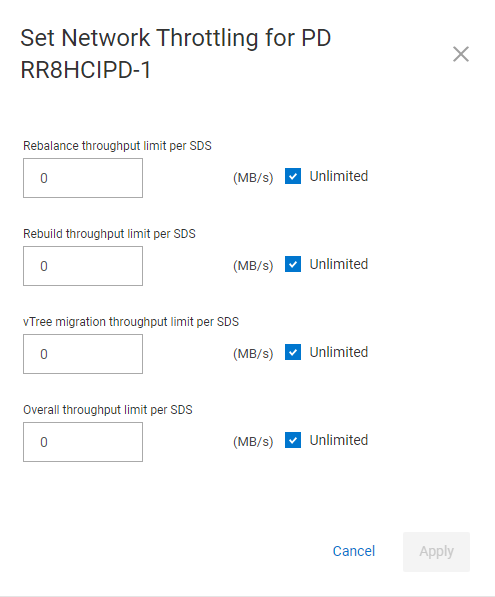
2- 儲存集區 I/O 優先順序:此設定是針對每個儲存集區設定,將會變更重新建置或重新平衡的 IO 優先順序,而且會影響系統效能。針對重新建置和重新平衡,預設為「限制並行 IO」設為 1。
A-From scli:
scli --set_rebuild_policy ((( protection_domain_id  | --protection_domain_name ) --storage_pool_name ) | --storage_pool_id ) --policy  [Options][--i_am_sure]

scli --set_rebalance_policy ((( protection_domain_id  | --protection_domain_name ) --storage_pool_name ) | --storage_pool_id ) --policy  [Options][--i_am_sure]
原則可以是以下其中一項:no_limit、limit_concurrent_io、favor_application_io dynamic_bandwidth_throttling
如果原則使用「no_limit」以外的任何內容,則需要使用命令 OPTIONS。請參閱 PowerFlex 說明文件,以取得這些設定的更多參考資料。
B-從 UI:前往「儲存集區」清單,選取有問題的儲存集區,然後從修改清單中選擇「I/O 優先順序」。
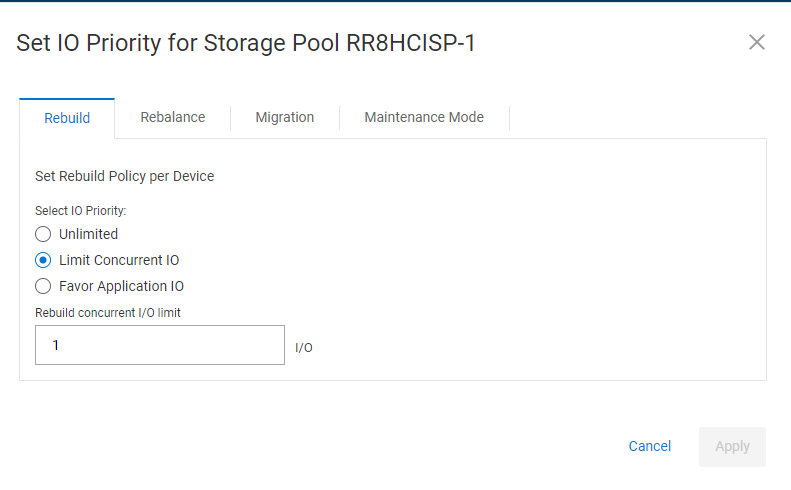
3- 同時進行的重建和再平衡活動。此處的預設設置為 2。
A- 此參數只能從 scli 變更:
scli --set_rebuild_rebalance_parallelism (((--protection_domain_id  | --protection_domain_name ) --storage_pool_name ) | --storage_pool_id ) (--limit )

Example, setting the limit to 5:
scli --set_rebuild_rebalance_parallelism --protection_domain_name pd1 --storage_pool_name HDD_POOL --limit 5
注意:如果您在命令中使用 storage_pool_id 參數,則不需要同時指定保護網域 ID 或名稱,以及儲存集區名稱。除非 ScaleIO 支援指定,否則此參數保留為 2。增加此設置將比網路限制和 I/O 優先順序設置更快地對前端 IO 產生負面影響。