PowerScale OneFS: Intermittent file not found related errors when using username expansion variables for SMB home shares
Summary: Intermittent failures saving a file in a username expanded home directory when the computer account also connects to the share but cannot find the file.
This article applies to
This article does not apply to
This article is not tied to any specific product.
Not all product versions are identified in this article.
Symptoms
When you are trying to save, modify or rename the file under home directories created automatically using variable path expansion or username expansion variables (%U), you might intermittently receive an error stating that the file is no longer located in that path or something similar. The file may then disappear and reappear after the page has been refreshed.
Cause
An SMB share configured with a username-expansion variable (%U) means that the home directory is automatically created for each user that connects to the share. This is regardless of whether that is a computer or user account:
PowerScale-1# isi smb shares list --zone=SMBzone
Share Name  Path
-------------------------------------
homedir     /ifs/home/%U
-------------------------------------
Total: 1

PowerScale-1# ls -l /ifs/home/
total 5
drwx------     2 user0                   Isilon Users              27 May 15 11:32 user0
drwx------     3 EXAMPLE\dell-rabie-pc$  EXAMPLE\domain computers  28 May 15 11:36 dell-rabie-pc$ <<----- Computer account
drwx------     3 EXAMPLE\paul            EXAMPLE\domain users      28 May 15 11:36 paul           <<----- User account using computer "dell-rabie-pc$"
In the following packet capture, the user paul creates a file in the share \\homedir\profiles which is expanded to \\homedir\profiles\paul\. The computer account tries to find the same file and thinks it is connecting to the same share \\homedir\profiles. It is looking under \\homdir\profiles\dell-rabie-pc$\, thus the file is not found. \\homedir\profiles\paul\test is not the same as \\homdir\profiles\dell-rabie-pc$\test.
6600 48.216535 10.148.x.x   10.45.x.x SMB2 166 Session Setup Request, NTLMSSP_AUTH, User: EXAMPLE\paul    <<----- User account using computer "dell-rabie-pc$"
6661 48.216535 10.45.x.x   10.148.x.x SMB2 146 Session Setup Response
6662 48.800589 10.148.x.x   10.45.x.x SMB2 166 Tree Connect Request Tree: \\homedir\profiles
6663 48.801463 10.45.x.x   10.148.x.x SMB2 138 Tree Connect Response
6646 48.213583 10.148.x.x   10.45.x.x SMB2 422 Create Request File: test3\test\New Text Document.txt
6650 48.215117 10.45.x.x   10.148.x.x SMB2 374 Create Response File: test3\test\New Text Document.txt
6659 48.216535 10.148.x.x   10.45.x.x SMB2 166 Session Setup Request, NTLMSSP_AUTH, User: EXAMPLEdell-rabie-pc$ <<----- Computer account
6660 48.216535 10.45.x.x   10.148.x.x SMB2 146 Session Setup Response
6813 48.800589 10.148.x.x   10.45.x.x SMB2 166 Tree Connect Request Tree: \\homedir\profiles
6814 48.801463 10.45.x.x   10.148.x.x SMB2 138 Tree Connect Response
6819 48.802674 10.148.x.x   10.45.x.x SMB2 266 Create Request File: test3\test\New Text Document.txt
6820 48.803106 10.45.x.x   10.148.x.x SMB2 131 Create Response, Error: STATUS_OBJECT_PATH_NOT_FOUND

In frames 6646 and 6650, the file is created successfully. Frame 6819 shows a request to access "New Text Document.txt",  but frame 6820 shows that the file was not found.
Further inspection of the information in frame 6819, shows that the create request came from the computer account and not the user account:
6819 48.802674 10.148.x.x   10.45.x.x SMB2 266 Create Request File: test3\test\New Text Document.txt
Session Id: 0x07b5cf4100d5a9be
    [Account: dell-rabie-pc$ Acct:dell-rabie-pc$]
    [Domain: DDMI Domain:EXAMPLE]
    [Host: dell-rabie-pc Host:dell-rabie-pc]
Resolution
This issue does not happen when using home directories that are not automatically created using variable path expansion.
Workaround:
- If you can deny the "domain computers" group from accessing the share, this prevents the file not found errors. This should be done in a test setting first to verify any possible negative impact:
# isi smb shares view varexp
                                     Share Name: varexp
                                           Path: /ifs/varexp-home/%U
                                    Description:
                     Client-side Caching Policy: manual
Automatically expand user names or domain names: True
Automatically create home directories for users: True
                                      Browsable: True
Permissions:
Account                  Account Type  Run as Root  Permission Type  Permission
--------------------------------------------------------------------------------
EXAMPLE\domain computers group         0            deny             full
Everyone                 wellknown     0            allow            full
--------------------------------------------------------------------------------
Total: 2
2. Disable the client from caching the not found event, though this may decrease performance:
For any questions or concerns about modifying these settings, please contact Microsoft Support.
To add the registry entries, perform the following steps:
- Type 'regedit' in the windows search bar
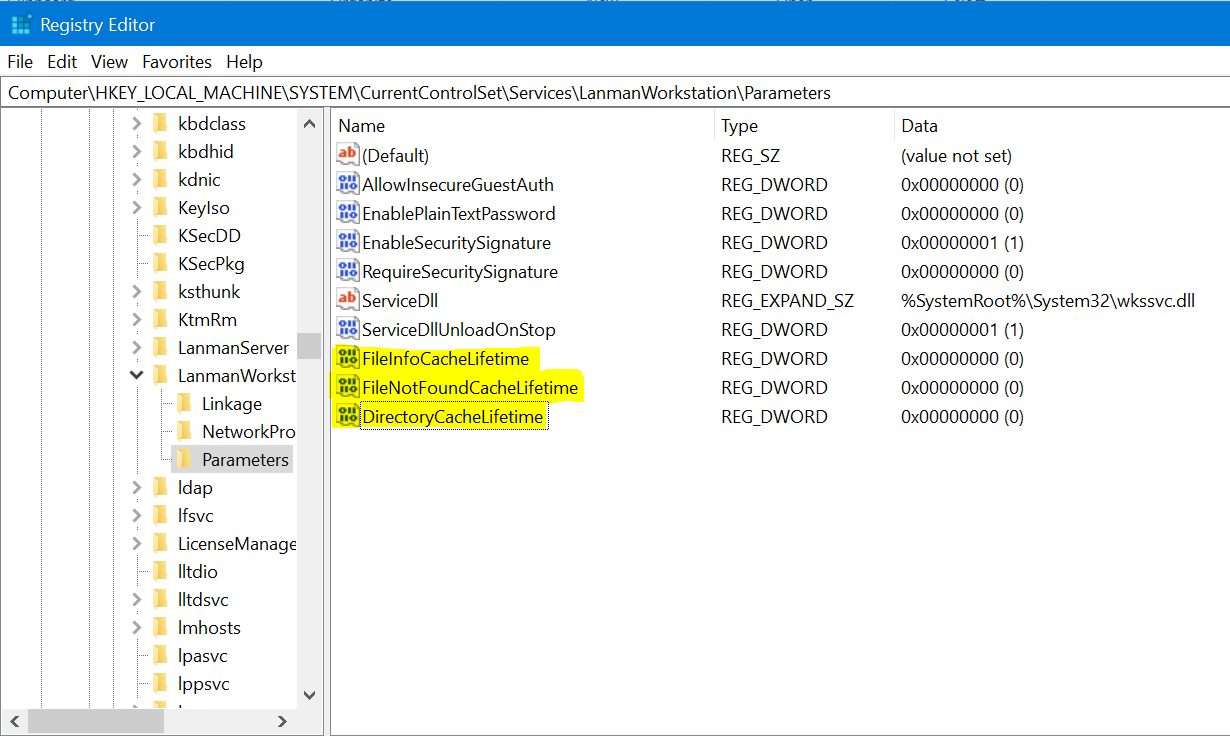
- Navigate to the below location: Computer\HKEY_LOCAL_MACHINE\SYSTEM\CurrentControlSet\Services\LanmanWorkstation\Parameters
- Once in the above location, create a new DWORD value (Right click > new > DWORD value)
- Give the below register name. The newly created value is zero by default
FileNotFoundCacheLifetime Dword=0 >> The file not found cache timeout period.
If the issue remains or occurs even when in a subdirectory and not at the share root, add the following registries along with the above entry:
FileInfoCacheLifetime Dword=0                               >> The file information cache timeout period.
DirectoryCacheLifetime Dword=0                            >> This is the directory cache timeout.
The registry entries would appear as below:
Additional Information
- Disabling the File information cache can have a significant effect on client performance and show an increase in the number of metadata requests that are sent to the server.
- Additional details on the registry values can be found here:
https://docs.microsoft.com/en-us/windows-server/administration/performance-tuning/role/file-server/
Affected Products
Isilon, PowerScale OneFSProducts
Storage, Enterprise Storage, Isilon, Isilon, PowerScale OneFSArticle Properties
Article Number: 000079025
Article Type: Solution
Last Modified: 16 Dec 2025
Version: 4
Find answers to your questions from other Dell users
Support Services
Check if your device is covered by Support Services.