De versie van Dell Full Disk Encryption identificeren
Summary: Leer hoe u de versie van Dell Full Disk Encryption kunt identificeren door deze stapsgewijze instructies te volgen.
This article applies to
This article does not apply to
This article is not tied to any specific product.
Not all product versions are identified in this article.
Instructions
Als u de versie van Dell Full Disk Encryption kent, kan een beheerder:
- Bekende problemen te identificeren
- Gebruikersinterfaceverschillen te bepalen
- Workflow-wijzigingen te begrijpen
- Systeemvereisten te controleren
Betreffende producten:
- Dell Full Disk Encryption
Betreffende besturingssystemen:
- Windows
U kunt versiebeheer bepalen via de gebruikersinterface (UI) of het installatieprogramma van het product. Klik op de gewenste methode voor meer informatie.
UI
Dell Full Disk Encryption moet worden geïnstalleerd voordat de versie wordt geïdentificeerd via de UI.
- Op het Windows-bureaublad dubbelklikt u op Dell Data Security console.
 Opmerking: U kunt de Dell Data Security Console ook openen met Windows Verkenner op
%SYSTEMDRIVE%\Program Files\Dell\Dell Data Protection\Security Tools\Dell.SecurityFramework.Console.exe. - Klik in de rechterbovenhoek van de Dell Data Security console op het tandiwelpictogram en selecteer vervolgens About.

- Noteer de versie die wordt weergegeven.
 De versie kan verschillen van het bovenstaande voorbeeld.
Installatieprogramma
Voor informatie over het downloaden van het installatieprogramma kunt u Dell Encryption Enterprise of Dell Encryption Personal downloaden raadplegen.
- Pak de onderliggende installatieprogramma's uit vanuit het hoofdinstallatieprogramma van Dell Data Security.
Voor meer informatie verwijzen we u naar Onderliggende installatieprogramma's uitpakken vanuit het hoofdinstallatieprogramma van Dell Data Security.
- Klik in het pad van het uitgepakte hoofdinstallatieprogramma met de rechtermuisknop op [EXTRACTED PATH]
\Encryption Management Agent\EMAgent_[BITDIEPTE]_setup.exeen selecteer vervolgens Eigenschappen.
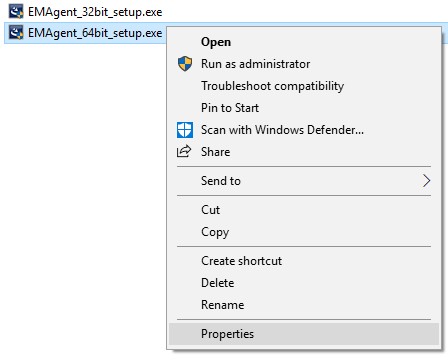
- Klik op het tabblad Details.

- Noteer de eerste drie getallen van de productversie. In het voorbeeld zijn 8.16.0 de eerste drie getallen.
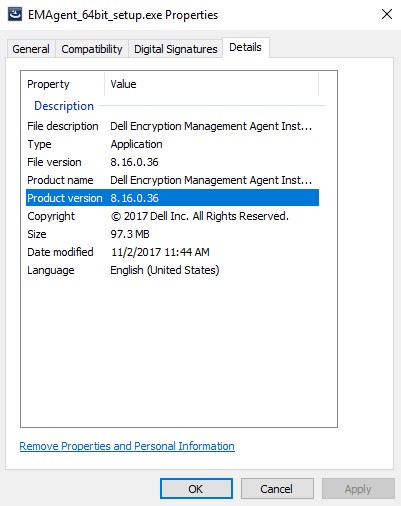 De versie kan verschillen van het bovenstaande voorbeeld.
Additional Information
Videos
Affected Products
Dell EncryptionArticle Properties
Article Number: 000124907
Article Type: How To
Last Modified: 10 Aug 2026
Version: 13
Find answers to your questions from other Dell users
Support Services
Check if your device is covered by Support Services.