Dell Data Protection 加密裝置在休眠後進入開機迴圈
Summary: 本文包含已安裝 Dell Data Protection | Encryption 時在電池耗盡後持續開機迴圈的相關資訊。
This article applies to
This article does not apply to
This article is not tied to any specific product.
Not all product versions are identified in this article.
Symptoms
受影響的產品:
- Dell Data Protection | Encryption
Cause
不適用
Resolution
會看到裝置自動進入休眠,但是這些裝置在嘗試開機或嘗試從休眠狀態恢復時發生故障。
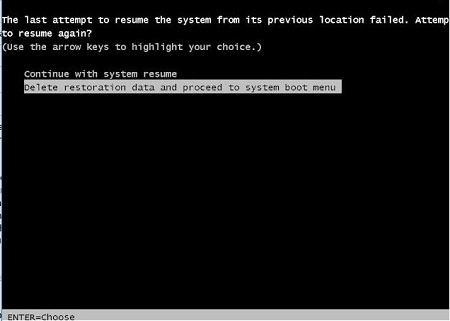
如果遇到此問題,當電腦嘗試從休眠狀態恢復時,使用者會看到兩個選項。電腦會提供繼續恢復或刪除休眠檔案的選項,並從電腦開機開始。選擇第二個選項以刪除休眠檔案,並從電腦開機開始。這會暫時解決此問題。再次回到休眠狀態會導致此問題重新出現。
若要永久解決此問題,請確定系統 BIOS 處於最新狀態。您可以在 https://www.dell.com/support/home 找到此資訊,也可依平台或產品服務編號搜尋受影響的裝置。
如要聯絡支援部門,請參閱 Dell Data Security 國際支援電話號碼。
請前往 TechDirect,以線上產生技術支援要求。
如需更多深入見解與資源,請加入 Dell 安全性社群論壇。
Affected Products
Dell EncryptionArticle Properties
Article Number: 000125930
Article Type: Solution
Last Modified: 24 Jun 2026
Version: 11
Find answers to your questions from other Dell users
Support Services
Check if your device is covered by Support Services.