Dell Data Protection Encryption 设备在休眠后进入启动循环
Summary: 本文包含有关安装 Dell Data Protection | Encryption 后电池耗尽后持续启动循环的信息。
This article applies to
This article does not apply to
This article is not tied to any specific product.
Not all product versions are identified in this article.
Symptoms
受影响的产品:
- Dell Data Protection | Encryption
Cause
不适用
Resolution
设备自动进入休眠状态,但这些设备在尝试引导或尝试从休眠状态恢复时出现故障。
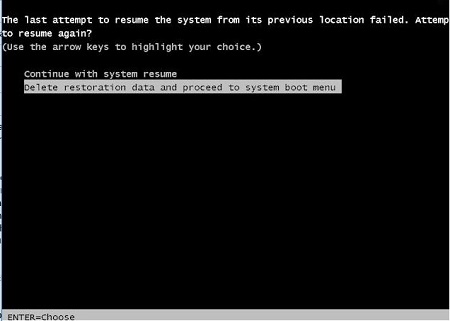
如果遇到此问题,当计算机尝试从休眠状态恢复时,用户将看到两个选项。计算机提供了继续恢复或删除休眠文件并从计算机启动开始的选项。选择第二个选项以删除休眠文件并从计算机启动开始。这将暂时解决此问题。重新进入休眠状态会导致此问题重新出现。
要永久解决此问题,请确保系统 BIOS 最新。您可以在 https://www.dell.com/support/home 通过按平台或服务编号搜索受影响的设备来找到它。
要联系支持部门,请参阅 Dell Data Security 国际支持电话号码。
转至 TechDirect,在线生成技术支持请求。
要获得更多见解和资源,请加入戴尔安全社区论坛。
Affected Products
Dell EncryptionArticle Properties
Article Number: 000125930
Article Type: Solution
Last Modified: 24 Jun 2026
Version: 11
Find answers to your questions from other Dell users
Support Services
Check if your device is covered by Support Services.