How to Identify the Version of Wyse Management Suite
Summary: Learn how to identify the version of Wyse Management Suite (Private Cloud) by following these instructions.
This article applies to
This article does not apply to
This article is not tied to any specific product.
Not all product versions are identified in this article.
Instructions
Identifying the version of Wyse Management Suite allows you to:
- Identify known issues.
- Determine UI differences.
- Understand workflow changes.
- Verify system requirements.
Affected Products:
- Wyse Management Suite
Affected Versions:
- v1.0 and Later
Versioning can be determined either through the product user interface (UI) or through the product Installer. Click the appropriate method for more information.
UI
- Sign in to Wyse Management Suite.
 Note: For information about accessing the Wyse Management Suite Administration Console, reference How to Access the Wyse Management Suite Administration Console.
 - Click Portal Administration.
 Note: Some versions may display Portal Admin instead of Portal Administration.
 - Click Subscription.
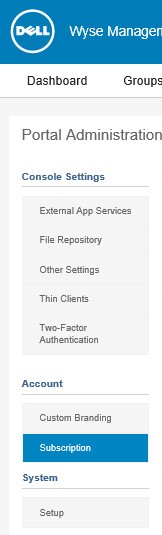
- The version is displayed within Server Information.
 Note: The version may differ from the above screenshot.
Installer
- Right-click the installer and then select Properties.
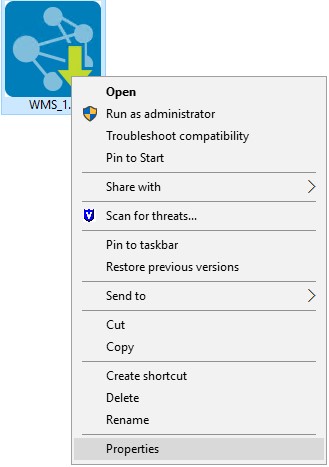
- Click the Details tab.

- Document the Product version. The first two numbers are the most important digits. In the example image, the Product version is 1.1.
 Note: The version may differ from the above screenshot.
Affected Products
Wyse Management SuiteArticle Properties
Article Number: 000126017
Article Type: How To
Last Modified: 20 Jun 2024
Version: 6
Find answers to your questions from other Dell users
Support Services
Check if your device is covered by Support Services.